Automation platforms such as n8n are often introduced as productivity tools: connect a few systems, automate repetitive work, maybe add some AI. Inside a corporate network, however, that framing is incomplete. A self-hosted workflow engine can reach internal systems, execute actions on behalf of users, and hold sensitive credentials. That puts it in the same category as a jump host or a CI/CD runner even though it is usually evaluated and deployed like an ordinary business application.
That became very concrete during a recent assessment. A client asked us to pen-test their internal infrastructure, and on the scope list was something I’d only heard about secondhand: n8n, one of those tools that keep surfacing in conversations about AI-powered automation.
I’d never touched it before, and I went in without assumptions. That turned out to be the right posture: what surprised me was not what n8n can do for productivity, but the gap between how it is presented and what it means to have one sitting inside a corporate network.
That gap matters because the pressure to adopt these tools is real. The past two years have produced a relentless stream of platforms promising to transform how businesses work, and the message is often the same: automate faster, integrate more, add AI, or fall behind. But speed of adoption and depth of security evaluation rarely move together. Tools are integrated into production based on what they promise to enable, not on a clear understanding of what they can reach, execute, or expose.
n8n is my worked example here because it is the one I assessed, but the pattern is general. Before deploying any platform of this kind, five questions decide whether it can be operated safely:
- Which systems can it reach?
- Where do its actions execute?
- What protections does it ship with and how easily do they erode?
- Who can use its capabilities?
- Can its permission model express the boundaries your environment needs?
The rest of this article walks through each question, using n8n to show what the answer looks like in practice.
What n8n Is
n8n is an open-source workflow automation platform. Users build workflows by connecting “nodes,” where each node represents an action, integration, or data source. In practice, that means users can connect internal systems, SaaS applications, databases, APIs, messaging tools, and increasingly also large language models.
That is why n8n often appears in the same conversations as AI tools. It can act as the orchestration layer around AI-assisted workflows or agents, which is also why it has landed on many shortlists during the current automation wave.
None of that is controversial. It is the productivity pitch, and it is accurate. What it leaves out is what all those connections mean once the platform sits inside a corporate network.
For the rest of this article, I am referring to a default, self-hosted n8n 2.0 deployment unless stated otherwise. The distinction matters, because deployment models and security defaults differ across versions.
A Privileged Position, by Design
The first question for any automation platform is reach: which systems can it talk to, and across which network boundaries? A tool that can only touch a handful of SaaS APIs is a very different risk than one that can open administrative sessions into your server segment.
Out of the box, n8n ships with nodes for a wide range of security-relevant systems and protocols: SSH, FTP, LDAP, HTTP, database systems, Microsoft Entra ID, cloud services, messaging platforms, and business applications, to name a few.
That breadth is intentional and central to the product’s value. But it carries a security implication that is easy to overlook during evaluation or rollout: n8n occupies a privileged position on the network. It is designed to reach security-relevant systems, and in a default configuration, it often can.
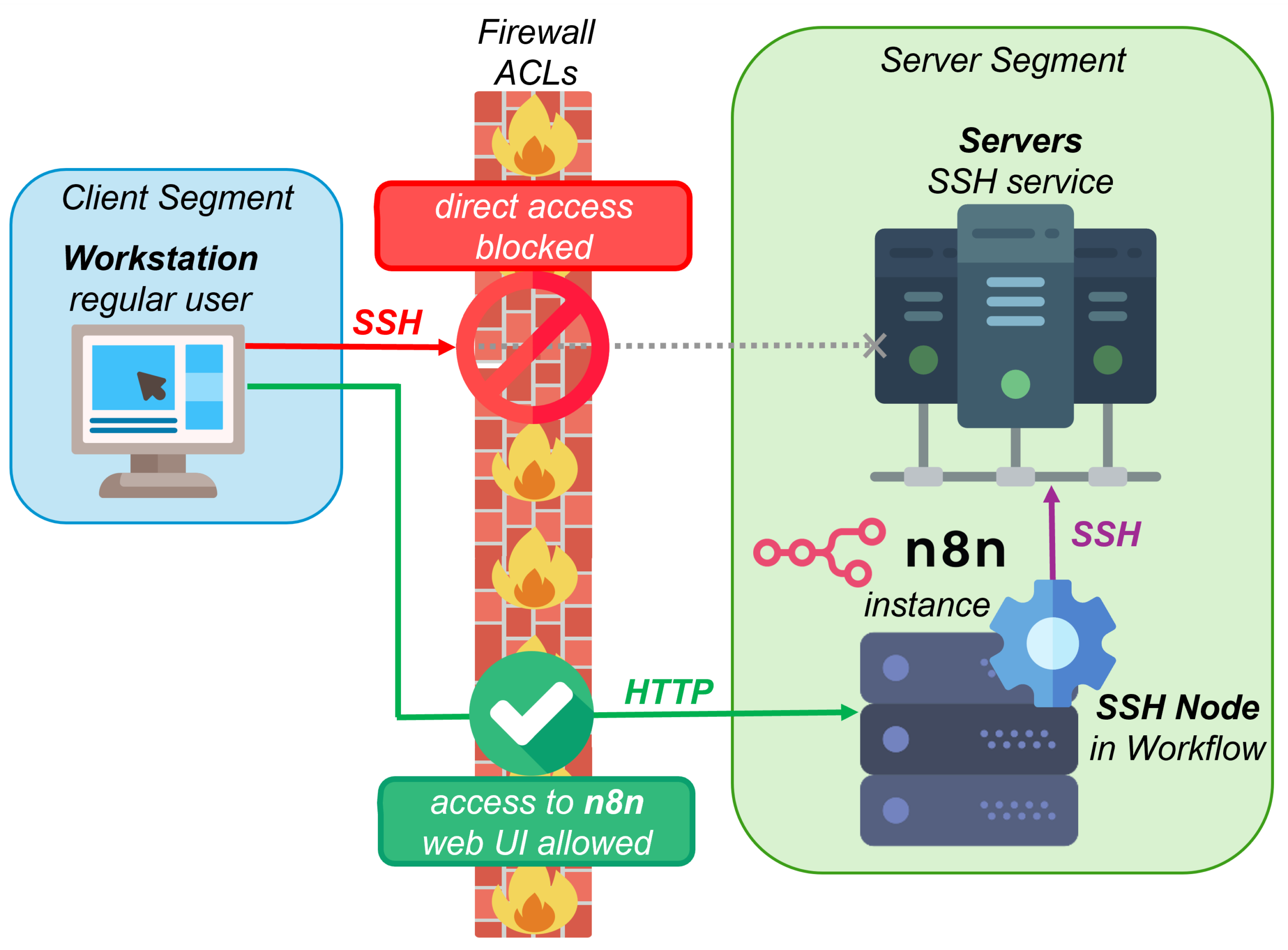
Consider a common enterprise network design where client and server segments are separated. Users in the client network are generally not allowed to initiate administrative protocol sessions to servers, such as SSH. This separation is enforced at the network level, through segmentation and the access control lists that police traffic between zones. It is a deliberate architectural decision to limit lateral movement – an attacker’s ability to hop from one compromised machine to others – and reduce the blast radius of a compromised endpoint.
Now place n8n in that environment with default configuration, grant a user access to the n8n interface, and allow them to create workflows. Assume it is hosted where it can reach the server segment, as such platforms typically are. From a productivity perspective, this may look harmless: a no-code automation tool that helps employees connect systems and automate tasks.
From a security perspective, the situation changes. That same user can now build a workflow using the SSH node and effectively bypass the network segmentation control entirely. Not through a vulnerability. Not through an exploit. Simply by using the platform as it was designed, without necessarily setting off the alerting that direct access would have triggered. The same logic applies to database nodes, LDAP queries, HTTP requests to internal services, and other enabled nodes.
The Edge of the Sandbox
Network reach is only one part of the picture. The second question is execution: when a workflow runs, where does its code actually run, and what kind of boundary exists between a workflow author and the system hosting the platform? In n8n, this question often comes up around the Code node, which lets workflow authors run custom JavaScript or Python as part of a workflow.
Version 2.0 deserves credit here. By default, the Code node now runs in an isolated task runner instead of the main n8n process, and access to environment variables from Code nodes is blocked.1 2
But that boundary does not cover the whole platform. It mainly addresses the Code node. Other nodes can still interact with the runtime environment, the file system, or external systems in ways that matter for security.
One limitation is the task runner mode. In the default internal mode, the runner is still a child process that uses the same user and group as the main n8n process – a configuration n8n’s own documentation flags as not recommended for production. For proper isolation, the documentation points to external mode, where the runner runs as a separate sidecar container.3
The more important limitation is that isolation applies to the Code node, not to every risky capability. The ability to execute system commands or read and write local files is a different class of problem because those actions interact directly with the host or container context.
This is where the default configuration starts to matter. n8n 2.0 made meaningful improvements, but some of those protections depend on how the instance is configured and maintained over time.
Easy-to-Break Security Defaults
That leads to the third question: which protections does the platform ship with, and do they survive normal day-to-day administration – or does a routine configuration change quietly remove them?
n8n 2.0 introduced several security improvements worth acknowledging. Among them, the Execute Command node and the Local File Trigger node are now disabled by default because they pose a security risk.4
That is a sensible default. The problem is how easy it is to lose that protection when the node exclusion list is customized.
n8n uses the NODES_EXCLUDE environment variable to define which nodes should not be available in the workflow editor. This is useful when an organization wants to block nodes that are not needed or considered too risky.
The subtle issue is that a custom value replaces the default exclusion list. For example, an administrator may decide to exclude a set of database nodes that are not needed in their environment. If they set a custom NODES_EXCLUDE value but do not also include Execute Command and Local File Trigger, nodes that were disabled by default can become available again. The default protections do not stack on top of the custom configuration; they are replaced by it.
The migration documentation makes this behavior explicit: setting NODES_EXCLUDE="[]" re-enables every node.5 A protection that disappears the moment someone edits an adjacent setting is a protection you cannot assume is still in place.
Workflow Authors Everywhere
The questions so far have been about what the platform can do. The fourth question is who can do it: how large is the group of people who can reach the workflow canvas and use whatever powerful nodes are enabled?
When a new user is created in n8n, they are assigned the Member role by default. That role allows users to create and execute workflows. In isolation, that may sound reasonable. In context, it can become a security problem.
This becomes especially relevant when n8n is connected to an enterprise directory. In an Active Directory environment, for example, LDAP integration may allow a broad set of users to authenticate to the n8n interface, depending on the configured search base and user filter.6 Combined with the default Member role, many of them can become workflow authors.
Any user who can reach the workflow canvas may then be able to use whatever powerful nodes are enabled. The effective group of users with access to those capabilities can therefore become much larger than intended. And, as the previous sections showed, those capabilities can include reaching the server segment, executing commands, and touching the file system.
The RBAC Gap
The final question ties the others together. Suppose you accept that some users should have powerful capabilities and others should not. Can the platform’s permission model actually draw that line?
On paid plans in n8n, Role-Based Access Control (RBAC) can help structure access to projects, workflows, credentials, executions, and other resources. That is useful, but these controls are mostly about access to resources, not about which platform capabilities a workflow author may use.7 8
The challenge is that several security-relevant configurations operate at the instance level: they apply uniformly across all users, regardless of the RBAC model. There is no built-in mechanism to give one group of users access to the SSH node while denying it to another. There is no way to make the Execute Command node available only to a trusted subset of workflow authors. The directories and files that file-handling nodes are allowed to touch are likewise instance-wide.
The credential model follows a similar pattern. Credentials can be organized and shared through projects and workflows, but the encryption key protecting stored credentials belongs to the instance.9 If that key is exposed, the impact is not limited to one user group or project boundary.
In practice, this creates a binary choice for administrators: restrict a capability for everyone, potentially breaking legitimate use cases, or enable it for everyone, including users for whom that capability was never intended. There is limited middle ground.
Reclassify Before You Deploy
Tools like n8n can be operated within acceptable security boundaries. But that requires deliberate architecture, careful configuration, and a clear understanding of what secure operation may cost in convenience. None of that happens by default, and none of it is usually surfaced by a pure productivity evaluation.
n8n is only one example. The same pattern can appear whenever workflow engines, agent frameworks, or low-code platforms are introduced faster than their security model is understood. They are often evaluated for what they can automate, while the harder question is what they can reach, execute, or expose.
So before deploying such a platform, reclassify it. Stop treating it as a business application and start treating it as privileged access infrastructure – the same category as a jump host or a CI/CD runner, and deserving of the same scrutiny. The five questions in this article are a starting point: which systems it can reach, where its actions execute, what its defaults protect and how easily that erodes, who can use its capabilities, and whether its permission model can express the boundaries your environment actually needs.
Security should not block business goals, technical innovation, or productivity. But those goals should not be pursued at any price. A sensible deployment lives between those positions, and reaching it requires the security conversation to start before the platform is on the network, not after.
- https://docs.n8n.io/changelog/v20-breaking-changes#enable-task-runners-by-default ↩︎
- https://docs.n8n.io/changelog/v20-breaking-changes#block-environment-variable-access-from-code-node-by-default ↩︎
- https://docs.n8n.io/deploy/host-n8n/configure-n8n/set-up-task-runners ↩︎
- https://docs.n8n.io/changelog/v20-breaking-changes#disable-executecommand-and-localfiletrigger-nodes-by-default ↩︎
- https://docs.n8n.io/deploy/host-n8n/configure-n8n/security/block-specific-nodes#suggested-nodes-to-block ↩︎
- https://docs.n8n.io/administer/manage-users-and-access/verify-user-identity/connect-ldap#enable-ldap ↩︎
- https://docs.n8n.io/administer/manage-users-and-access/set-permissions-and-roles-rbac ↩︎
- https://docs.n8n.io/deploy/host-n8n/configure-n8n/basic-configuration/use-environment-variables ↩︎
- https://docs.n8n.io/deploy/host-n8n/configure-n8n/basic-configuration/configuration-examples/set-a-custom-encryption-key ↩︎
Leave a Reply