Intro
In 2024 I released the initial version of Pipeleek. At the time the tool was a simple GitLab CI/CD pipeline secrets scanner, not much more. Since then, it has evolved quite a bit: I’ve added support for new CI/CD platforms, integrated the Renovate security research published last year, and built a range of helper commands on top of the scanner. Today it’s time to release version 1.0 of Pipeleek!
Features
Secret Scanner Platform Additions
At its core Pipeleek is still a secrets scanner for exposed credentials in CI/CD pipelines. While many products scan for secrets at the version control level, Pipeleek covers leaked credentials in pipeline logs and artifacts. With version 1, Pipeleek supports the following CI/CD platforms:
- GitLab
- GitHub
- Bitbucket
- Azure DevOps
- Gitea
- CircleCI
- Jenkins
Pentest Helpers
Most of the new helpers were added to the GitLab platform commands. These are commands that can be used to further abuse credentials found in an earlier scan. For example, if you find a leaked personal access token, Pipeleek can help harvest Secure Files, CI/CD Variables, Terraform states and more. See the GitLab guide for details on how to use and combine these. These helpers tailor Pipeleek for penetration testing use.
Runner Exploitation Helper
If you identify a misconfigured self-hosted runner during an engagement, Pipeleek can help take it further. The runner exploitation helper automates spinning up a job and obtaining an interactive shell, letting you perform further post-exploitation steps such as container escape checks.
Renovate Enumeration and Exploitation
A major addition to Pipeleek since the last blog post is support for Renovate misconfiguration exploitation, mostly on GitLab. If you are not familiar with the attack surface, have a look at the Renovate blog post.
The GitLab Renovate commands support identifying and exploiting vulnerable Renovate configurations. Pipeleek can scan repositories for Renovate configuration files and scan users for potential Renovate bot accounts. Once a misconfigured Renovate bot is identified, Pipeleek helps exploit it to e.g. gain access to all repositories the bot user can reach, enabling lateral movement across repositories.
Additionally, Renovate can be abused to bypass branch protection rules and introduce commits into protected branches of repositories you only have limited access to.
A guide on how to enumerate and abuse Renovate bots is part of the Pipeleek documentation.
Real-World Examples
To show these aren’t just theoretical capabilities, here are two real findings from using Pipeleek in the wild.
Renovate Autodiscovery – Tor Project
The Tor Project operates their own GitLab instance where they use a Renovate Bot globally for all their projects.
As the pipeline logs show, the Renovate Bot autodiscovers repositories across the whole instance without any filtering. The bot finds all repositories it has access to. It’s noticeable that the bot also renovates repositories which are not in the tpo/ (Tor Project) namespace.
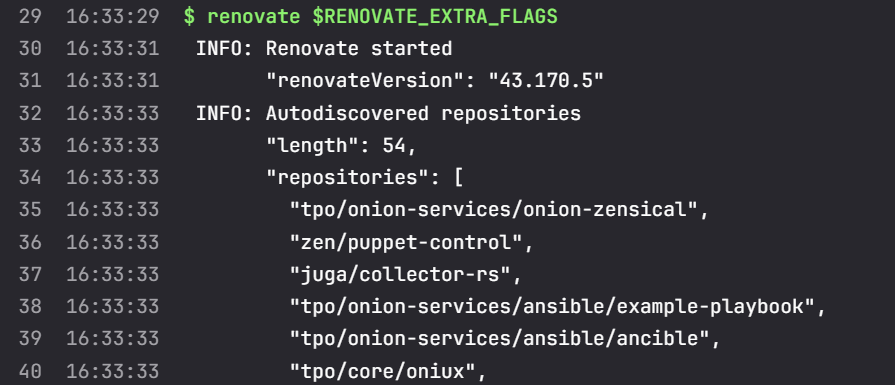
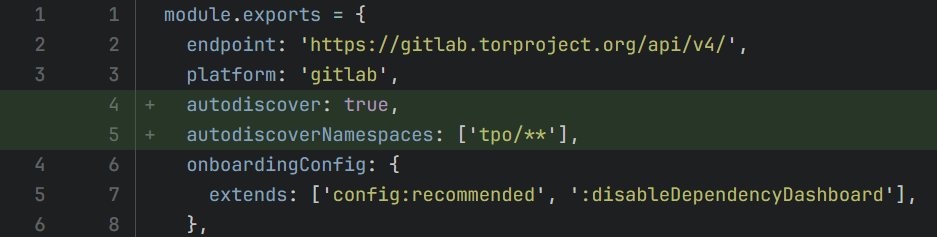
This is exactly what the pipeleek gl renovate autodiscovery command replicates: an attacker could have requested a GitLab account, created a malicious repository, and invited the Renovate Bot to it. The repository would then have been renovated, letting the attacker dump the bot’s access token and thereby compromise every repository it has access to. This problem was fixed in the following two commits: 13d48769 and aeb43ef8.
The fix was to introduce an autodiscovery filter that only allows tpo/ projects to be renovated:
GitLab Personal Access Token Leaks
During a secret scan using Pipeleek, I stumbled upon the following hit in one of GitLab’s own repositories:
2026-05-07T10:23:56+02:00 hit SECRET confidence=high file=combined_report/20250404_0940_dedicated_instance.log jobName=report ruleName=Gitlabv2 type=archive url=https://gitlab.com/gitlab-com/cs-tools/gitlab-cs-tools/deprecation-migration-tools/advanced-search-deprecations/-/jobs/9624848232 value="Command: python3 advanced_search_deprecations.py \"glpat-fz8iCFHoAG2aryuf7piD\" 18.0_config.yml --gitlab sales.gitlab-private.or"
2026-05-07T10:23:56+02:00 hit SECRET confidence=high file=combined_report/20250404_0940_dedicated_instance.log jobName=report ruleName="Gitlab - Personal Access Token v2" type=archive url=https://gitlab.com/gitlab-com/cs-tools/gitlab-cs-tools/deprecation-migration-tools/advanced-search-deprecations/-/jobs/9624848232 value="Command: python3 advanced_search_deprecations.py \"glpat-fz8iCFHoAG2aryuf7piD\" 18.0_config.yml --gitlab sales.gitlab-private.or"
2026-05-07T10:24:01+02:00 hit SECRET confidence=high file=combined_report/20250404_0940_project_18_test.log jobName=report ruleName="Gitlab - Personal Access Token v2" type=archive url=https://gitlab.com/gitlab-com/cs-tools/gitlab-cs-tools/deprecation-migration-tools/advanced-search-deprecations/-/jobs/9624848232 value="Command: python3 advanced_search_deprecations.py \"glpat-bzoxCnU6N2c2MXCgJM0AQbO6SCAGATNIkAF2EA.121r5m3ui\" test_logs/configs/proj"
The secret scanner found two personal access tokens leaked in log files that were stored as pipeline artifacts. Luckily, GitLab had already detected the issue, fixed it, and rotated the PATs.
Getting Started
Ready to try Pipeleek yourself? Here’s where to start.
Installation
Besides features, a lot of work went into ease of installation and portability. Pipeleek can be installed with a simple bash one-liner, via Go, or by downloading binaries from GitHub Releases. Builds are available for Linux, Windows and macOS. Per-platform builds are also available to reduce binary sizes. The configuration now supports CLI flags, environment variables as well as a config file.
Documentation
The documentation has been greatly improved. Read the getting started guide and then continue with the GitLab pentest guide, which gives a rough overview of how to approach an engagement. The same approach can be adapted to other supported platforms as well.
Lab
To make this less theoretical, I built a GitLab Attack Lab as the hands-on counterpart to Pipeleek 1.0: a deliberately vulnerable setup where you can run realistic CI/CD attack paths end-to-end and see how one leaked pipeline secret can snowball into broader GitLab compromise.
What you can test out:
- Leaked secrets in job logs and artifacts → Pipeleek secret scanning
- Cross-project pivoting after token compromise → Pipeleek helpers
- Renovate bot misconfig abuse and repo takeover paths → Pipeleek Renovate enumeration/exploitation commands
- Shared runner abuse → Pipeleek runner exploitation
- Shared runner jobs harvesting and pivoting → Another helper tool gl-runner-harvester
Conclusion
Pipeleek has evolved from a simple GitLab pipeline secret scanner into a tool that helps assess the security of CI/CD environments. I hope you find the new features useful. Feedback, bug reports, and contributions are always welcome.
Happy Leeking!
GitHub:
https://github.com/CompassSecurity/pipeleek
Docs:
https://compasssecurity.github.io/pipeleek/introduction/getting_started
Lab:
https://github.com/compasssecurity/gitlab-attack-lab
GitLab Runner Harvester:
Leave a Reply