Some months ago, I performed a web application penetration test on an application that used passkey for authentication. As part of the assessment, I also tested the passkey implementation and noticed some unusual behavior. During the debugging process, I created two short JavaScript helper functions that can be used to hook the browser APIs involved in passkey operations, allowing the passkey configuration to be inspected and manipulated. This gave me the ability to reliably perform some passkey tests and assess the configuration and implementation.
TL;DR: Use the JavaScript hooks from compasssecurity/passkey-hooks to inspect and manipulate Web Authentication API calls in order to perform various tests on passkeys. Also, try to dig deeper if you don’t understand something and share your results.
Intro: How User Verification Works
This section provides a brief overview of how WebAuthn user verification works without going too much into details.
Whenever passkey are used in a browser, either during the initial registration process (registration ceremony) or during authentication (authentication ceremony), the website provides the client with a set of parameters and options. These include whether user verification (authentication on the authenticator) is required, which cryptographic algorithms are supported, whether resident/discoverable keys should be used to enable simple login flows without requiring users to enter a username, which key material should be used, the challenge that must be signed, and so on.
The following examples were performed on the WebAuthn demo page webauthn.io1, but similar behavior can be observed on other sites that implement passkeys. The following configuration was used to enforce user verification:
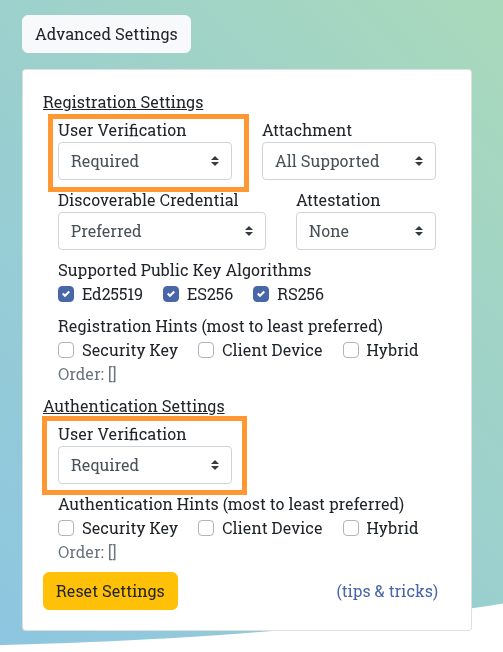
User verification means that users must authenticate themselves on the authenticator, for example using a PIN or biometrics, depending on the capabilities of the authenticator. If user verification is set to required, the user must authenticate on the authenticator; otherwise, the process is aborted. If it’s set to preferred, users must authenticate if the authenticator supports it. If it’s set to discouraged, user authentication is explicitly disabled during the login flow. In the following examples, a YubiKey supporting PIN-based authentication was used.
When a user registers a new authenticator, the server informs the client, among other parameters, that user verification is required:
HTTP/1.1 200 OK
Content-Type: application/json
[...]

{
  "rp": {
    "name": "webauthn.io",
    "id": "webauthn.io"
  },
  "user": {
    "id": "d2ViYXV0aG5pby1hbGljZQ",
    "name": "alice",
    "displayName": "alice"
  },
  "challenge": "CkaHwEPWwYmg-VWGzweQXCVAUU3Xey9g1_A92uFgFzp2F9qYYxgUgwvwCi1tMbtohTwbrRveR7oLcGod3yTNrw",
  "pubKeyCredParams": [
    {
      "type": "public-key",
      "alg": -8
    }, [...]
  ],
  "timeout": 60000,
  "excludeCredentials": [],
  "authenticatorSelection": {
    "residentKey": "preferred",
    "requireResidentKey": false,
    "userVerification": "required"
  },
  "attestation": "none",
  "hints": [],
  "extensions": {
    "credProps": true
  }
}
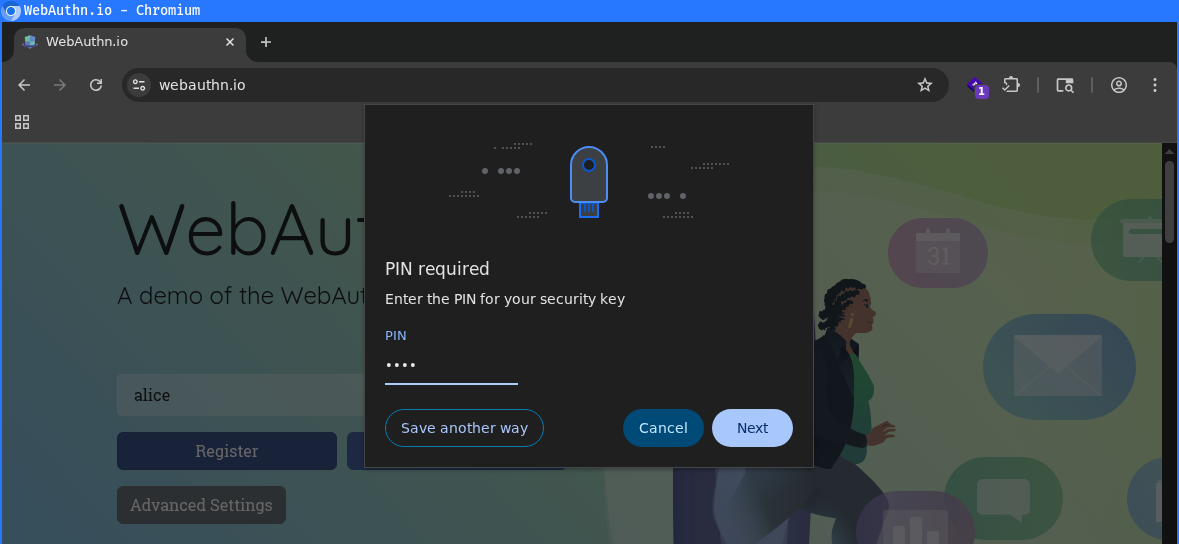
As a result, the user is prompted to enter the PIN when registering the passkey:
When the user initiates authentication, the server provides the client with the random challenge that must be signed and again specifies that user verification is required, among other options:
HTTP/1.1 200 OK
Content-Type: application/json
[...]

{
  "rp": {
    "name": "webauthn.io",
    "id": "webauthn.io"
  },
  "user": {
    "id": "d2ViYXV0aG5pby1hbGljZQ",
    "name": "alice",
    "displayName": "alice"
  },
  "challenge": "CkaHwEPWwYmg-VWGzweQXCVAUU3Xey9g1_A92uFgFzp2F9qYYxgUgwvwCi1tMbtohTwbrRveR7oLcGod3yTNrw",
  "pubKeyCredParams": [...],
  "timeout": 60000,
  "excludeCredentials": [],
  "authenticatorSelection": {
    "residentKey": "preferred",
    "requireResidentKey": false,
    "userVerification": "required"
  },
  "attestation": "none",
  "hints": [],
  "extensions": {
    "credProps": true
  }
}
The user is again required to enter the PIN to complete the login. Once the correct PIN has been entered, the authenticator signs the challenge received from the server and returns the resulting response to the server:
POST /authentication/verification HTTP/1.1
Host: webauthn.io
Cookie: csrftoken=HOyiptOIPOQHj1VJdUfijLvcLMuIpRKJ; sessionid=wwrzw2fx1nb65t923rnhqlfwxy5eae7f
Content-Type: application/json
[...]

{
  "username": "alice",
  "response": {
    "id": "OQfh1mK9AL4IOv3X54GqUxirhbxWylMxfznJmkNVkKx7e1kKaMK1infxpJtZC2CQ",
    "rawId": "OQfh1mK9AL4IOv3X54GqUxirhbxWylMxfznJmkNVkKx7e1kKaMK1infxpJtZC2CQ",
    "response": {
      "authenticatorData": "dKbqkhPJnC90siSSsyDPQCYqlMGpUKA5fyklC2CEHvAFAAAACQ",
      "clientDataJSON": "eyJ0eXBlIjoid2ViYXV0aG4uZ2V0IiwiY2hhbGxlbmdlIjoiQnJIdjdjQjJrNUtMdTkySjNYX1AzZldHcVNoX2t4QjFCTlk0NkhsWENGLXZ4bDhzU1JoZ2pzcEVFSnByN0dNdjkxQ1VQWDIzYkQ5a081aGlzdTFiZFEiLCJvcmlnaW4iOiJodHRwczovL3dlYmF1dGhuLmlvIiwiY3Jvc3NPcmlnaW4iOmZhbHNlfQ",
      "signature": "PvWxmsQBdBKGSXMzoXVbFkTnov99e-4aCc44cPiz8RrOqY_bsDv3IclArhustYqdlMCXA-jwlyHTHK-itMHKDQ",
      "userHandle": "d2ViYXV0aG5pby1hbGljZQ"
    },
    "type": "public-key",
    "clientExtensionResults": {},
    "authenticatorAttachment": "cross-platform"
  }
}
This authentication request contains an authenticatorData parameter, which includes information about the authentication process. It also indicates whether user verification was performed, in the form of a flag in bit 2 of byte 322:
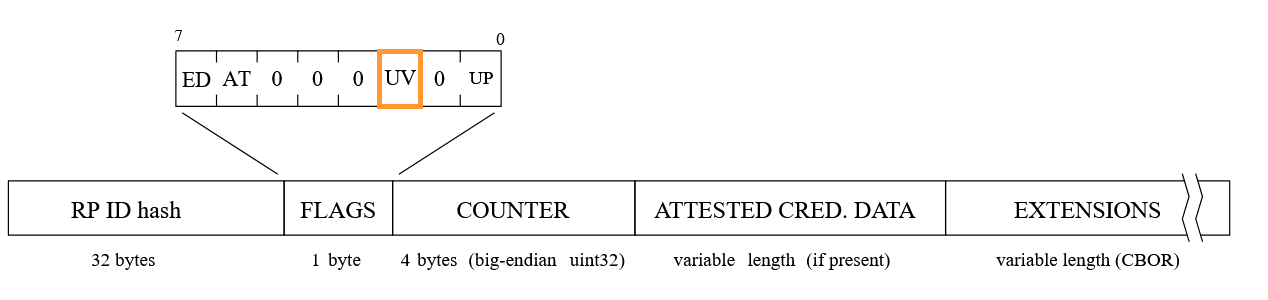
The flags can be inspected by Base64URL decoding the authenticatorData and examining the resulting binary output bit by bit. In this case, the user verification bit set, as the user entered the PIN.

This is how the server can verify if the user correctly authenticated on the authenticator. Since the authenticatorData is signed by the authenticator, attackers cannot tamper with this data.
My Pentest Issue: Ignoring Server Responses
In my pentest, I wanted to check what happens if the user performs a login on the webapp without user verification. If the application would accept this, that would be bad, because an attacker with access to a lost or stolen authenticator could just use it and login with the first factor (the possession of the key) and without the second factor (knowing the PIN).
To evaluate this, the simplest approach would be to modify the authenticatorData user verification flag in the authentication request. However, this is not possible because the response is cryptographically signed, and previous tests already confirmed that any modification resulting in invalid signatures is rejected.
As an alternative, the response was intercepted via the Burp Suite proxy, and the userVerification parameter was set to discouraged, to explicitly disable user verification. Despite this change, the authenticator still consistently asked for the PIN, indicating that user verification was enforced by the authenticator rather than the modified request.
I had already performed this and similar tests in previous assessments, and did not understand this behavior. Intuitively, if the authenticator is instructed not to require user verification, it should not prompt the user for a PIN.
When an application wants to use WebAuthn or passkeys for authentication, the client-side JavaScript running in a browser with WebAuthn support must invoke the standardized Web Authentication APIs3 to register and use authenticators.
After some debugging and discussions with colleagues (THX again 😊), it turned out that the observed behavior was caused by the received options not being correctly passed into the corresponding APIs, which was a pentest finding on it’s own. So, this makes completely sense.
The first key takeaway from this blog post is that, when pentesting passkeys, the server responses for registration and authentication are not necessarily the most important part to assess. What matters more is how the browser’s Web Authentication APIs are called.
The Solution: A Simple Hook 🪝
OK, now after clarifying the inconsistency, the next steps were clear for me. Hooking the necessary APIs to see which options are passed and tamper with them using JavaScript.
For the registration of new credentials, the navigator.credentials.create() function is called and for actual authentication using an existing credential the navigator.credentials.get() function4 is called.
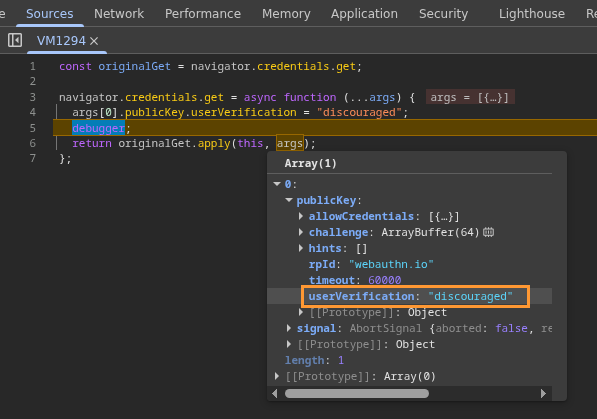
The following JavaScript snippet can be executed in the browser’s developer console to overwrite the create() function with custom code that sets userVerification option to discouraged, so that the authenticator does not ask for a PIN:
const originalGet = navigator.credentials.get;
navigator.credentials.get = async function (...args) {
  args[0].publicKey.userVerification = "discouraged";
  debugger;
  return originalGet.apply(this, args);
};
In addition, the debugger statement pauses the login process, so that all passed parameters can be inspected. The changes were applied successfully:
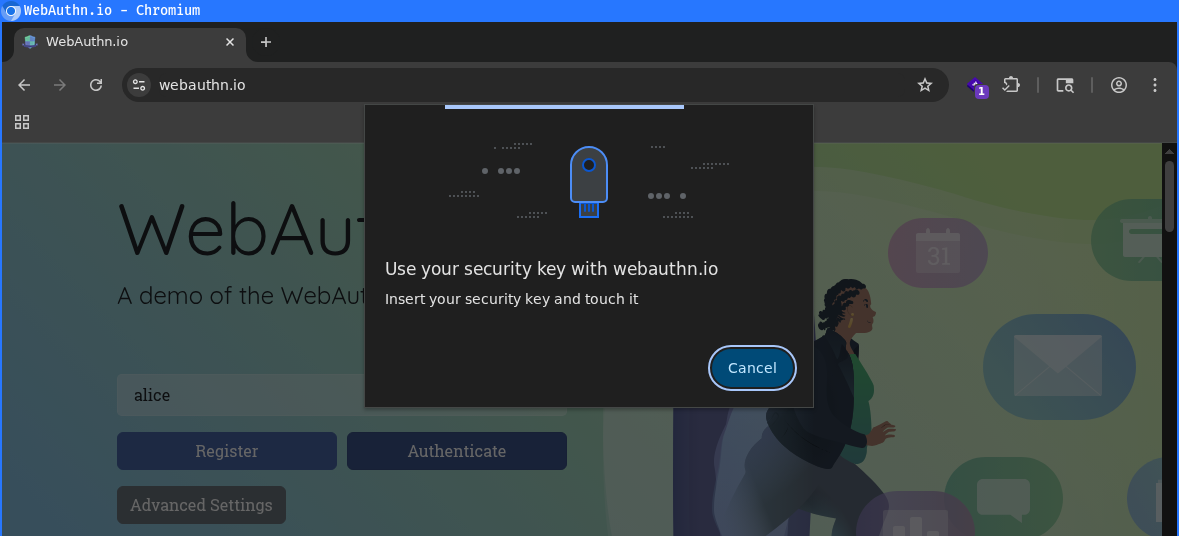
Now, the user is not asked anymore to enter the PIN but only to touch the authenticator (user presence):
The authenticator signs the challenge and sends the response to the server:
POST /authentication/verification HTTP/1.1
Host: webauthn.io
Cookie: csrftoken=HOyiptOIPOQHj1VJdUfijLvcLMuIpRKJ; sessionid=njujpqpdhxsz6c7gwyaaz5tttz9kqsff

{
[...]
    "response": {
      "authenticatorData": "dKbqkhPJnC90siSSsyDPQCYqlMGpUKA5fyklC2CEHvABAAAACQ",
      "clientDataJSON": "eyJ0eXBlIjoid2ViYXV0aG4uZ2V0IiwiY2hhbGxlbmdlIjoiQ0NkSFE5UmZXaUVkTnBXV1BoNEZOelpXaWJOVjdxTEN6OEU0cndrbU5vakwyeG1WbDI1eXhhRHpqd0lTU2p5NHYzdkc0eV9tMERWdU5UOU5iX1IzQmciLCJvcmlnaW4iOiJodHRwczovL3dlYmF1dGhuLmlvIiwiY3Jvc3NPcmlnaW4iOmZhbHNlfQ",
      "signature": "zC8ANl0CJhox_4L1YZ21Qn-et185xlxlXmMH219AMdhGNhJx-p5jLcXkaB3jZfW5n-Jg-ZbSvmg-L_IMf9xeBg",
      "userHandle": "d2ViYXV0aG5pby1hbGljZQ"
    },
[...]
}
The user verification bit is no longer set in the decoded authenticatorData, so the modification was successfully applied:

Unfortunately (from a pentester’s perspective), the authentication failed because user verification is required by the server but was not actually performed. As a result, the demo application is not vulnerable in this scenario.
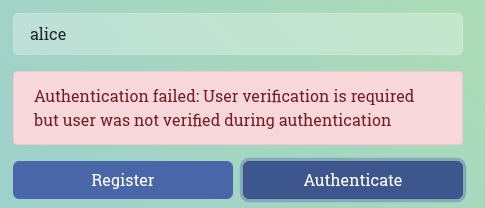
This is therefore correctly implemented, and user verification cannot be bypassed. BTW, our customer’s web application also implemented this correctly, so there wasn’t a finding reported in this regard 😉.
The Result: More Useful Hooks
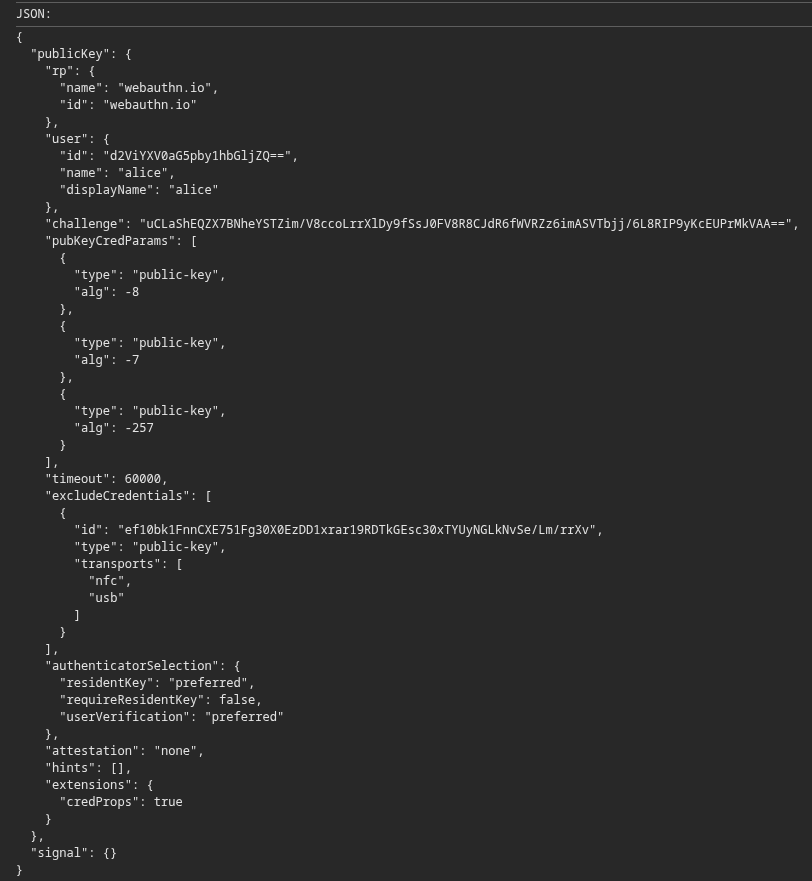
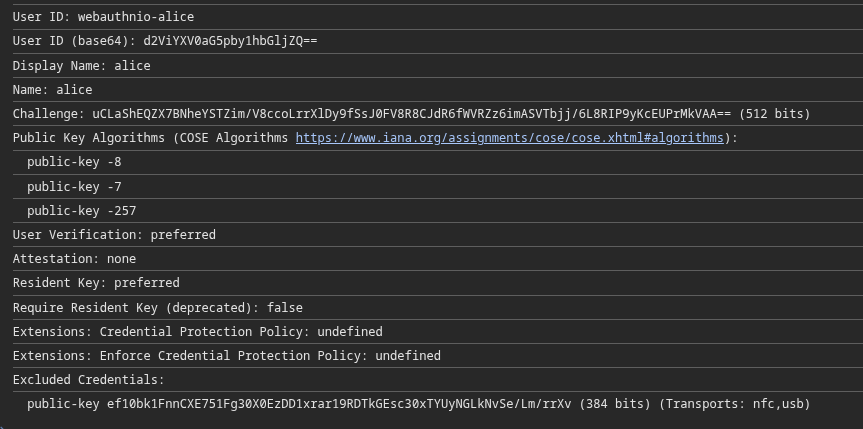
I found the hook-based approach for the WebAuthn APIs quite useful for several other passkey tests, and decided to extend the existing hook a bit and an additional one for the create() function was implemented as well.
Because these are some lines of code and the details are not relevant in this blog post, you can find the snippets on GitHub: compasssecurity/passkey-hooks.
The hooks for both functions can be pasted into the browser developer console. They will log the passed object, allowing it to be inspected manually, print out a JSON for the pentest report and extract the relevant fields as text for a quick overview.
Example for the navigator.credentials.create() function:
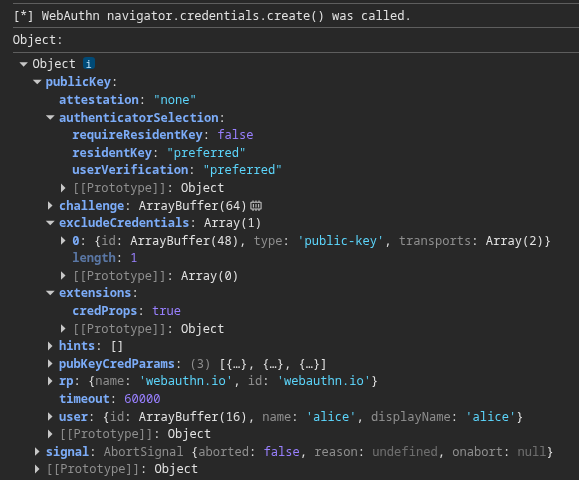
Example for the navigator.credentials.get() function:
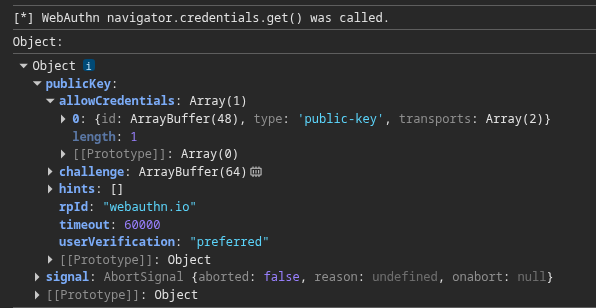
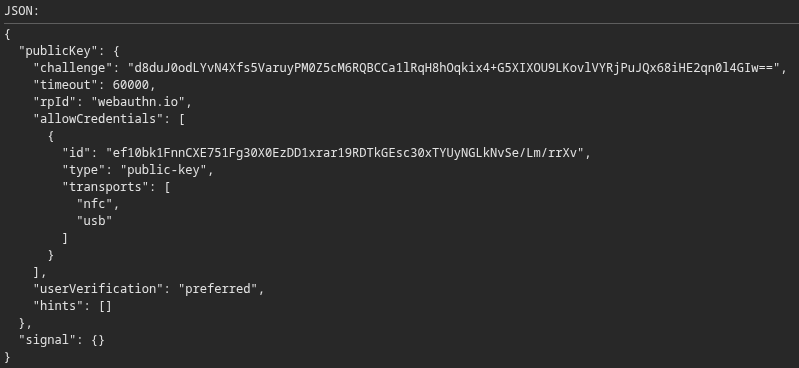

The debugger statement pauses execution, allowing the passed arguments to be inspected and modified on-the-fly:
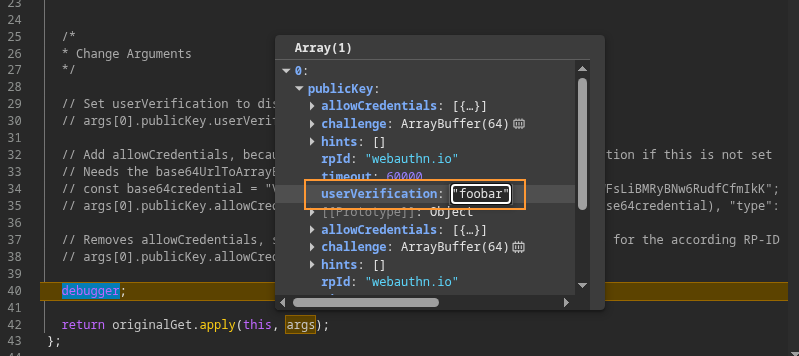
The hooks also contains some pre-defined but commented out modification options. Besides disabling user authentication (in the example above), the allowCredentials can also be set. This tells the authenticator which credentials should be used. Authentication without a PIN requires these allowCredentials. Otherwise, without a PIN, it’s not possible to enumerate the available credentials and decide which ones should be used.
Outro: The Non-Technical Recap
This blog post does not show anything exciting new, but illustrates the typical process in penetration testing when something initially does not work as expected. This is very common in projects and often leads to learning new things, improving tools and sharing knowledge.
The second key takeaway from this blog post is that nothing should be assumed. Instead, one should try to find the root cause of a problem/behavior, and the learnings should be documented so they can be shared with colleagues (or sometimes even in a public blogpost) and reused for future projects. Sharing is caring 😉🤘.
References
- WebAuthn.io. A demo of the WebAuthn specification: https://webauthn.io/ ↩︎
- Web Authentication: An API for accessing Public Key Credentials
Level 2, W3C Recommendation, 8 April 2021, Authenticator Data: https://www.w3.org/TR/webauthn-2/#sctn-authenticator-data ↩︎ - Web Authentication: An API for accessing Public Key Credentials
Level 2, W3C Recommendation, 8 April 2021, Web Authentication API: https://www.w3.org/TR/webauthn-2/#sctn-api ↩︎ - Mozilla Developer Network, Web Authentication API: https://developer.mozilla.org/en-US/docs/Web/API/Web_Authentication_API ↩︎
Leave a Reply